
Sales Enablement Tech Stack: What You Need & How to Build One in 2026
A sales enablement tech stack combines a CRM, content management platform, LMS, and analytics tools to align sales and marketing and close deals faster.

Robert Dickson
RevOps Manager, AutoRFP.ai··13 min read
Your sales team doesn’t need another random tool in the stack. They need a system that helps reps find the right content, follow the right process, and move deals forward without hunting through five platforms.
That matters because over 75% of companies using sales enablement tools see sales increase within 12 months, and 40% report growth above 25%. This guide breaks down what a sales enablement tech stack needs in 2026, which tools to include, and how to build one that actually supports revenue instead of adding more admin.
What Is a Sales Enablement Tech Stack?
A sales enablement tech stack is the tools sales teams use for content, outreach, training, visibility, and deal execution.
The goal is simple: help reps find approved information faster, use the latest content, and keep deals moving without rebuilding assets from scratch.
A strong sales enablement tech stack helps teams:
Shorten the sales cycle: Reps answer buyer questions faster.
Improve content delivery: Teams send the right deck, case study, or product sheet at the right stage.
Create a single source of truth: Content is updated once and reused across sales tools.
Improve visibility and ownership: Leaders see deal blockers, and each tool has a clear role.
Different tools support different parts of the sales process. A CRM tracks accounts, contacts, deals, and pipeline stages.
Sales engagement tools manage outreach and follow-ups. Content tools keep approved assets easy to find.
An AI RFP automation platform like AutoRFP.ai supports the RFP side by helping proposal and sales enablement teams turn approved messaging, past responses, and company knowledge into consistent answers for RFPs, DDQs, and security questionnaires.
Essential Tools to Include in Your Sales Enablement Stack
A sales enablement tech stack should help reps sell with more speed, consistency and visibility. The goal is not to add more tools. The goal is to give every tool a clear job.
Salesforce’s State of Sales research has found that reps spend only 28% of their week actually selling. That is why the right stack matters. It should reduce admin work, improve follow-ups, keep approved content easy to find and help teams respond faster to complex buyer requests.
| Use Case | Tool Category | Example Tool |
|---|---|---|
| Track accounts, contacts and pipeline | CRM | Salesforce Sales Cloud |
| Manage outreach and follow-ups | Sales engagement | Outreach |
| Store and share approved content | Sales content management | Highspot |
| Review sales calls and coach reps | Conversation intelligence | Gong |
| Respond to RFPs and questionnaires | AI RFP automation | AutoRFP.ai |
1. Salesforce Sales Cloud For CRM And Pipeline Visibility
Salesforce Sales Cloud is the CRM layer of the sales enablement stack. It helps teams manage leads, accounts, opportunities, activities, forecasts and sales data in one place.
You need a CRM because sales enablement cannot work properly if reps do not know which accounts they own, where deals stand or what actions need to happen next.
Key features:
Account and contact management: Keeps buyer, company and relationship details organized.
Opportunity tracking: Shows where each deal sits in the pipeline.
Sales forecasting: Helps leaders predict revenue and spot pipeline gaps.
Workflow automation: Reduces manual updates and repetitive admin work.
Reporting dashboards: Gives sales leaders visibility into activity, pipeline and performance.
Salesforce is best for enterprise teams that need deep customization, sales forecasting and a strong CRM foundation. It is not a dedicated content enablement tool, but it gives the rest of the stack a reliable sales data layer.
2. Outreach For Sales Engagement And Follow-Ups
Outreach is the sales engagement layer of the stack. It helps SDRs, BDRs and AEs manage emails, calls, tasks and prospecting workflows.
You need a sales engagement tool because follow-ups are easy to miss when reps rely on memory, spreadsheets or scattered reminders. Outreach gives teams a repeatable process for contacting prospects at the right time.
Key features:
Email sequences: Helps reps run structured outbound campaigns.
Call and task management: Keeps daily prospecting activity organized.
Follow-up reminders: Reduces missed next steps.
Prospect engagement tracking: Shows how buyers respond to outreach.
Workflow automation: Helps teams standardise sales activity across reps.
Outreach is best for teams that run high-volume prospecting and need more control over outreach execution. It should not replace your CRM, content platform or RFP automation tool.
3. Highspot For Sales Content Management
Highspot is the sales content management layer of the stack. It helps teams organise decks, one-pagers, case studies, product sheets, battlecards and playbooks.
You need a content platform because reps should not waste time searching through folders or sending outdated assets. Highspot gives sales teams one place to find and share approved content.
Key features:
Sales content management: Centralises approved sales assets and messaging.
AI-powered guidance: Recommends content and next steps for reps.
Buyer engagement tools: Helps reps share personalized content experiences.
Analytics and adoption tracking: Shows which assets reps use and buyers engage with.
Sales play support: Helps teams connect content to specific sales motions.
Highspot is best for mid-market and enterprise teams with large content libraries. It helps marketing and sales stay aligned on what content is approved, current and useful.
4. Gong For Conversation Intelligence And Deal Coaching
Gong is the conversation intelligence layer of the stack. It records and analyzes sales calls, meetings and buyer interactions.
You need a conversation intelligence tool because CRM notes rarely show what really happened in a sales conversation. Gong helps managers review real calls, coach reps and understand deal risks.
Key features:
Conversation intelligence: Captures and analyzes calls and meetings.
Deal insights: Shows buyer signals, risks and engagement patterns.
Rep coaching: Gives managers real examples for feedback.
Forecast support: Connects sales conversations to pipeline visibility.
Objection analysis: Helps teams understand common buyer concerns.
Gong is best for sales teams running frequent demos, discovery calls and pipeline reviews. It is strongest when managers have a clear coaching process.
5. AutoRFP.ai For AI RFP Automation
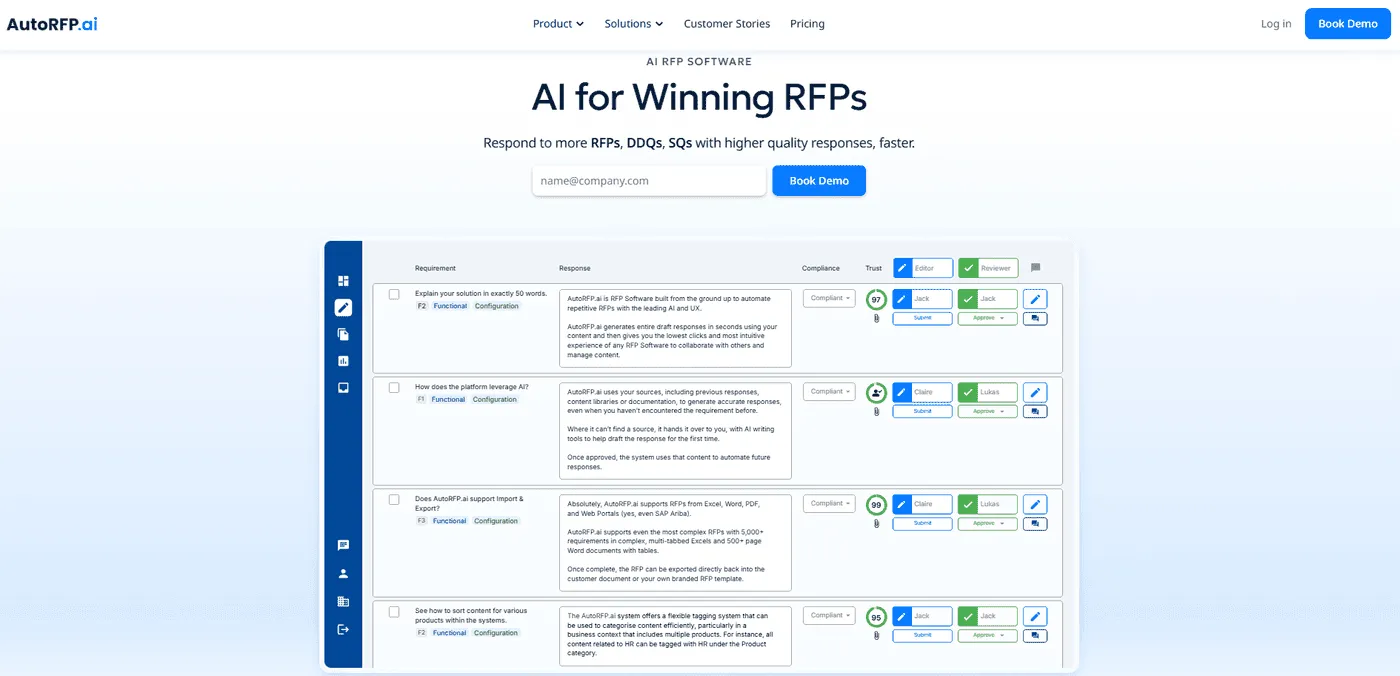
AutoRFP.ai is the AI RFP automation layer of the sales enablement stack. It helps proposal, sales enablement and enterprise sales teams respond to RFPs, DDQs and security questionnaires faster.
You need an AI RFP automation platform because complex buyer requests often slow down deals. Reps need accurate answers, approved messaging and clean handoffs across sales, product, security, legal and proposal teams.
AutoRFP.ai turns approved sales messaging, past responses and company knowledge into consistent, buyer-ready answers. This helps reps avoid starting from a blank page or rewriting technical answers in their own words.
AI RFP Response Engine
AutoRFP.ai drafts RFP responses using approved messaging, previous submissions and company knowledge.
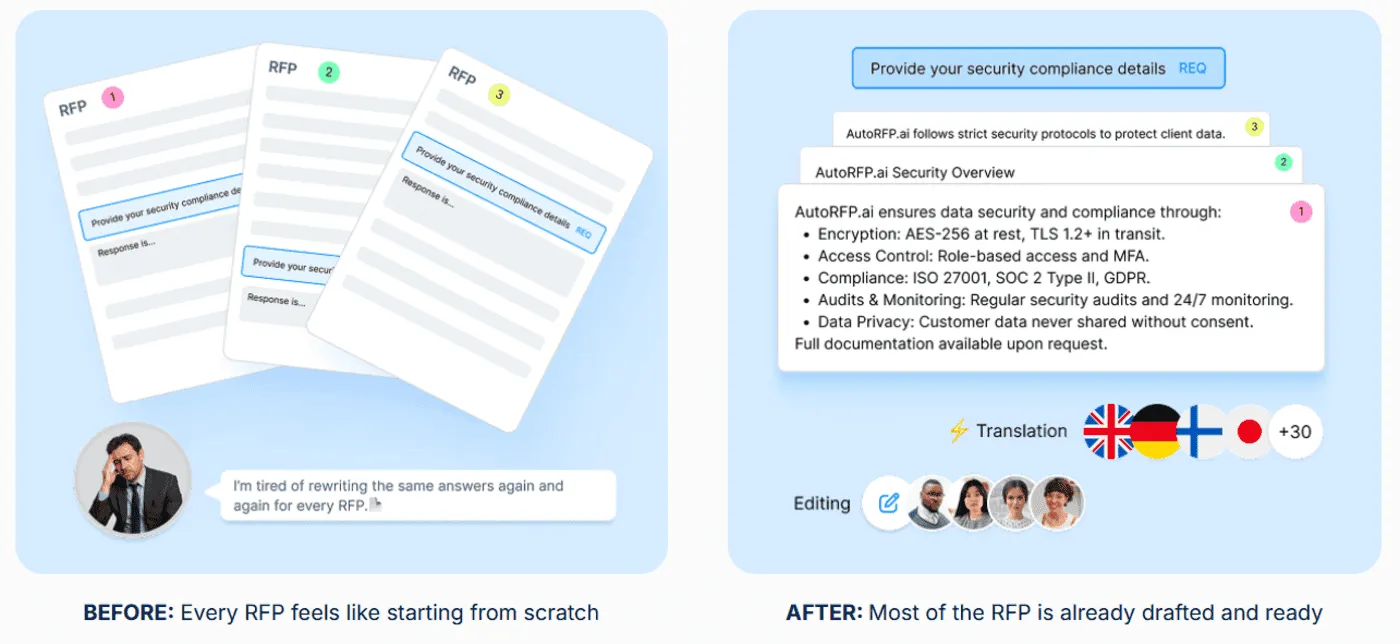
For sales enablement teams, this helps reps answer complex buyer questions without creating inconsistent product, security or positioning language. It also keeps responses aligned across the sales organisation.
Instead of one rep using one version of a security answer and another rep using a different one, teams can work from the same approved response base.
Self-Updating RFP Content Library
AutoRFP.ai keeps approved response content connected to the latest source material.
When product messaging, feature details, security language or sales collateral changes, teams can update the source once. They do not need to chase outdated answers across folders, spreadsheets and old proposals.
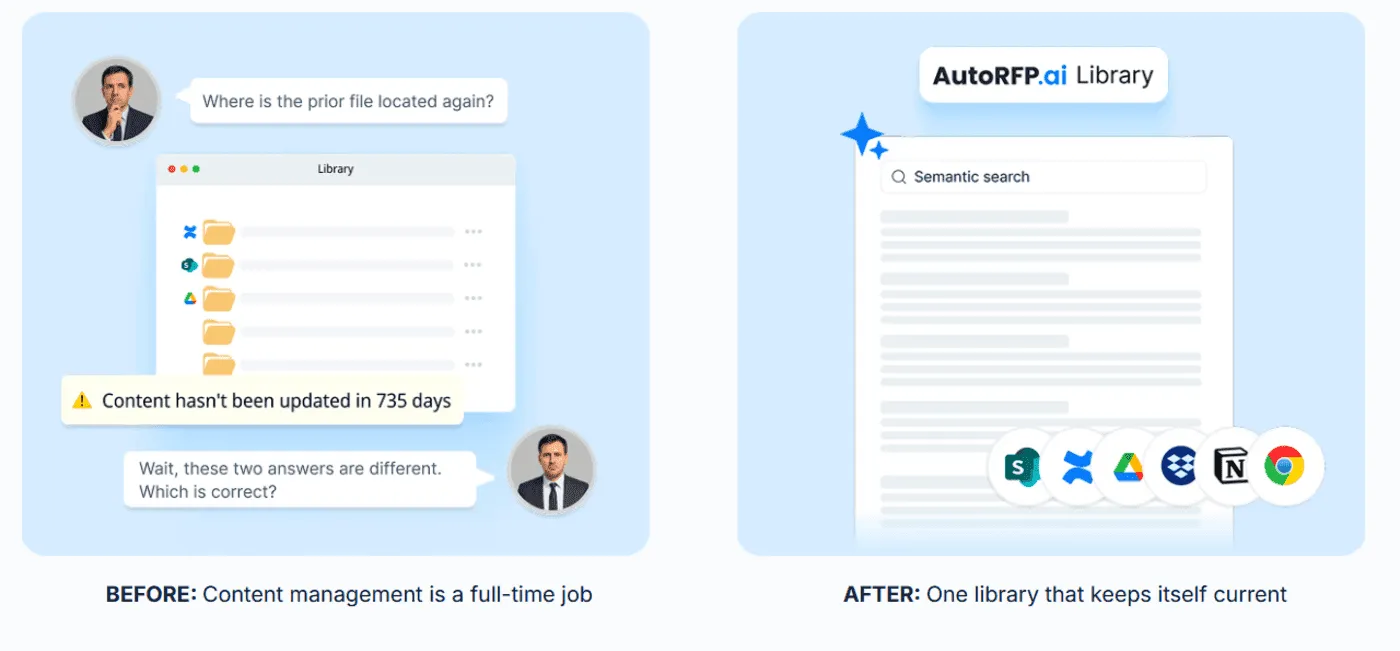
This matters because reps often reuse content long after it becomes outdated. A self-updating library helps proposals reflect the latest product story.
AI RFP Q&A Chatbot
AutoRFP.ai gives reps a Q&A assistant that can answer questions from approved content.
Instead of asking SMEs the same product, security or compliance questions repeatedly, reps can get sourced answers from the knowledge base. This is useful during live selling moments when reps need quick, reliable information.
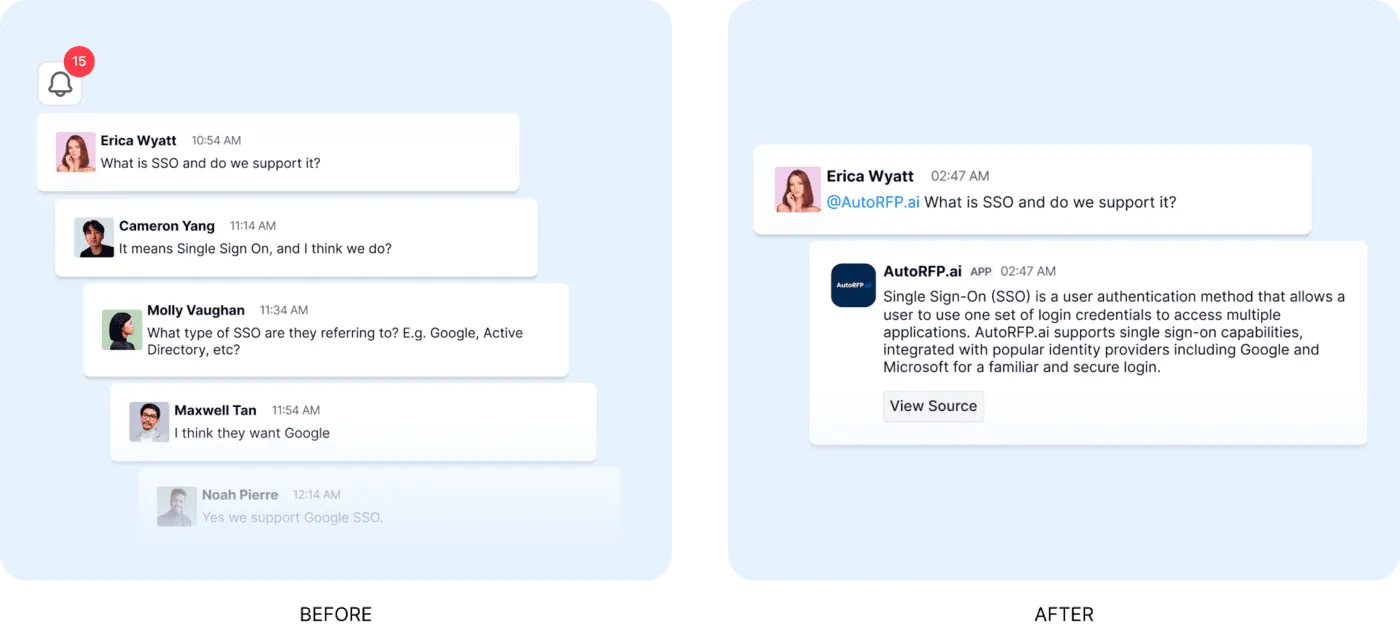
It turns battlecards, response templates, product notes and approved answers into searchable support.
RFP Project Management
AutoRFP.ai gives reps, proposal managers and enablement teams shared visibility into active RFPs.
Teams can see owners, deadlines, blockers and completion status without relying on status meetings or long message threads. This makes handoffs cleaner across sales, proposal, legal, product and security teams.
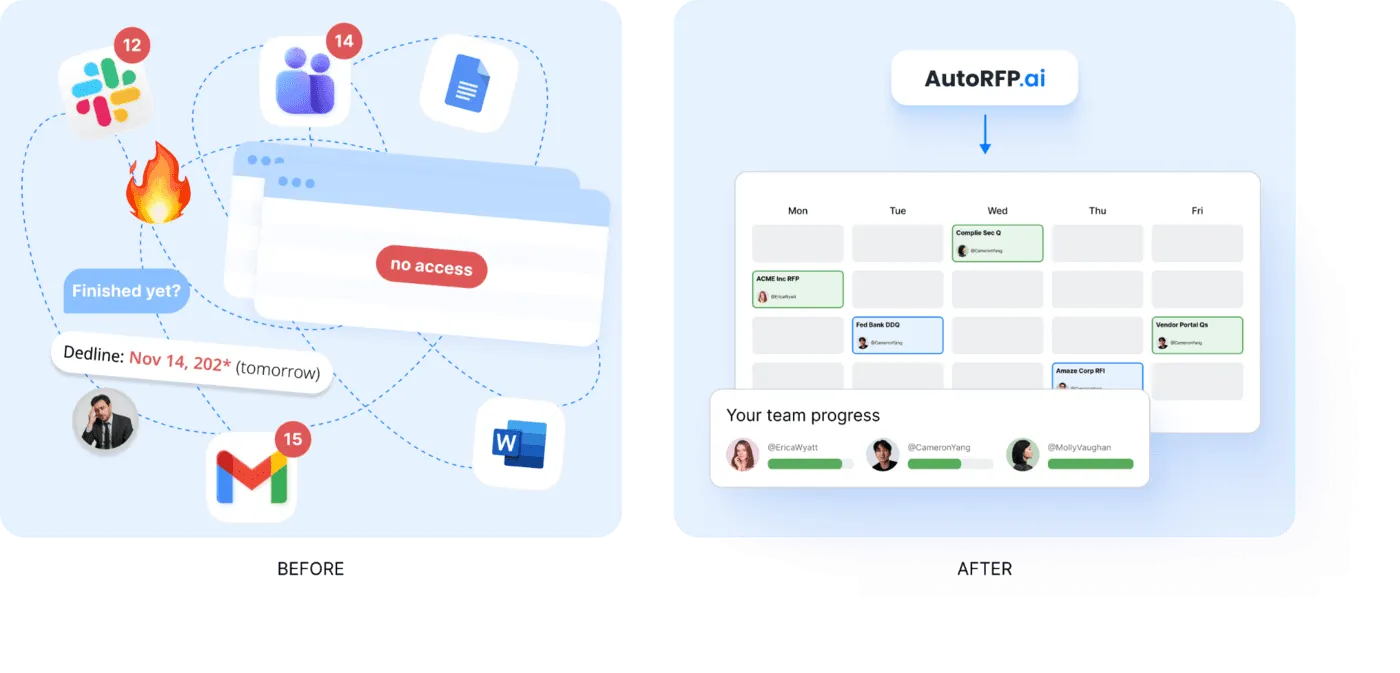
It also helps enablement leaders spot workflow gaps before response cycles slow down.

Video transcript
Transcript is auto-generated and may contain minor errors.
Have you ever wanted to use Claude to create your own custom word documents for sales proposals, RFIs, or other documents that you want to send to your prospects? I want to show you exactly how you can achieve this using Claude's brand new Claude skills. We're going to be creating a proposal just like this, completely AI generated, formatted to how exactly we want it, all based on the prospect's customer insights, so in relation to what they've told you in the sales proposal, their website, your website, and everything else you may want to include in this custom proposal for your prospect using AI. Let's jump into it. First, you can download this prompt and find it from the link in the description below, but this prompt is what we're going to be putting into our Claude project instructions to then be the basis of our document. So, you can see in this document in this prompt it has
the purpose, provides Claude with a role, and then a workflow to identify things like data sources. Here, if you've plugged in various MCPs, which are model contact protocol, or effectively integrations for AI into your other software, you can then have it talk to those tools to get relevant data. So, we use Grain for all our call recordings internally, but if you use something like Gong or other call recording software like Fathom, if they have an MCP available, you can connect it to Claude and have it then talk to that software for relevant discussions you've already had with your prospect for the sales proposal. So, first it identifies data sources. It also could be information from your CRM like HubSpot or Salesforce, and then it's going to research the prospect company. So, it might ask you for the prospect's website if it can't find it in the relevant information you've already provided, and it's going to look for relevant information about that prospect. It's then going to look at relevant case studies. A great proposal always talks about your customers and what they can achieve with your tool or
solution for the prospect that is relevant to that prospect. So, it's going to look for relevant case studies on your website. You can obviously provide it other information if you want if you It's not on your website, but it's going to look for case studies to understand your solution better. Then it'll look for current state information. So, this might be going through the call recordings and effectively looking for information about how the prospect currently works on there It's going to look for information on current state. So, that is how the prospect already solves the problem themselves. They might be an incumbent software or other solution they're using like an agency or something like that as well. Might be or they might be doing something a lot more manual. But effectively, hopefully through discovery and demonstrations and discussions you've had with the prospect, you would have a really solid understanding of their current state and that's what you're going to have here. So, that's step four. Step five, generate the proposal document. This is really cool. So, effectively skills you can either create your own custom skills or Anthropic have uploaded kind of base
skills to everyone's desktop instances. This is going to use the create skill that would already be in your instance especially on a paid plan. And then it's going to use that to create a which you can see here I've uploaded to Google Docs the finished thing, but you can upload it to Microsoft Word or any other kind of document editor as you see fit. It's going to look for consistent styling. Now, of course, you can go in and customize this prompt and or get AI I customize this prompt and have the styling be more specific to how you might do proposals. I've done it to how which is where I'm from does proposals. Then it's going to break that down and kind of present the finished document all AI generated to me that is really relevant to my company and relevant to the prospect and our solution for the prospect in the proposal. Then it will ask you additional questions have that if it can't find that information through the tooling and it will ask itself those questions to help kind of base it off of the document. Now, this is really cool. So, what kind of document is it actually going to create? So, we've looked at the steps that Claude will do to create the
document, but what is the document? And here, of course, you can go through and customize this prompt to make them all relevant for your proposals, but I've done something where it creates a cover page with relevant information, so that's what you can see here. I prepared by Where Software. It then does an executive summary. It creates a more information about understanding the prospect's business. You can see here, I've done Meridian Infrastructure Partners, which is just a made-up company for the example, but of course, this would be relevant for your prospect. Then it looks at current challenges. So, this is really cool. So, this would look at, for instance, call recordings or notes in your CRM or anything that you provided about the prospect's current challenges, and will weave that into the proposal to make it really relevant to the prospect. So, proposal cycle times and all these other kind of things that are relevant for this prospect in terms of their current challenges. And then here, you can see it's mentioned a number of stakeholders. So, Claude also then identifies and I've So, then Claude identifies some decision-makers and
mentions them in the proposal because they're who could be decision-maker, champion, economic buyer, exact sponsor, kind of different people in the sales process that you've talked to, and it's going to mention from those discussions and make that proposal very personalized and relevant for that prospect and whoever might be reading it. We also use in the prompt a good prompting technique, which is kind of Also, in our prompt, we use some prompt engineering skills. For instance, examples of good and bad, which the LM then understands better context around what kind of output it's trying to produce. So, here we have example of some bad framing, which might come across as like condescending to the prospect. You want to avoid that in our sales proposal. And then what good framing is. So, you can again update this prompt to make more relevant for your company, but it's a really good kind of starting point. Then you have challenge. Now we go to solution overview. So this is really cool. Based on your company and what Claude understands from your business and your solution, of course you can provide it more details, it's going to build out a solution overview and how your solution
is addressing those challenges for the prospect. And then finally kind of finish off with why why your company. What it's going to do there in the why company is it's going to look at kind of what your what the prospect is currently doing verse your solution and where the difference is and where the benefits are. Really powerful stuff. Then any relevant success stories and then look at implementation methodology, timeline, the team that'll be working with them. Then you kind of see it goes through and generates all these things in again in really nice formatting to my brand voice, colors, tone, and then generates that and provides a final output as well with the commercials and pricing. Of course you can provide things like a uh Notion or Google Drive link or PDF in your project that includes your pricing table and then kind of stand better in pricing. Or you can ask it to skip pricing and leave that for the rep to fill out. And then you can see there ROI and further information. So next step from here is you grab the prompt
then go to Claude desktop and this this is web browser we can do it in Claude desktop. Jump into your instructions and then paste the prompt in there. Also make any changes to the prompt that you would like. I've called out a couple of different things that you can make different I've called out a couple of ways you can customize this to make it more relevant for your business. First, you can add additional files. So I called out a pricing schedule. You could upload your case studies here as a PDF if you want and just add additional files as you would like that are relevant to what you would expect an AI to use to generate proposals. Could be a solution overview. It could be common pain points. Could be information about personas, industry analysis on the certain prospects industries that you sell to. So that's all going to be in your files. Then in your instructions, you can have Claude edit this prompt for you or you can edit it yourself and say, "Hey, when looking at case studies, look at this file." And so that way when the LLM goes to use these project instructions, it's going to know exactly what context it has to use from your project files for the relevant parts of
its output, its response, in this case the sales proposal. Then you can see here in instructions we can add tools. So I mentioned your MCP integrations or other integrations you might have with Claude. You can click here and add additional connectors. You can see we have a lot in our account, but you can add additional connectors here or have it to you can use recent web web search. I always use extended thinking. It uses more tokens, but it's very valuable. And then you can click there and say and turn on other tools. So if you use Gong for your sales recordings and transcriptions and you have the MCP enabled in Claude and you want it to use the relevant calls that you have with that prospect to generate the proposal, great. Connect the MCP tool, talk call it out in the prompt, use to do this X and Y, and then it's going to use that really efficiently and productively. So when you go into then create a Word doc, I've I've done one here and you really don't have to use too much. You can be like, "Hey, can you create me a sales proposal for this custom for this prospect?" That might be if you if you have Claude connected to your CRM, it could be of the deal opportunity. It could be an email if it
has connections to your calendar or emails and figure out those people or you can provide a longer prompt with a lot more information. And then effectively goes through, uses the project instruction prompt, uses the relevant skill for creating the document, and then it's going to output and present you with a file that you can then download or add or open in Google Drive. And that will download as you can see it's a file and this is what you're going to have left. So I just covered off how you can use Claude desktop or Claude to create a sales proposal with a lot of different ways you can do this. If not just for your sales proposals, but if you're constantly doing RFIs that are pretty stock standard, you could use it to help with that. It really thrives where either you're expecting a lot of the same responses and you can give it past context or you want really customized proposals or RFIs where you have the data available to give it to Claude. It's not going to do well if you can't give it any context, it's going to be very bland, a very basic proposal. Whereas if you can give it
information that is relevant to that prospect, then that will make the proposal just that much better. And of course, you can go through in a Word Doc or Google Google Doc and update it as you see fit. Thing I will mention, I've of course spoken about how you can use MTPs. Make sure you're on a paid plan with Claude and make sure you you have training turned off. Make sure you're working in line with your IT governance, that you're not accidentally sharing a bunch of prospect information and your customer data with an LLM and it's going into the model for training. So make sure that's all turned off and you're talking to your IT team if you have any questions about your specific use case. Awesome. Thanks. That's how you can use Claude skills to create sales proposals.
How These Tools Work Together
A strong sales enablement tech stack should not feel like five disconnected platforms. Each tool should support a different part of the sales process.
Salesforce Sales Cloud tracks accounts, contacts, pipeline and forecasts.
Outreach helps reps run structured outreach and follow-ups.
Highspot keeps approved sales content easy to find and share.
Gong shows what happens in buyer conversations.
AutoRFP.ai supports the complex response work behind RFPs, DDQs and security questionnaires.
Side note: Together, these tools help sales teams work from the same data, use the right content, improve buyer conversations and respond faster when deals become more complex.
How to Build a Sales Enablement Tech Stack (Step-by-Step)
Building a sales enablement tech stack is not about buying more tools. It is about choosing tools that remove friction from your sales process and help reps sell with more consistency. Follow the steps below to build a sales enablement tech stack according to your own use case.
1. Map Your Current Sales Workflow
Start by looking at how your sales team works today. Identify where reps lose time, where deals slow down and where information gets messy.
Look at areas such as:
Where reps find sales content
How they personalise outreach
How they manage proposals and RFPs
How they update the CRM
How managers coach reps
How teams track content performance
Pro tip: Ask reps where they waste the most time each week. Their answers usually show which tools you need first.
2. Define the Problems Your Stack Must Solve
Do not choose tools based on features alone. Choose them based on the sales problems you need to fix.
For example:
If reps cannot find the right content, you need a content management tool.
If follow-ups are inconsistent, you need a sales engagement tool.
If RFPs take too long, you need proposal or RFP automation software.
If managers lack coaching visibility, you need conversation intelligence.
If reporting is manual, you need better analytics or CRM reporting.
Pro tip: Pick three priority problems first. Trying to fix everything at once usually creates a messy stack.
3. Choose Your Core Tools by Use Case
Your sales enablement tech stack should cover the main workflows that support selling. The exact tools depend on your team size, sales cycle and deal complexity.
A strong stack usually includes:
| Use case | Tool category |
|---|---|
| Manage customer data | CRM |
| Run outreach | Sales engagement platform |
| Store and share assets | Sales content management tool |
| Create proposals and RFPs | Proposal or RFP automation software |
| Coach reps | Conversation intelligence tool |
| Track performance | Sales analytics and reporting tool |
Pro tip: Start with must-have workflows before adding nice-to-have tools. A simple stack that reps use is better than a complex stack they ignore.
4. Make Sure the Tools Integrate With Your CRM
Your CRM should sit at the centre of the stack. Other tools should connect to it, so reps do not need to copy data between systems manually.
Check whether each tool can:
Sync activity data with your CRM
Pull account and opportunity details
Update notes, tasks or deal records
Connect with email, calendar and communication tools
Support your sales stages and approval workflows
Pro tip: If a tool does not integrate with your CRM, make sure there is a clear reason to keep it. Otherwise, it may create more admin work.
5. Build a Single Source of Truth for Sales Content
Sales content gets messy when decks, case studies, battlecards and approved answers live in too many places. Create one central place for reps to find the latest version.
Include content such as:
Pitch decks
Case studies
Product one-pagers
Objection-handling guides
Pricing and packaging notes
Approved proposal and RFP answers
Security and compliance responses
6. Add AI Where It Removes Real Sales Friction
AI should not be added just because it sounds advanced. Use it where reps need faster answers, cleaner workflows or less manual work.
AI can help with:
Recommending the right content
Drafting personalized outreach
Summarising calls and meetings
Updating CRM fields
Finding approved proposal answers
Analyzing sales conversations
Reporting on content usage and sales impact
Pro tip: Start with one high-friction workflow, such as proposal responses or call summaries. Prove the value before expanding AI across the stack.
7. Set Rules for Adoption, Ownership and Reporting
A sales enablement tech stack only works if people know how to use it. Set clear rules for ownership, training and measurement as part of your broader Revenue Operations strategy.
Define:
Who owns each tool
Who trains new users
Who updates content
Who checks data quality
Which metrics prove success
When tools should be reviewed or removed
Track metrics such as:
Rep adoption
Content usage
Time saved
Proposal turnaround time
CRM data quality
Win rate
Sales cycle length
Pro tip: Review your stack every quarter. Remove tools that overlap, go unused or no longer support your sales process.
How AI Is Changing the Sales Enablement Tech Stack
AI is changing sales enablement tech stacks by turning separate tools into connected workflows.
Instead of making reps jump between a CRM, content library, sales engagement tool, proposal software and call coaching platform, AI helps these tools work together.
Here’s what that looks like in practice:
| Area of the tech stack | How AI changes it |
|---|---|
| Content management | Recommends the right deck, case study or battlecard based on the deal context |
| CRM | Updates notes, logs tasks and gives reps cleaner pipeline data |
| Sales engagement | Helps draft personalized emails, follow-ups and outreach sequences |
| Proposal and RFP tools | Pulls approved answers and keeps responses consistent across deals |
| Conversation intelligence | Summarizes calls, spots objections and highlights coaching moments |
| Reporting | Tracks content usage, automation rate, time saved and sales impact |
The biggest shift is that AI makes the stack more proactive.
A normal content library stores assets. An AI-powered content tool tells reps which asset to use.
A normal CRM stores deal data. An AI-connected CRM can suggest next steps, update fields and reduce manual admin.
A normal proposal tool helps teams manage documents. An AI proposal tool can search approved knowledge, draft answers and keep messaging consistent.
This matters because sales teams do not just need more tools. They need fewer gaps between tools.
The best AI-enabled sales enablement stacks help reps:
Find approved content faster
Personalise outreach without rewriting everything manually
Keep proposal and RFP answers consistent
Improve coaching using real call data
Reduce admin work after meetings
Prove which tools and content actually influence revenue
Side note: So, AI is not just another category in the sales enablement stack. It is becoming the layer that connects content, CRM, coaching, proposals, outreach and reporting into one smoother workflow.
“AI isn’t here to replace enablement. It’s here to force enablement to evolve.” – Amy McClain, Revenue Enablement Consultant
Adopt a Smarter Sales Enablement Stack Today With AutoRFP.ai
Your sales enablement tech stack should help reps move faster, not add more admin. With the right tools, your team can manage the pipeline, run better outreach, find approved content, coach reps and respond to complex RFPs from one connected workflow.
AutoRFP.ai helps sales and proposal teams bring consistency, speed and accuracy to the RFP side of the stack, so deals do not slow down when buyer requests get complex.
Frequently asked questions
How Can Teams Avoid App Fatigue When Building a Sales Enablement Tech Stack?
App fatigue occurs when teams have to constantly switch between dozens of different tools, like shared drives, wikis, and CRMs, to find information. This fragmented workflow is a major productivity drain and increases the risk of using outdated or inconsistent data in RFP responses.
Why Should Sales Enablement Tools Work Where Your Team Already Works?
When tools are integrated into existing communication channels, they are much more likely to be adopted and used effectively. Reducing the friction of switching contexts allows teams to stay focused on high-value tasks and get answers to critical questions in real-time.
Does AutoRFP.ai Integrate With CRMs Like Salesforce?
Yes, AutoRFP.ai integrates with Salesforce to streamline your sales and proposal workflow. This connection helps in managing project data and ensures that your proposal team has access to relevant customer and opportunity information directly within the RFP process.
How Does AutoRFP.ai Integrate With Existing Knowledge Bases Like SharePoint Or Confluence?
AutoRFP.ai connects directly to your existing knowledge bases, including SharePoint, Confluence, Notion, and Seismic. This integration allows the AI to index and search your documentation in real-time, ensuring that RFP responses are always based on your most up-to-date and approved content.
Can AutoRFP.ai Connect RFP Workflows With Slack Or Microsoft Teams?
Yes, AutoRFP.ai offers deep integrations with Slack and Microsoft Teams. You can interact with the AI Q\&A Bot directly within your communication channels, allowing your team to get sourced answers to product and security questions without ever leaving their active threads.
How Can A Browser Extension Help Reps Answer Buyer Questions Faster?
Yes, the extension provides a quick-access interface into your content library. You can search for and find accurate, sourced answers to technical or security questions in real-time without ever leaving your browser tab, ensuring you provide consistent and professional information to prospects.
