
5 Best Inventive.ai Alternatives and Competitors in 2026
Compare the top Inventive.ai alternatives for AI-powered RFP responses. Find the best software to automate your proposal workflow and win more deals in 2026.

Robert Dickson
RevOps Manager, AutoRFP.ai··5 min read
Choosing an AI RFP software is a high-impact decision. Inventive.ai offers a lot, but you might need better ROI reporting, a more efficient notification management system, simpler software setup, a libraryless system, or a different pricing structure to make the numbers work. Before you commit, it is worth seeing how other AI RFP platforms stack up.
For revenue and RevOps leaders evaluating RevOps tools that directly impact pipeline velocity, win rates, and team efficiency, comparing these platforms side by side is essential as part of a broader AI sales enablement strategy.
In this article, we will walk through 5 of the best Inventive.ai alternatives and competitors, covering their key features, pricing, pros and cons, what real users say in reviews, who they are best suited for, and reasons to switch.
| Tool | Best for | Standout feature | Starting price |
|---|---|---|---|
| AutoRFP.ai | High-volume, quick, and accurate RFP, DDQ, and security questionnaire responses | Libraryless, sourced first drafts in minutes that learn from approved answers | $899/month (Scale) |
| Loopio | Governed content reuse and structured RFP workflows | Centralized answer library with repeatable workflows | $20,000/year (Foundations) |
| Responsive | Enterprise collaboration across complex RFX responses | Multi-contributor workflows with library-driven consistency | Contact sales |
| Proposify | Proposal creation, sending, and RFP tracking. | On-brand templates plus engagement tracking | $29/user/month (Basic) |
| PandaDoc | Document automation for proposals, quotes, and contracts | Pricing tables plus approvals and e-signature | $35/user/month (Starter) |
1. AutoRFP.ai
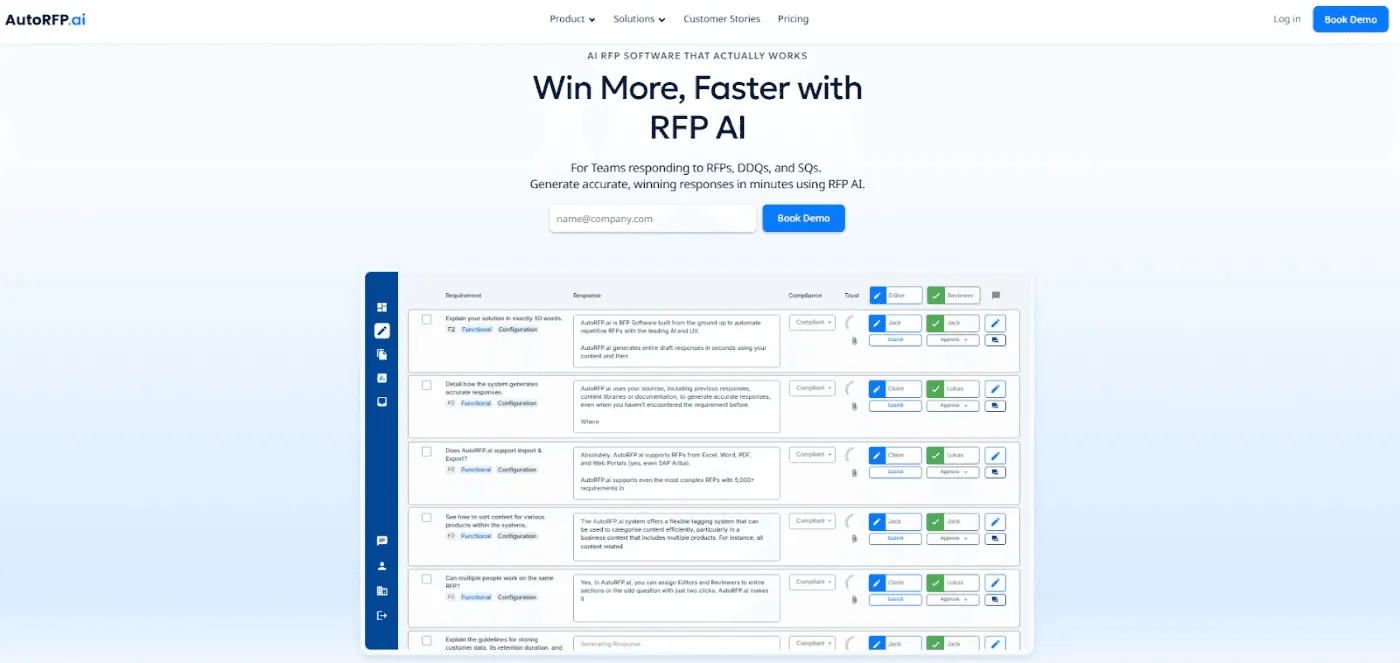
AutoRFP.ai is an AI-first request for proposal (RFP) response platform built to help business-to-business (B2B) teams win more deals, faster, across RFPs, due diligence questionnaires (DDQs), and security questionnaires.
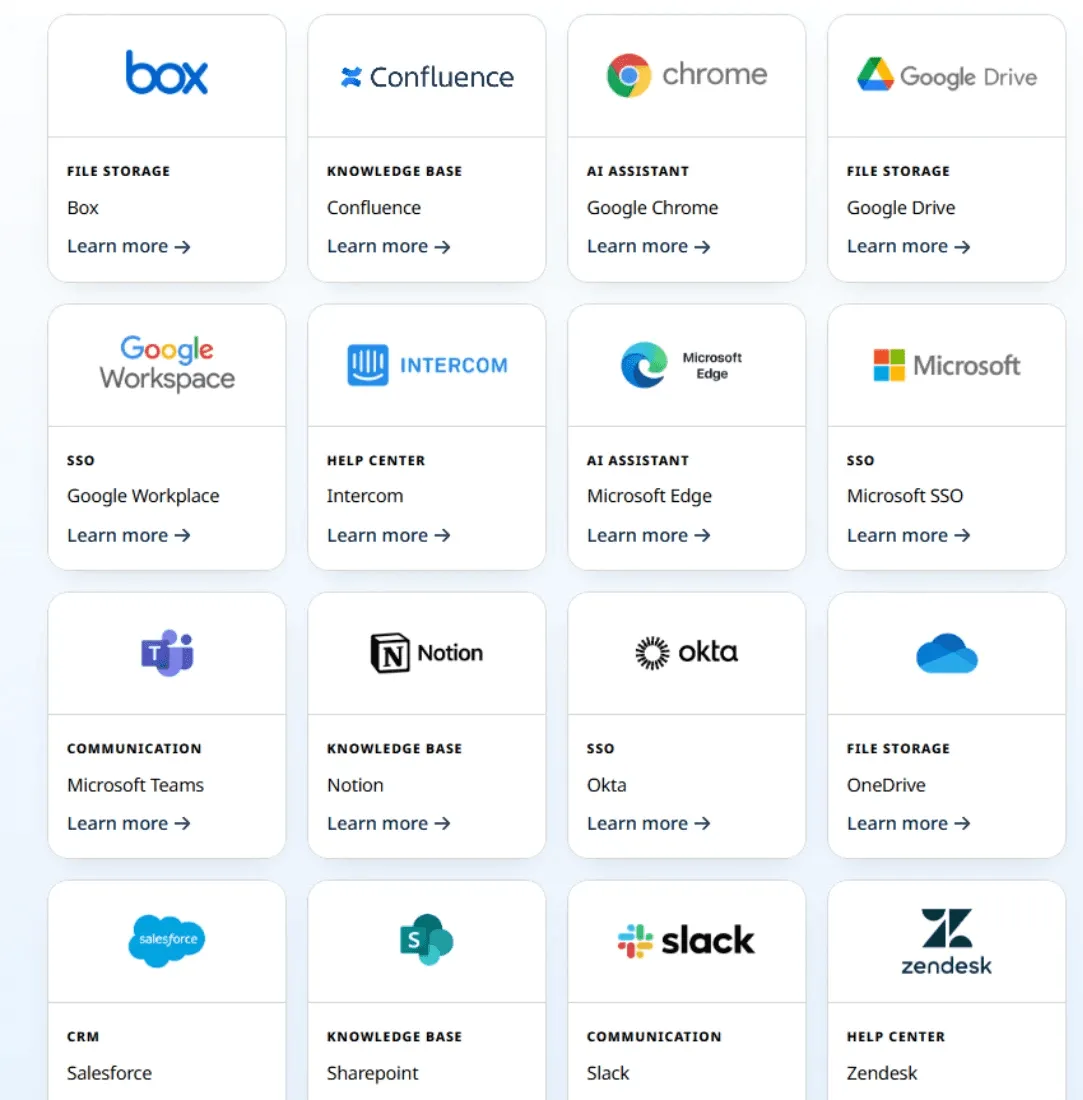
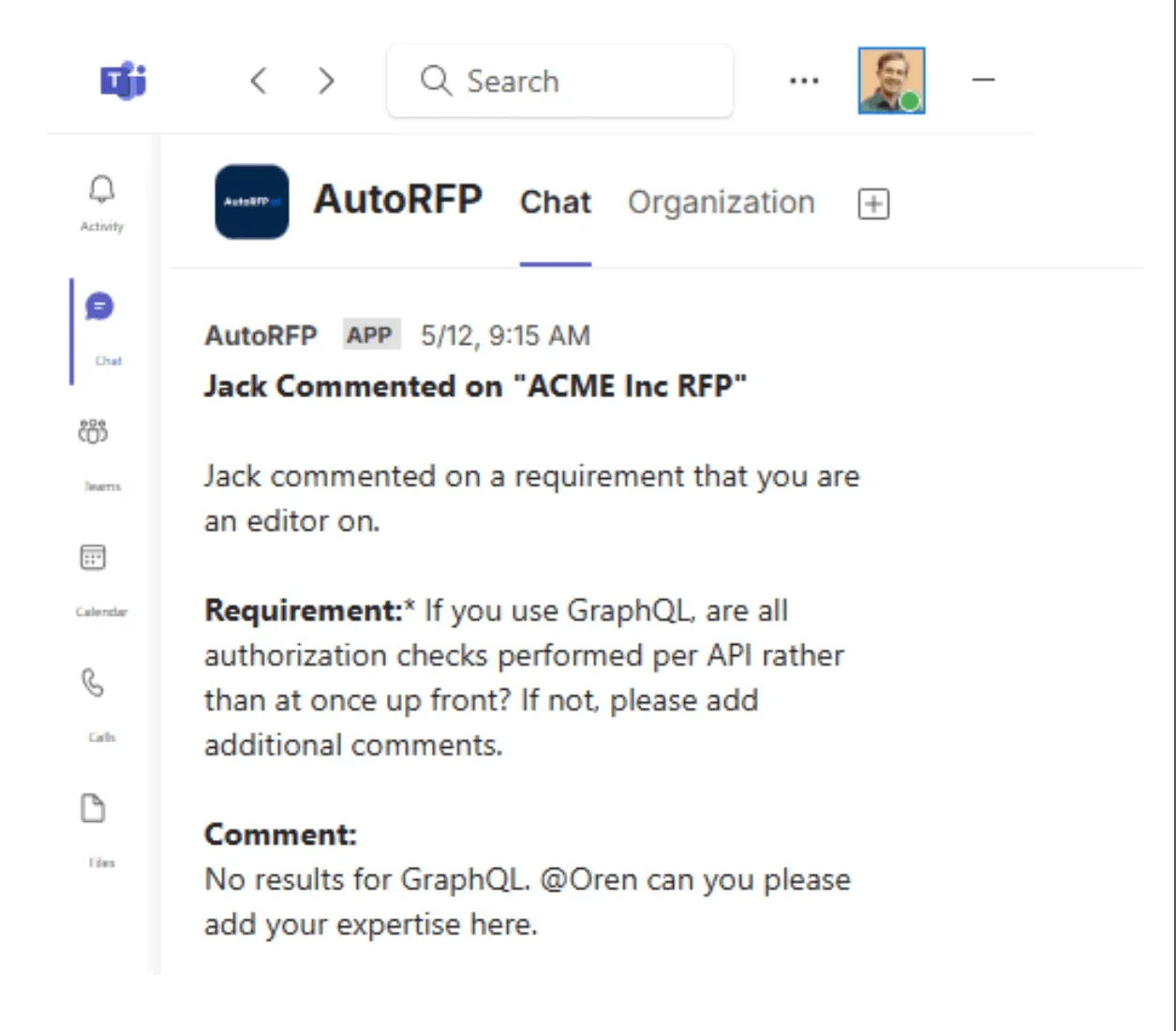
As an Inventive.ai alternative, it keeps work moving with teammate notifications (including Slack & Microsoft Teams), detailed ROI reporting, and simple setup with integrations to ~16 tools without complex, heavy integrations.
It also uses semantic understanding to match a buyer’s terminology (not just keywords), keep tone consistent, and generate accurate first drafts in minutes.
Unlike Inventive.ai, AutoRFP.ai takes a libraryless approach, learning from every approved response so you spend less time building, organising, and maintaining a separate answer library.
Key Features
These features show how AutoRFP.ai’s approach can be a better fit than Inventive.ai:
1. AI Drafts Trained On Your Winning Responses
Upload an RFP, and AutoRFP.ai generates accurate, on-brand first drafts in seconds using your past winning answers and internal docs.
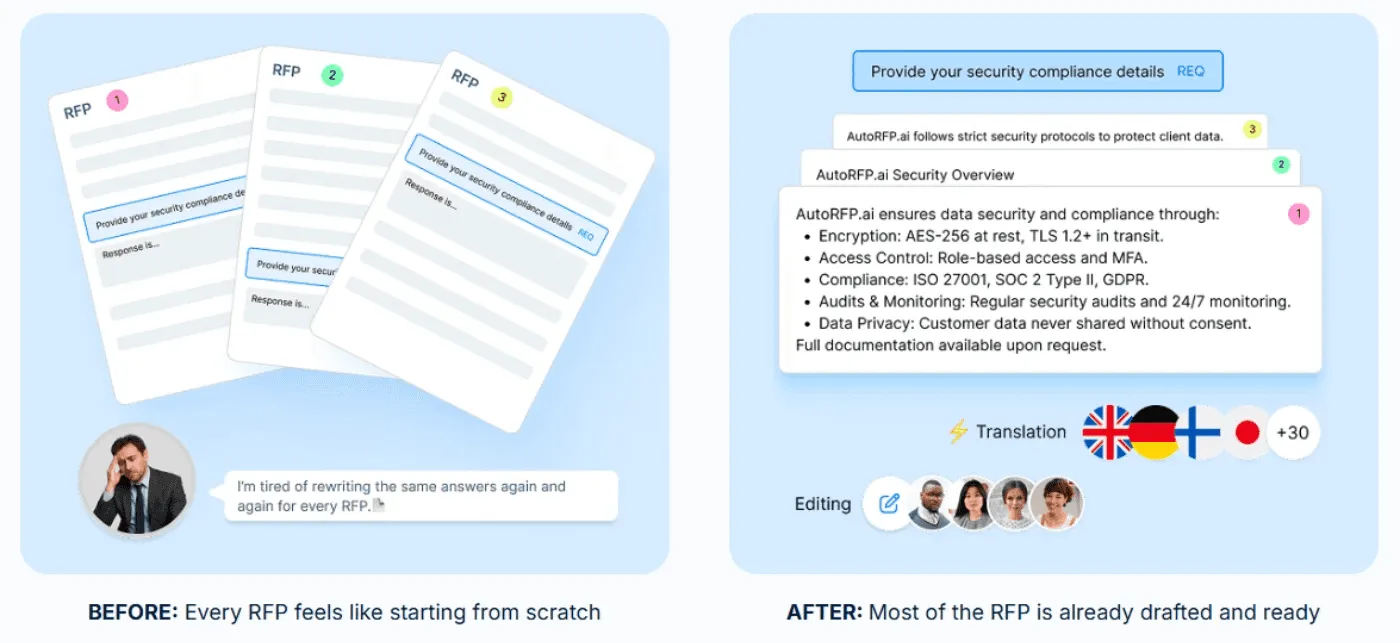
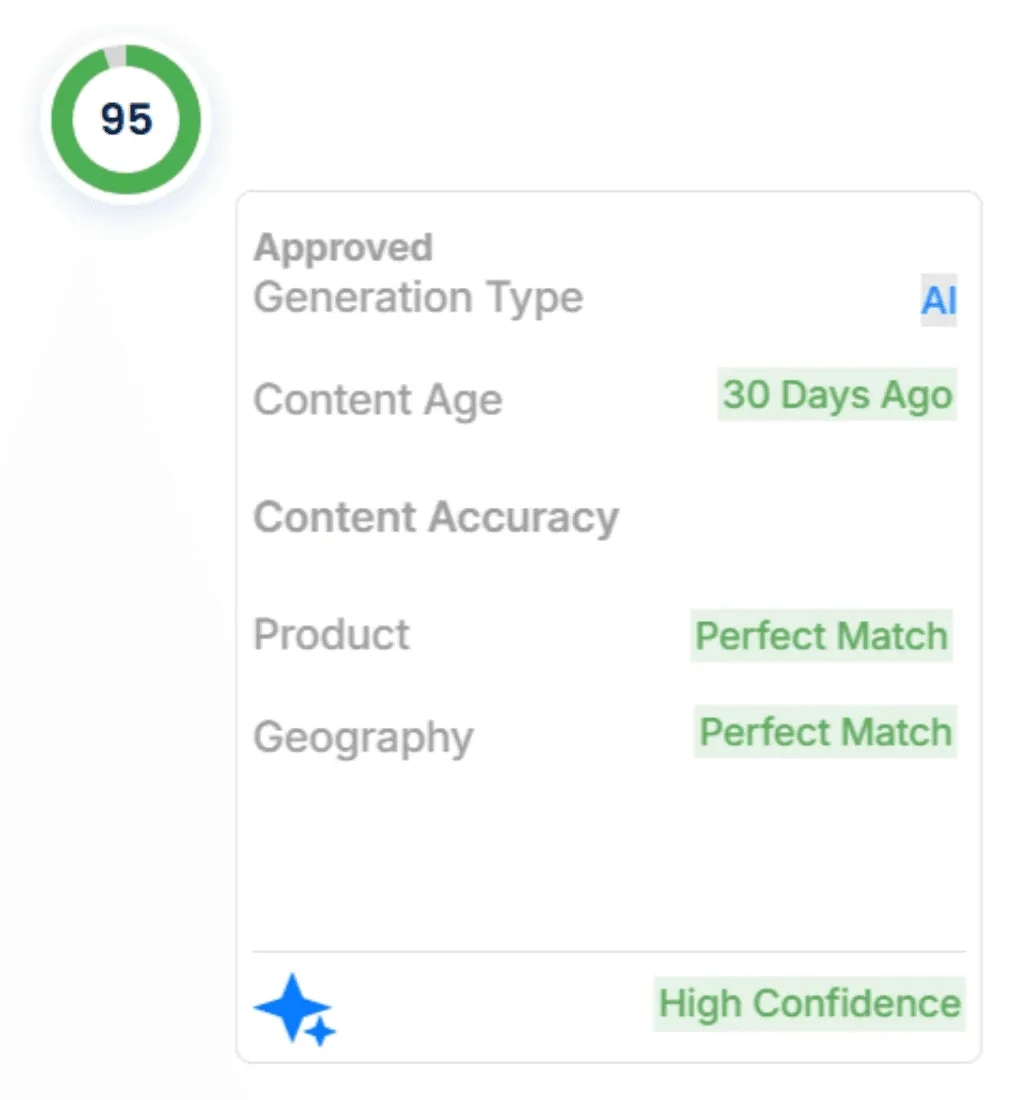
Every suggestion shows sources, content age, and a confidence score, so reviewers can trust what the AI used and update fast with one-click edits.
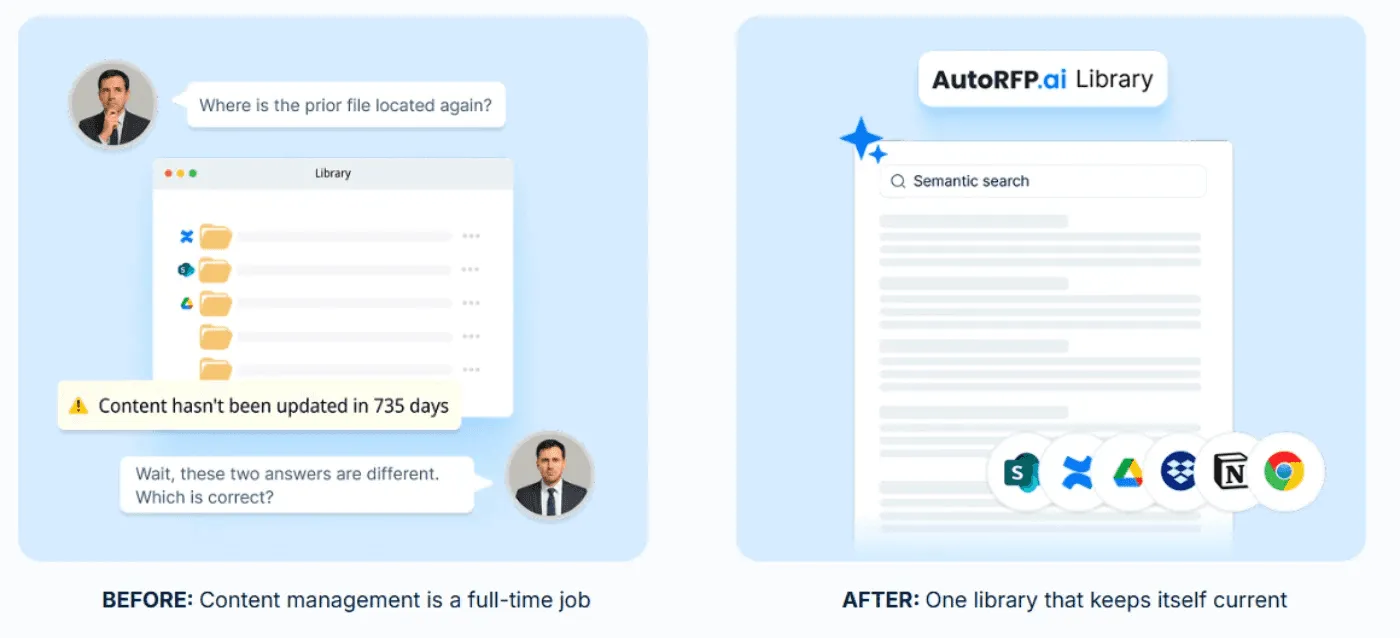
2. No Content Library To Maintain
AutoRFP.ai is libraryless; it learns automatically from what you approve inside active projects, without you organising or maintaining a separate answer bank.
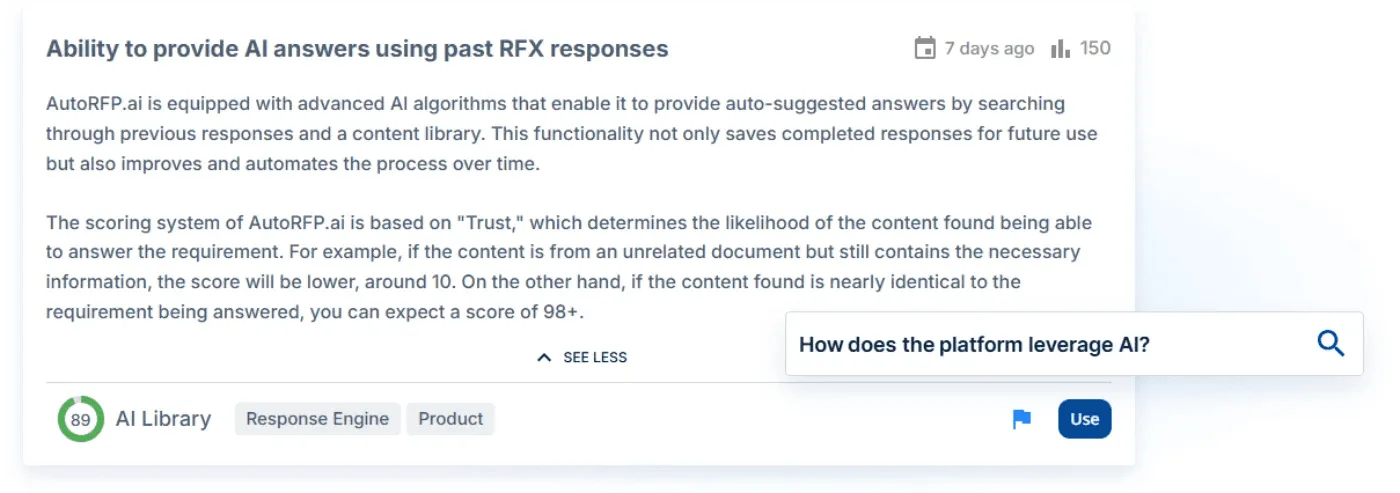
As your messaging changes, the system adapts by continually learning from the latest approved responses.
3. Track Progress And Keep SMEs Accountable
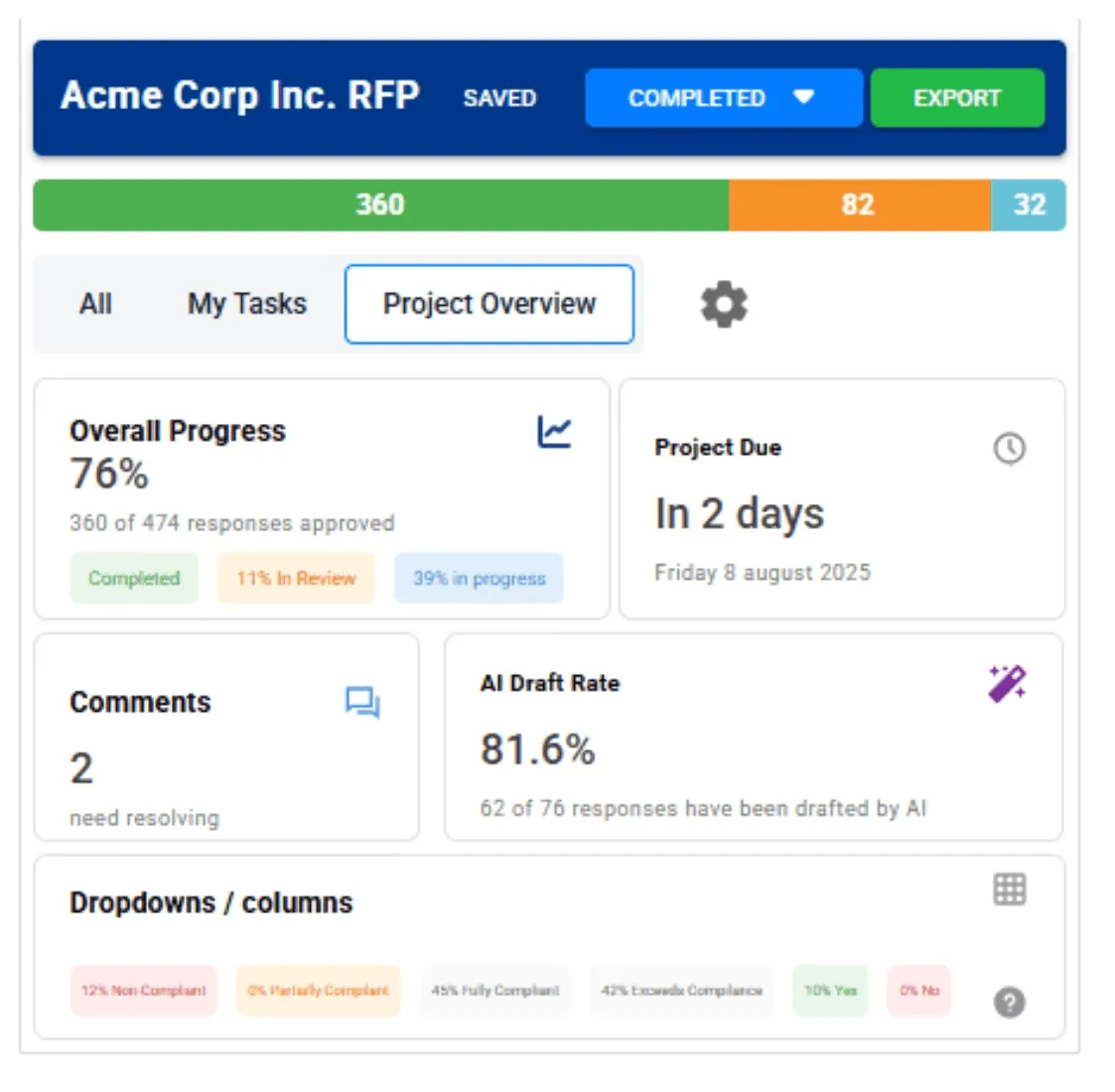
Compared to Inventive.ai, AutoRFP.ai gives you clearer real-time tracking and accountability, so you can see progress, blockers, and owners without spreadsheets or status meetings.
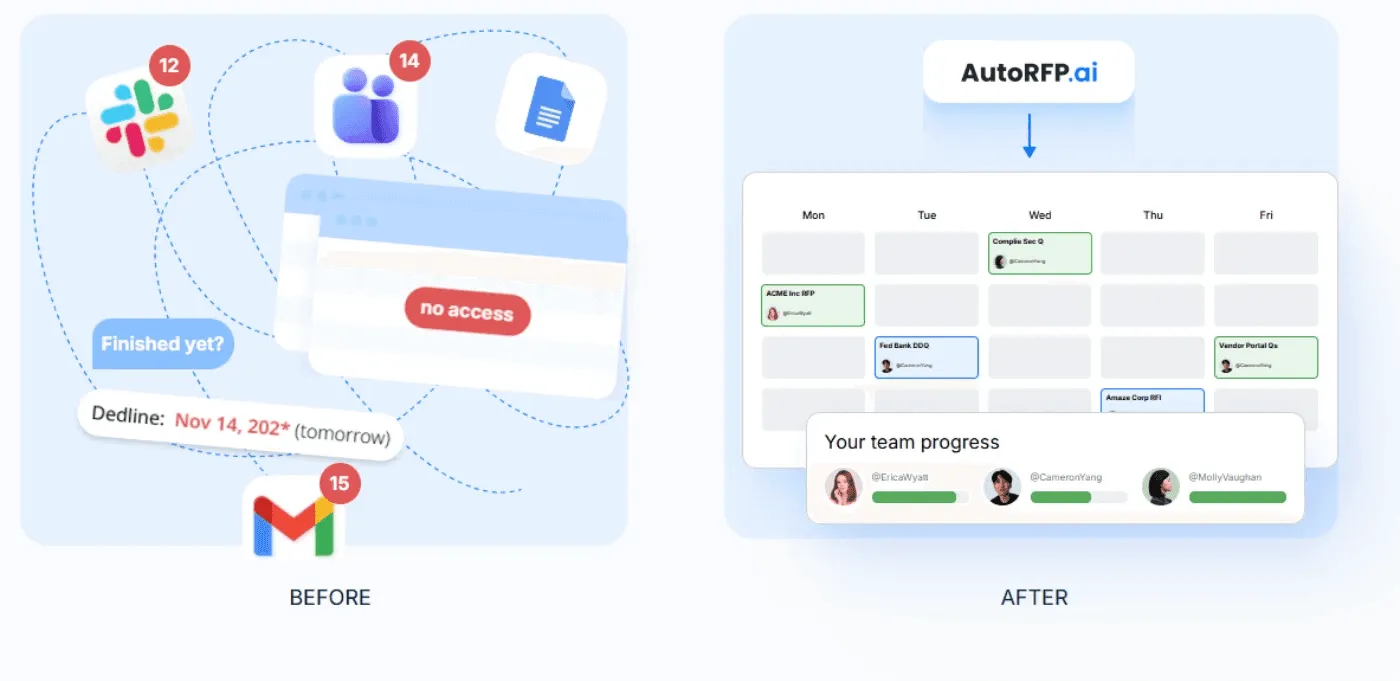
You can assign sections, send reminders, and keep SMEs moving with a single dashboard that provides workload and completion views.
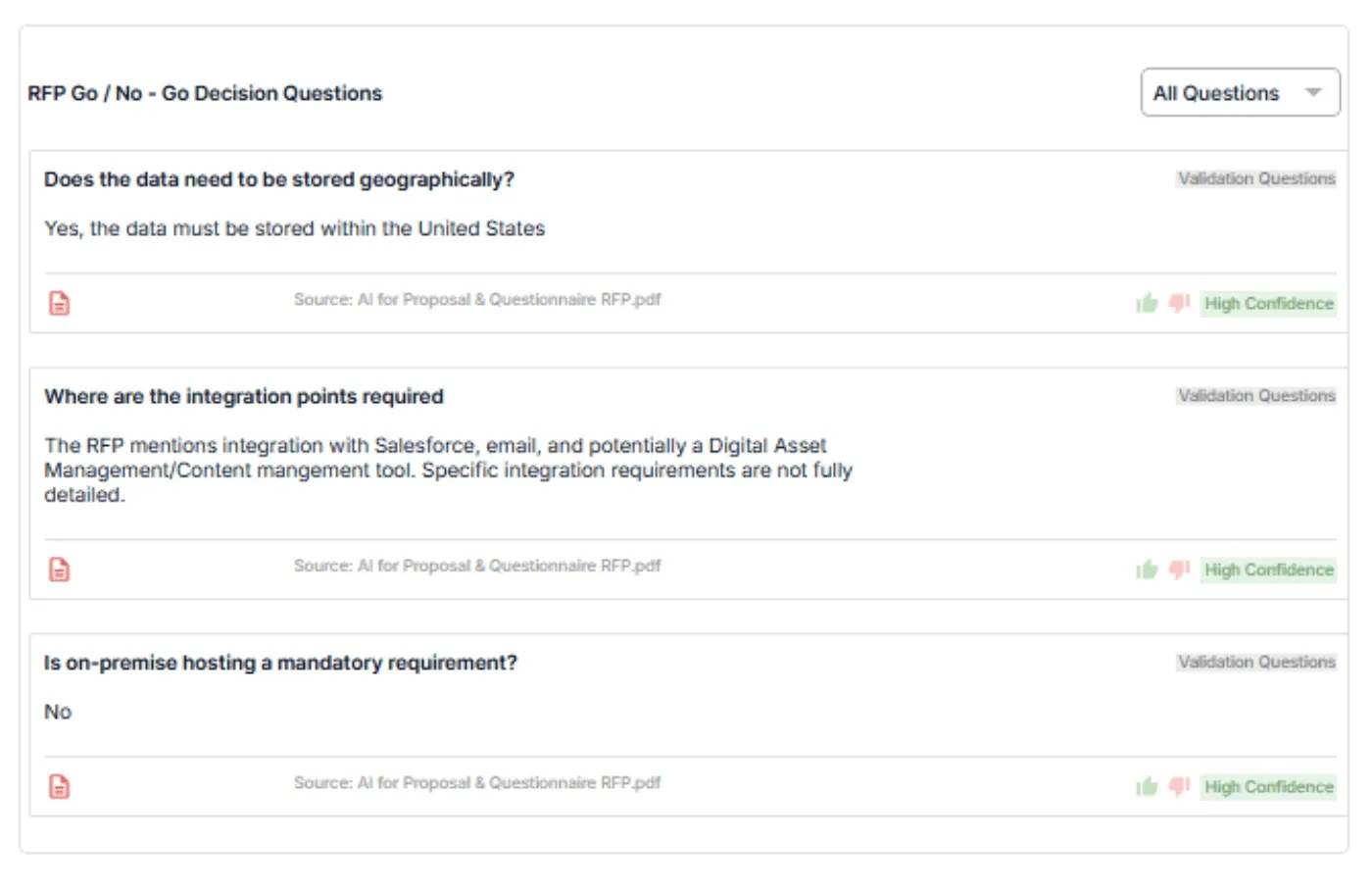
4. RFP Go/No-Go Analysis
AutoRFP.ai scans RFP documents against your Go/No-Go criteria to surface deal-breakers before your team spends hours writing.
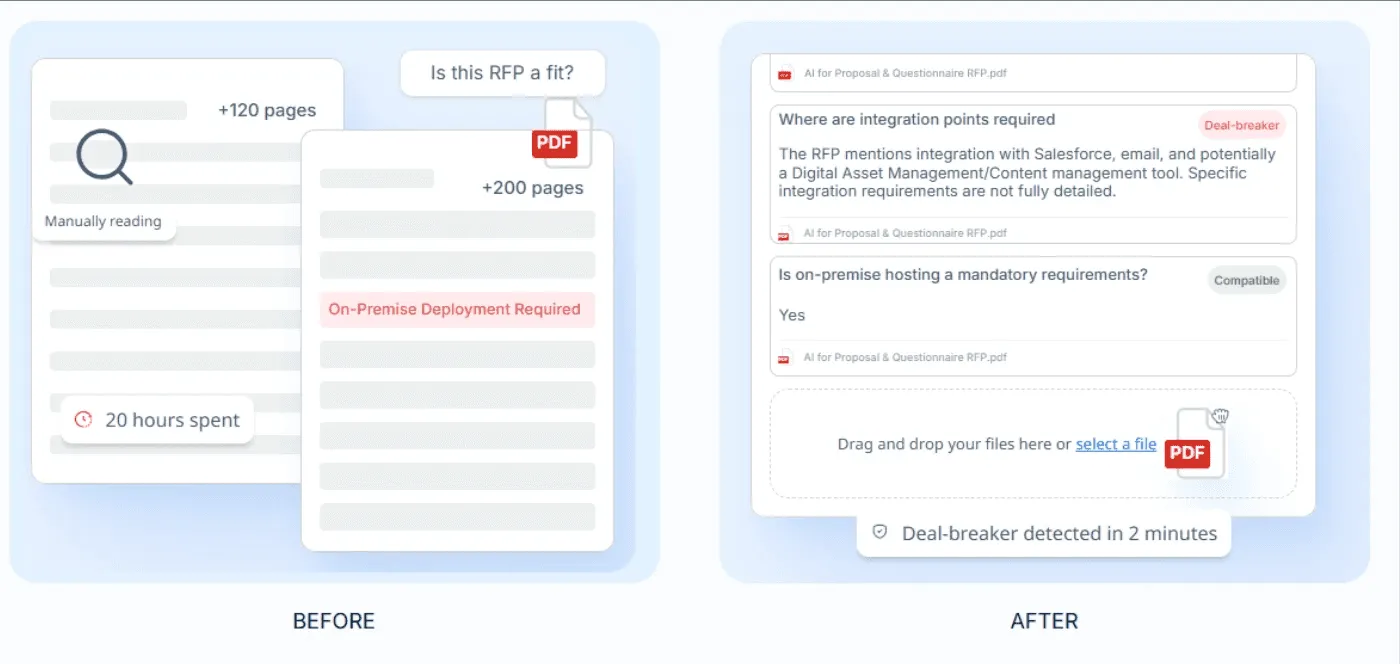
You define screening questions by category, legal, implementation, support, etc., and the AI applies them consistently to every RFP.
5. ROI Reporting That Proves Automation Value
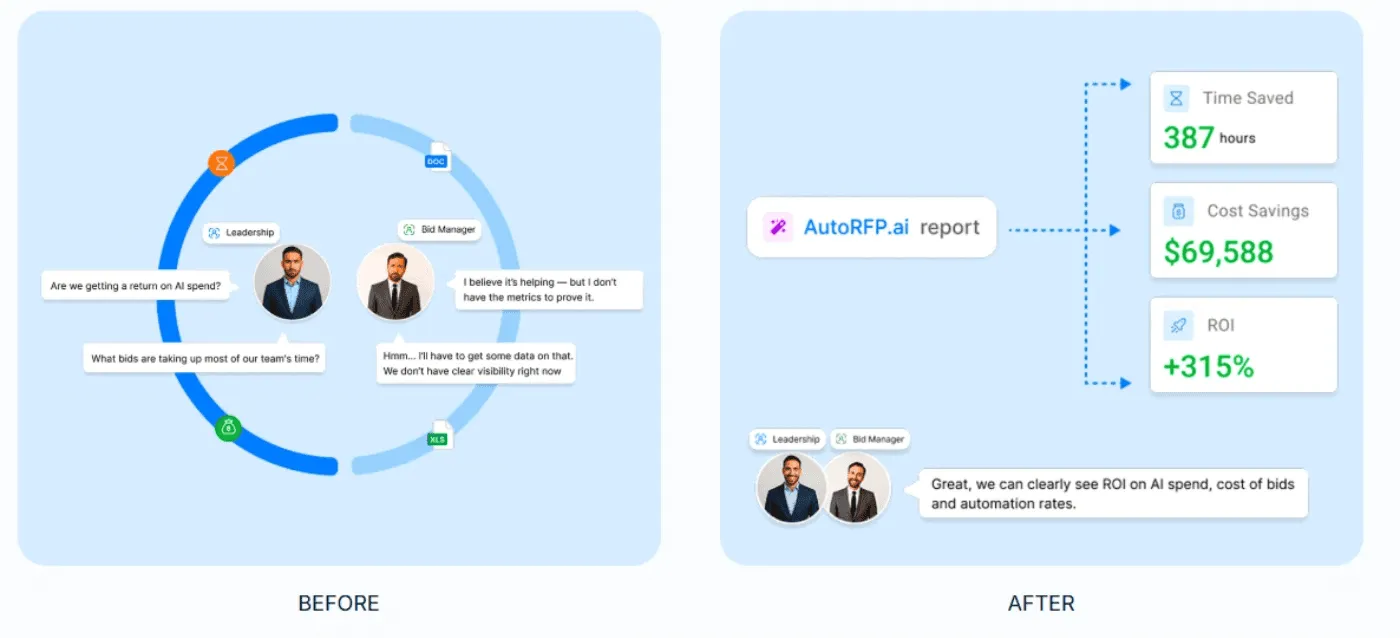
Inventive.ai’s reporting is often where teams feel the gaps, especially when you need to prove impact beyond “it feels faster.”
AutoRFP.ai’s ROI Report tracks automation rate, cost savings, and team efficiency across completed projects by showing what was AI-generated, reused, or written manually.
For revenue leaders focused on scaling efficiently, this kind of visibility turns AI RFP software into a measurable RevOps automation investment rather than just another productivity tool. Implementing these reporting structures matches core RevOps best practices that connect technical automation directly to measurable business growth.
You can also learn more about how to evaluate the Inventive AI pricing model to ensure your investment delivers the expected ROI.
Understanding various market rates, such as the current Arphie pricing structures, is key to measuring that investment against potential time savings.
6. Integration with RFP signals
The AutoRFP.ai Project Agent uses external third-party MCPs to input signals for upcoming RFPs. Winning proposals require more than just accurate answers; they require deep prospect intelligence. By incorporating insights from ZoomInfo’s GTM AI into the AutoRFP.ai workflow, teams ground every response in the world’s leading B2B data. Firmographic and technographic details can be pulled directly into the response engine, allowing for a level of personalization that sets your proposals apart. This headless use of ZoomInfo ensures that your sales and presales teams are always working with the most current signals, moving from lead generation to signed contract with unprecedented speed and accuracy.
Pricing
| Plan | Monthly Cost | Key Inclusions |
|---|---|---|
| Scale | $899 | Unlimited AI responses, users, content, and integrations |
| Accelerate | $1,299 | Everything in Scale, plus advanced analytics and priority support |
| Enterprise | Custom | Custom integrations, a dedicated success manager, and tailored security and compliance features with SSO |
AutoRFP.ai offers a 30-day money-back guarantee, personalised onboarding, and tailored training to help teams launch quickly. All plans include unlimited users (no seat-based fees) and can be set up in as little as 48 hours.
Where AutoRFP.ai Shines
Import any RFP format fast: Drop in ZIPs, PDFs, Excel, or Word files and AutoRFP.ai extracts every requirement, section, and context.
Submit without reformatting: Export completed responses in the prospect’s exact format, keeping Excel macros, dropdowns, and custom templates intact for one-click submission.
AI RFP Q&A chatbot: Connect Slack or Teams and ask @AutoRFP.ai for sourced answers from your library right inside the thread.
Answer portal questionnaires: Pull questions from web portals, generate responses from your library, and automatically export them back (Ariba, UpGuard, Jaggaer, more).
Where AutoRFP.ai Falls Short
- Not ideal for AEC, US GovCon/defense, custom software development, and highly bespoke professional services: Responses in these sectors are often too unique to follow repeatable patterns.
Customer Reviews
Ben D., Product Delivery Lead, said, “This really is a brilliant time-saving tool. It’s very clever, and the range of answer types, criteria, and scenarios it handles is impressive, as well as highly configurable by RFP. The initial setup was very easy, and using the platform is straightforward. The more you use it, the better it gets, as the AI learns from prior responses, and you can choose which past RFP’s it bases its knowledge on. Assigning answers for review by colleagues is a great feature, too. The support is responsive, and personal as well - only user error on my part so far!”
Another verified user on G2 noted that, “AutoRFP uses our historical data and content library to produce intelligent, contextually relevant answers, drastically cutting down the time it takes to complete an initial draft. It has enabled me to focus more on refining and personalising responses rather than starting from scratch. The guys at AutoRFP are super responsive and work amazingly quickly to act on the feedback we give them, and they’re great!”
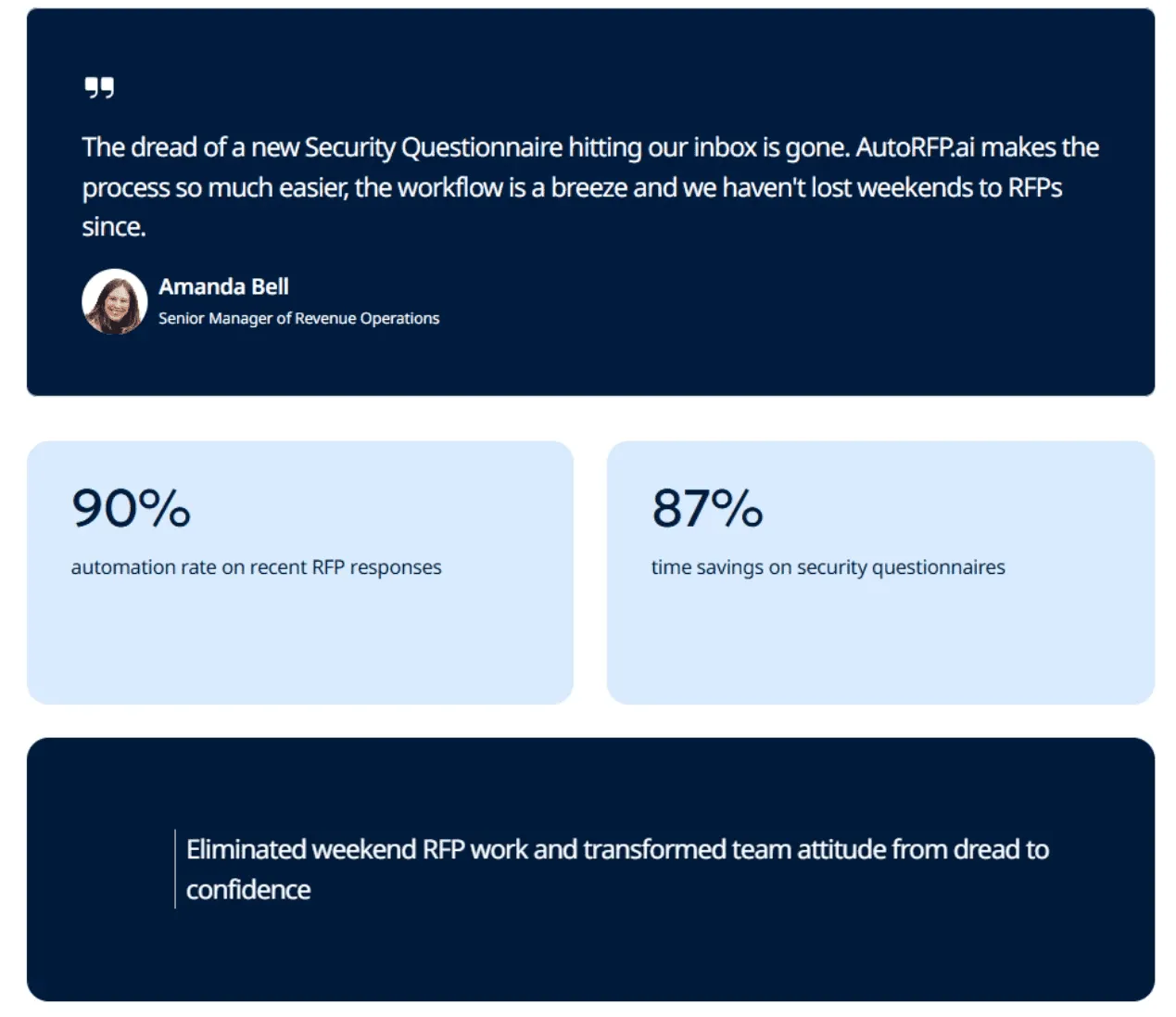
Amanda Bell, Senior Manager of Revenue Operations at Fiddler AI, said, “The dread of a new Security Questionnaire hitting our inbox is gone. AutoRFP.ai makes the process so much easier, the workflow is a breeze, and we haven’t lost weekends to RFPs since.”
Who AutoRFP.ai Is Best For
Mid-to large B2B SaaS teams: Teams that receive hundreds or even thousands of RFIs and RFPs and need faster first drafts, SME ownership, and clear progress tracking.
Financial services firms: Managed funds, insurers, and asset managers that receive hundreds or even thousands of RFIs, DDQs, and security questionnaires and need sourced answers and ROI reporting.
Regulated enterprise teams: Healthcare, fintech, and cybersecurity teams that receive hundreds or even thousands of RFIs and must handle strict approvals, portal questionnaires, and exact-format exports.

Video transcript
Transcript is auto-generated and may contain minor errors.
Hey, I'm Rob from autoRFP.ai. What is autoRFP.ai? Well, autoRFP.ai is an AI software as a service or SaaS application that does AI for proposal or RFP responses. That includes RFIs, like request for informations, includes due diligence questionnaires or DDQs, and includes security questionnaires. So, you can find all about us at autoRFP.ai. So, we're a technology company. We have offices all across the globe including Brisbane, Australia, Vancouver as well. And effectively, our tool allows, whether it be bid managers, sales people, proposal writers, RevOps team members, sales leadership, answer complicated request for proposals. So, what is a request for proposal? You can see one of our other videos below in the description. But effectively, our system
looks something like this. And it lets team members, and you can have unlimited number of people log in to autoRFP.ai, good product, allows people to go in, create projects, which would be for instance an RFP. I can go in here, create my information from my zip file, and that includes, you know, like an Excel spreadsheet, PDF, Word doc. We can run an AI go no go project analysis on the RFP. And then effectively from that, we can bring in all the information in terms of what are the questions, where our AI automatically scans the documents and figures out what is being asked of the RFP, whether it's multiple tabs in an Excel spreadsheet and everything else, whether it's drop-downs. And that all happens automatically through the power of AI. Then, we generate our response, and we can do it in in 40 plus different languages and adding languages all the time. Once you've imported your RFP into order rfp.ai,
you can collaborate with your team members assigning different people to answer the questions, review the questions, looking at an overview of the entire project and project managing due dates. Now AI effectively starts automatically answering those different questions based on your knowledge documentation. So that might be your website, your help docs, your technical documentation, your past RFP answers or security questionnaires, your security policies. But effectively all that different company information you import into order RFP and then our AI leverages that to create an AI first draft of an RFP response. Once we're happy with all those requests, we can approve it. That goes into the model to learn from and add to. So your current responses are automatically used for new responses and then you can export that as well. And then the final cool thing about order RFP is you have a lot of different
integrations that you can pull in, whether it's knowledge documentation from places like Notion, Google Drive and so on. So that's order RFP. We're an AI SaaS app. Uh you can host globally. We do not use customer data for training purposes or to send it back to LLMs. So we're secure and private. We have our ISO 2701 certificate and our SOC 2 certificate and then you can find up-to-date pricing and information on our website. Or if you came to learn more, you can book a demo and schedule time with our team. Thanks.
2. Loopio
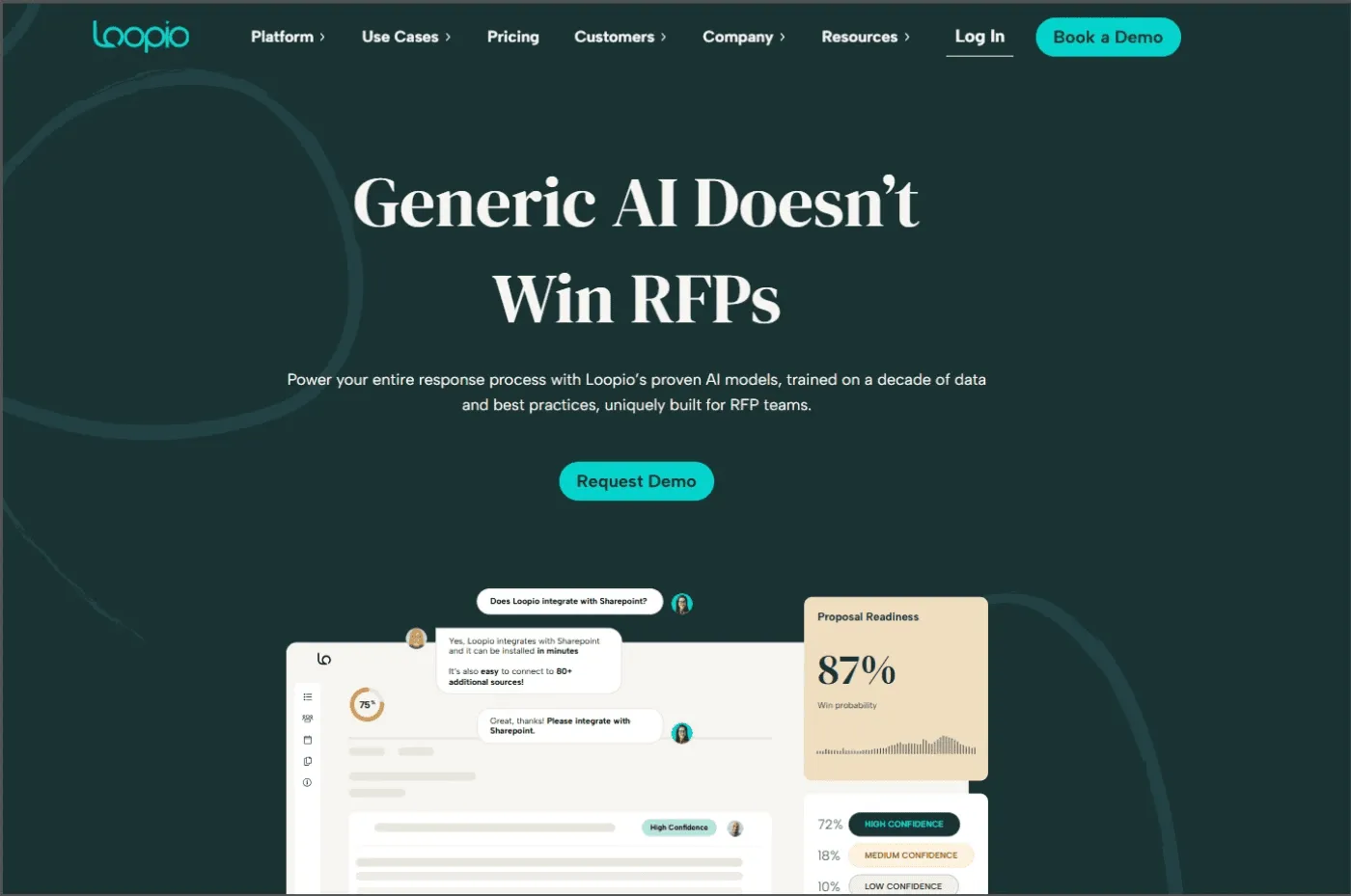
Loopio is a cloud-based response management platform for teams answering RFPs, RFIs, DDQs, and security questionnaires.
It combines a centralized answer library, project workflows, and AI-driven assistance to help teams find trusted answers faster and collaborate with SMEs without losing control of versions and deadlines.
It’s a solid Inventive.ai alternative if your priority is content reuse governance and structured response workflows across sales and security use cases.
Key Features
AI response assistance: Use Loopio’s AI capabilities to support response drafting and prioritization across projects.
Security questionnaire automation: Detect questions, suggest answers, and export responses back to the original format.
Integrations: Connect with tools like Salesforce and other systems to support collaboration and reporting.
Pricing
| Plan | Monthly Cost |
|---|---|
| Foundations | $20,000/year |
| Enhanced | Contact sales |
| Enterprise | Contact sales |
Where Loopio Shines
Content governance at scale: Centralized answers help teams stay consistent across repetitive questionnaires.
Cross-team collaboration: Built-in workflows help align sales, proposal, and security contributors in one workspace.
Where Loopio Falls Short
AI suggestions can miss the mark: Some users report that “Magic” recommendations are not always accurate or relevant.
Export and formatting issues: Users often need to manually reformat exports to Word or Excel after completing projects.
Learning curve and interface: New or occasional users can find the interface and advanced features hard to master
Heavier setup for smaller teams: Teams with low RFP volume may find the governance and process overhead disproportionate.
Customer Reviews
Jo B., RFP Manager, added a review saying that, “We’ve been clients of Loopio for about a year now. Initially, it only had part of the functionality we were looking for, but over the last year, they have been awesome about listening to what else we were looking to have to actually build out RFP’s within their system, and have built out the majority of that functionality at this point.”
Ritesh P., a proposal coordinator, expressed his frustration, saying, “I am not satisfied with Loopio’s Magic functionality. Despite the fact that there are relevant answers in the database, the Magic function often fails to deliver the right or even relevant answers to my questions. I’ve tried using it with different settings, but there is no noticeable difference in the quality of answers produced. While it offers responses to a number of questions, the accuracy and relevance remain problematic. Without the Magic function, my experience with Loopio is significantly better.”
Who Loopio Is Best For
Proposal or bid teams: Managing high volumes of RFPs with repeatable content and clear workflows.
Security teams: Turning security questionnaires into a faster, more consistent process.
3. Responsive (Previously RFPIO)
Responsive is an enterprise response management platform for RFPs, RFIs, security questionnaires, and due diligence requests.
This tool combines a central content library with collaborative workflows and AI assistance, so teams can draft faster, route questions to SMEs, and keep responses consistent across high-volume deals.
Key Features
AI agents: Automate intake, analysis, and first-draft answer generation to speed up the pursuit lifecycle.
Workflow and collaboration: Assign owners, track progress, and coordinate cross-functional reviews in one place.
Integrations: Connect with tools like Salesforce and Slack to fit existing revenue workflows.
Pricing
| Plan | Monthly Cost |
|---|---|
| Lite Edition | Contact sales |
| Emerging Edition | Contact sales |
| Growth Edition | Contact sales |
| Enterprise Edition | Contact sales |
Side Note: Responsive competitor AutoRFP.ai has a simple pricing model that makes it easy for customers to forecast expenses and ROI. Price plans are listed publicly, a pay-per-outcome model is used, and there are no hidden fees.
Where Responsive Shines
Enterprise-grade collaboration: Strong for multi-stakeholder responses with clear ownership and visibility.
Library-driven consistency: Helps teams reuse vetted content and reduce repetitive drafting across RFXs.
Where Responsive Falls Short
Inaccurate AI pulls: Some users want more control over what AI-assisted responses pull from the library to avoid irrelevant content.
Inefficient search: Reviewers report frustration when searching for exact phrases or when content doesn’t surface quickly.
Steep learning curve: New users can feel overwhelmed by the number of features and options during onboarding.
Export and formatting issues: Users report spacing problems on export, including around merge tags, plus extra effort to reuse content outside the tool.
Customer Reviews
Lauren D., Senior Manager, Proposal Department, said, “I am a long-term and early adopter of Responsive’s strategic response management software. What I like best is how much easier it is for us to manage our reliable content, answer complex RFPs, and regularly reuse that content so it doesn’t get lost. I use it almost every day, and we couldn’t manage our extensive projects without it. When I need assistance, their customer support is fantastic, treating our problems like their problems.”
Nelson N., Sr Solutions Consultant, wrote on Capterra that, “The search is terrible. It constantly misidentifies what I’m searching for and shows completely unrelated results. Searching for answers is our main use case for this tool, and it fails pretty miserably. I waste a lot of time in Responsive, looking for things that should be straightforward. It’s always a crapshoot importing documents, a lot of time it messes up identifying the right questions and answers, and I’ve lost track of how many times the answers get exported to the wrong cell.”
Who Responsive Is Best For
Enterprise proposal teams: Managing high RFP volume with many contributors and strict deadlines.
Security and IT teams: Standardizing security questionnaire responses with a governed library.
See how Responsive alternatives stack up for teams that want better visibility, simpler setup, and less manual work.
4. Proposify
Proposify is proposal software for creating, sending, tracking, and e-signing sales documents like proposals, quotes, and agreements. Teams use it to keep proposals on-brand with reusable templates and get visibility into client engagement after sending.
Key Features
Drag-and-drop templates: Create branded proposals fast with reusable sections and layouts.
Deal tracking analytics: Track opens, views, and time spent to follow up at the right moment.
E-signatures: Collect legally binding signatures inside the document flow.
Integrations: Connect to CRM, payments, and invoicing tools via native apps or Zapier.
Pricing
| Plan | Monthly Cost |
|---|---|
| Basic | $29/year |
| Team | $49/year |
| Business | $69/year |
Where Proposify Shines
On-brand proposals: Keep formatting consistent with templates and locked sections.
Faster close workflows: Combine send, track, sign, and sometimes payments in one place.
Where Proposify Falls Short
Editing and formatting problems: Users report pain with text, tables, and copy-pasting content.
Bugs and instability: Reviewers mention the app can feel buggy or unstable at times.
Limited customization: Some users feel restricted when building highly specific proposal layouts.
Slow editor performance: Large proposals can feel laggy and require refreshes.
Accessibility gaps: Some reviewers flag limitations for screen reader accessibility.
Customer Reviews
Kara B., an Agency Account Manager, reviewed that, “I’ve been using Proposify for several years now. We use it nearly every day. Before implementing the system, we were sending quotes in emails, or we had created our own templates for quotes, and I like that the system can calculate totals and discounts easily. I also love that my clients and team members can download a PDF of each quote to save in their files if needed. Proposify helps our team stay organized and gives our clients a professional experience.”
Deanna C. wrote on Capterra, saying, “Just had the worst experience with this software. Terrible customer service. I was charged for a whole year renewal ($500+) and reached out as soon as I saw it on my cc (2 days later). Their response was that I was under contract. So now I guess I have another year of super buggy proposal software that I can’t use. I would avoid the headache, bad software, and bad service.”
Who Is Proposify Best For
- Agency account managers: Sending polished proposals with fast turnarounds and e-signatures.
5. PandaDoc
PandaDoc is document automation software for creating, sending, tracking, and e-signing proposals, quotes, and contracts.
Teams also use pricing tables, a product catalog, and reusable content blocks (plus variables) to generate consistent documents faster, especially when offers include multiple line items and standard terms.
Key Features
Templates and editor: Build proposals and contracts with a drag-and-drop document builder.
E-signatures and audit trail: Send documents for legally binding e-signatures with tracking.
Pricing tables and catalog: Add products, services, discounts, and totals without rebuilding quotes each time.
Approval workflow: Route documents to internal approvers before anything goes to a customer.
Pricing
| Plan | Monthly Cost |
|---|---|
| Free | $0/year |
| Starter | $35/year |
| Business | $65/year |
| Enterprise | Contact Sales |
Where PandaDoc Shines
Faster quote-to-sign: Pricing tables and reusable blocks help reps assemble accurate proposals without starting from scratch.
Cleaner internal control: Built-in approval workflows reduce last-minute surprises from finance or legal.
Where PandaDoc Falls Short
Editing and formatting: Users report friction with complex layouts, images, and formatting-heavy documents.
Performance and glitches: Reviewers mention slowdowns, occasional glitches, and document management pain points.
Customer support: Some users report slower responses or less helpful support interactions.
Mobile experience: Mobile signing and usability can feel limited for some workflows.
Billing issues: Refund expectations can clash with policy, especially for cancellations mid-term.
Customer Reviews
Kimberly C., an Administrative Consultant, wrote, “I absolutely love PandaDoc! It’s very easy to use and figure out once you get the hang of it. It’s so simple to sign digitally and adjust to your preference.”
A user on G2 was visibly frustrated with PandaDoc as he wrote, “Many options that I used have been moved to more expensive tiers, making the costs 3x what they were. They don’t offer a refund, just move the features, so I’m stuck with software I don’t use and have paid for a year. It wasn’t straightforward; there’s a bit of a learning curve to learn initially. I’m now using Canva + Google Drive for digital signatures, which is much easier.”
Who Is PandaDoc Best For
Sales teams: Sending proposals and quotes with tracking plus e-sign.
Teams with productized pricing: Using pricing tables and catalogs to keep line items consistent.
Ops, finance, and legal: Adding approval steps before documents go out.
If your team is still comparing vendors, our guide toIris AI alternatives can help you narrow the list faster.
Reasons to Consider an Alternative to Inventive.ai
Here’s why you might want to look beyond Inventive.ai.
1. Limited Visibility Into RFP Gaps
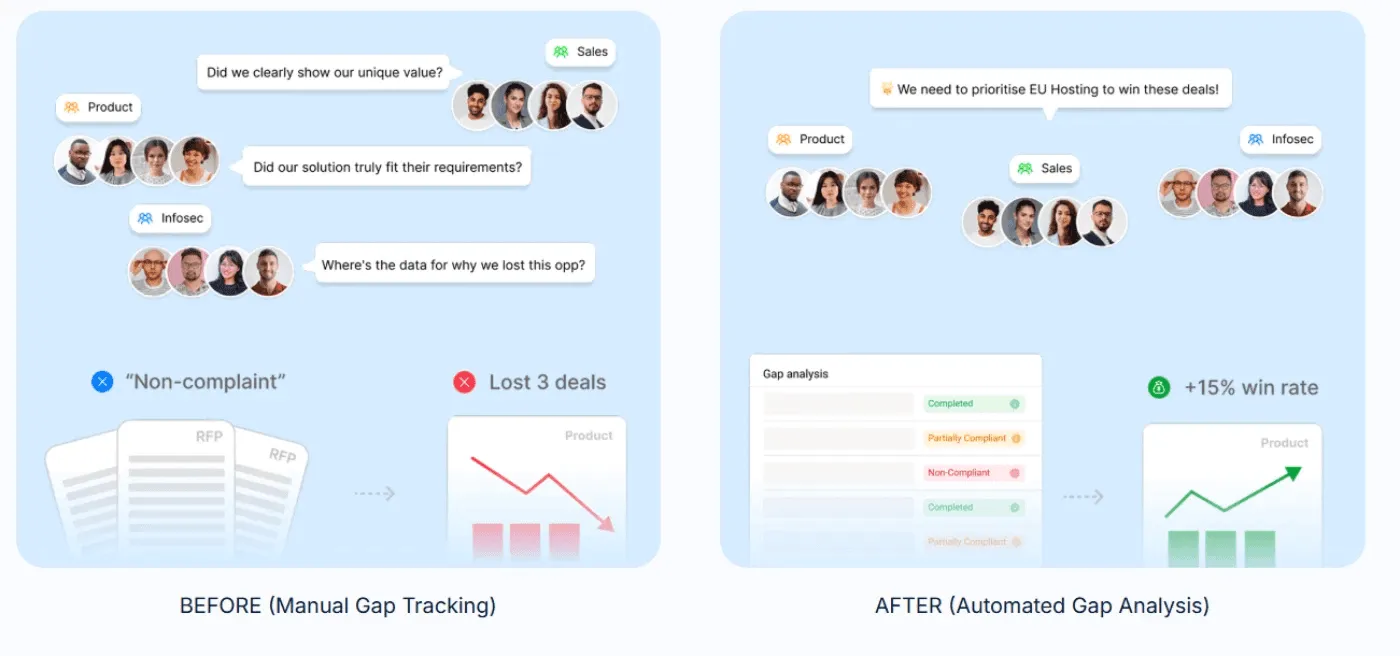
Inventive.ai can feel light on reporting when you’re trying to understand what’s costing you deals. You may finish submissions without a clear view of recurring compliance gaps.
AutoRFP.ai’s RFP Gap Analysis Report rolls up compliance answers across past RFPs to surface the requirements you’re repeatedly failing or flagging. No setup, no tagging, just patterns you can act on.
2. Time-Consuming Setup and Integration Challenges
Another reason teams switch is that Inventive.ai setup and integrations can feel time-consuming or difficult to connect with existing tools.
AutoRFP.ai integrates with ~16 tools (like Confluence, Google Drive, SharePoint, Salesforce, Zendesk, and more) and can get you started in 48 hours with onboarding support.
3. Overwhelming Notifications and Unclear Collaboration Trails
Users also say Inventive.ai notifications can be overwhelming, creating noise instead of clarity on what needs action.
AutoRFP.ai keeps notifications action-based, lets you tag SMEs on specific questions, routes updates to Slack or Teams, and maintains a full audit trail of changes.
A Simpler Way to Run RFP Responses: AutoRFP.ai
If your team answers RFPs at scale, the real challenge is not writing faster, but staying consistent, accountable, and confident under pressure.
AutoRFP.ai removes friction from the entire process, helping teams move from intake to submission with less noise, fewer manual steps, and clearer proof of impact, without adding operational overhead.
