
2026 AI Sales Enablement: Impact, Implementation & More
Learn what AI sales enablement is, how it works, key use cases, and how AI helps revenue teams improve productivity, win rates, and deal execution.

Robert Dickson
RevOps Manager, AutoRFP.ai··9 min read
Sales teams are drowning in assets and advice, yet still asking “Which deck should I use?” ten minutes before a call. Managers improvise, ops fills the gaps manually, and leaders wonder why win rates are flat when they have “so much enablement.”
AI sales enablement tackles the last mile, where guidance either shows up in the workflow or never gets used.
This article explores what AI sales enablement really means in practice, the concrete benefits you can expect, and the key use cases where it earns its keep first.
You will also learn how to implement it step by step, what experts say to prioritize when choosing tools, and how aligning your framework with proven sales enablement best practices helps you build a faster, smarter system around your reps.
You can explore how these strategies specifically optimize technical workflows in our guide to presales enablement.
What Is AI Sales Enablement?
AI sales enablement combines machine learning (ML), natural language processing (NLP), large language models (LLMs), and AI agents to help sales teams sell faster, stay consistent, and reduce manual work across the funnel.
It typically includes:
Smart content delivery: Recommends the right asset for each deal as part of a modern sales enablement tech stack architecture.
Single source of truth: Pulls the latest approved answers and messaging.
Pipeline visibility and handoffs: Clarifies ownership and next steps.
Usage and impact tracking: Connects content use and buyer engagement to wins.
AI drafting support: Creates replies, follow-ups, and summaries.
AI coaching and simulation: Gives practice scenarios and feedback.
Conversation intelligence: Analyzes calls for trends in objections, tone, pace, and delivery.
“AI isn’t here to replace enablement. It’s here to force enablement to evolve.” – Amy McClain, Revenue Enablement Consultant, Founder and Owner, Revenue Enablement Consultant at Enabled, LLC
Main Benefits of AI in Sales Enablement
Here are the main benefits of AI in sales enablement, framed around the stats that show where teams are seeing the biggest impact.
| Main benefit | What improves for the business |
|---|---|
| More content reuse, less rework | Automated libraries reduce rewriting and keep answers consistent. 59% of high-win teams use content library automation. |
| Better win rates with AI coaching | Always-on coaching gives structured feedback from real calls. Teams using AI coaching saw 14% higher win rates. |
| Higher revenue growth | AI improves lead generation and scoring, helping reps focus faster. Sales leaders using AI forecast 25% higher revenue growth on average. |
| Better sales execution | AI connects content, workflows, and buyer data so reps deliver the right message at the right time. 81% of sales teams already use AI. |
| Personalization at scale | AI tailors content by buyer and stage, improving relevance and satisfaction. Teams expect net promoter scores (NPS) to rise from 16% to 51% by 2026. |
| Higher rep engagement and retention | AI helps managers spot rep friction early and assign targeted enablement. Low-drag sellers achieve 1.7x higher quota attainment than high-drag sellers. |
Key Use Cases of AI in Sales Enablement
These are the most important use cases of AI in sales enablement today:
1. Using AI for RFP Responses and Proposal Consistency
This is one of the highest-impact use cases because it improves win quality, speed, and brand consistency across deals. Adoption is already strong.
According to AutoRFP.ai’s Proposal Win Rate Report 2026, 65% of high-win teams use AI proposal technologies
Scale Response Quality Without Adding Headcount
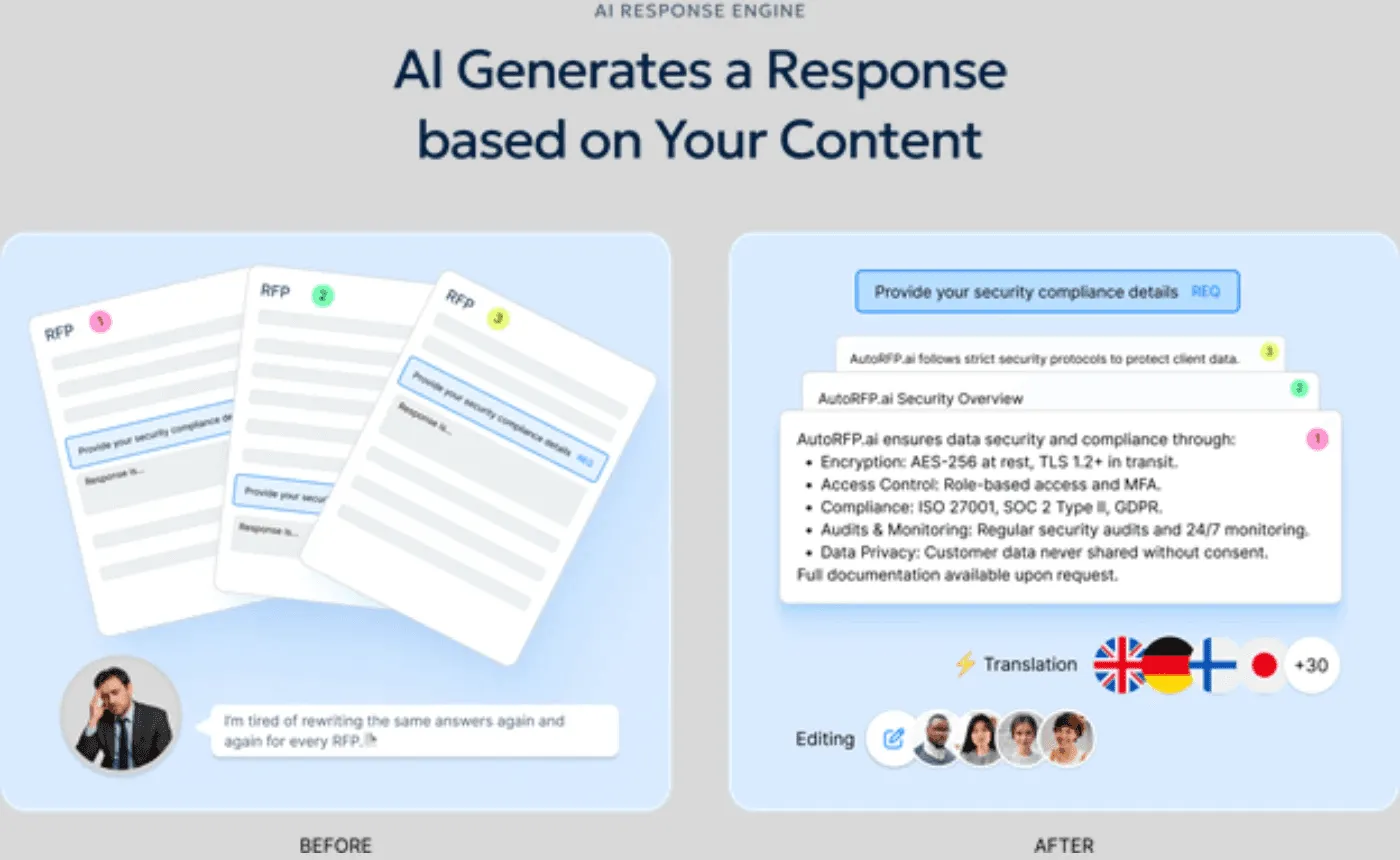
When reps handle smaller RFPs on their own, response quality tends to be inconsistent. AI RFP tools like AutoRFP.ai help standardize responses using approved messaging, so teams can scale output without adding reviewers.
Keep Answers Current from One Source
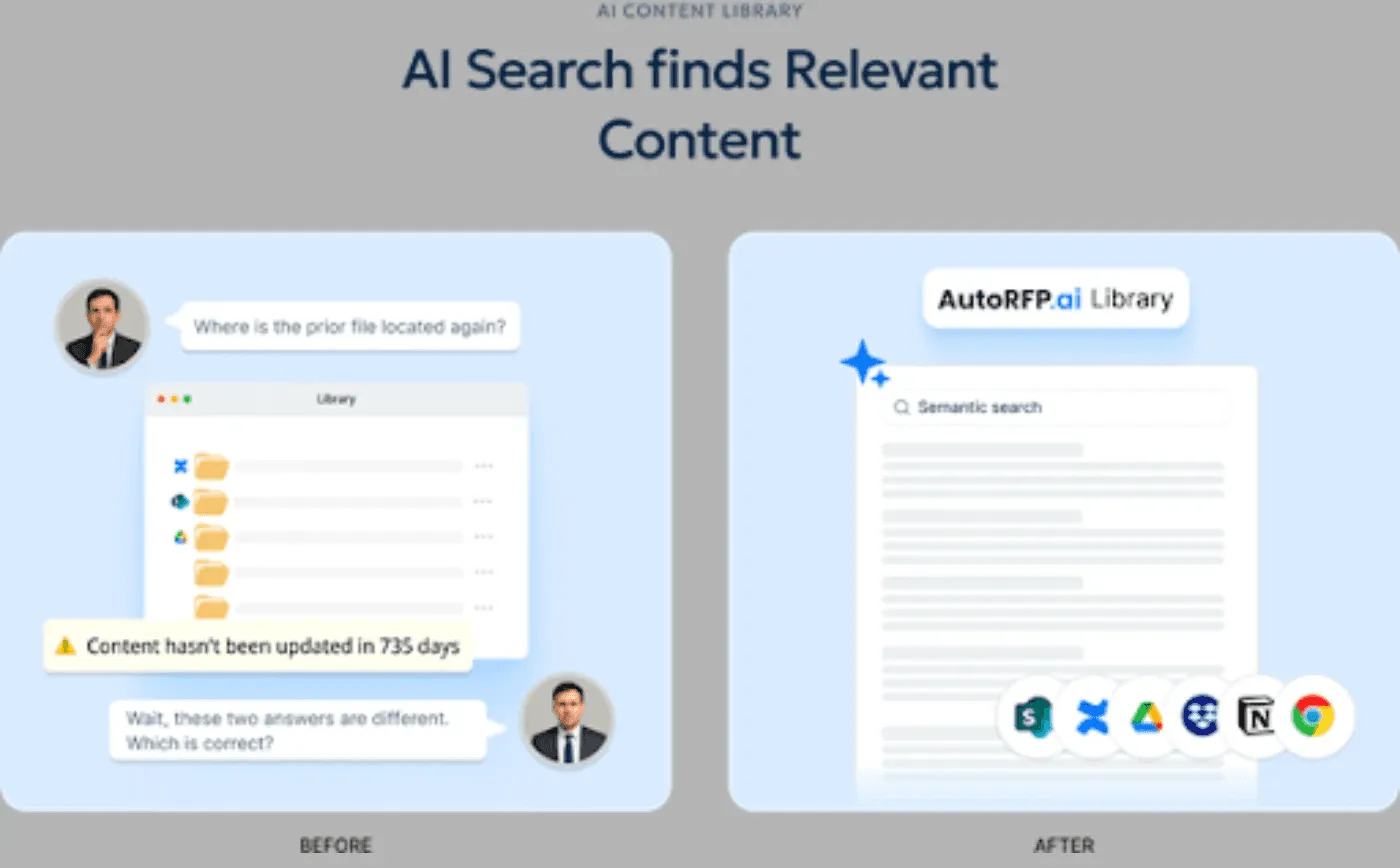
Product language changes fast, but proposal content often stays outdated across decks, battlecards, and response docs.
This is why sales enablement teams need AI-native RFP tools like AutoRFP.ai: approved content lives in one place, and when it changes, reps automatically use the latest version.
This video walks through an AI proposal drafting workflow in Claude, from setup to a finished Word document. It shows how Claude uses CRM and call context to draft a formatted proposal, with a quick reminder on privacy and training settings.

Video transcript
Transcript is auto-generated and may contain minor errors.
Have you ever wanted to use Claude to create your own custom word documents for sales proposals, RFIs, or other documents that you want to send to your prospects? I want to show you exactly how you can achieve this using Claude's brand new Claude skills. We're going to be creating a proposal just like this, completely AI generated, formatted to how exactly we want it, all based on the prospect's customer insights, so in relation to what they've told you in the sales proposal, their website, your website, and everything else you may want to include in this custom proposal for your prospect using AI. Let's jump into it. First, you can download this prompt and find it from the link in the description below, but this prompt is what we're going to be putting into our Claude project instructions to then be the basis of our document. So, you can see in this document in this prompt it has
the purpose, provides Claude with a role, and then a workflow to identify things like data sources. Here, if you've plugged in various MCPs, which are model contact protocol, or effectively integrations for AI into your other software, you can then have it talk to those tools to get relevant data. So, we use Grain for all our call recordings internally, but if you use something like Gong or other call recording software like Fathom, if they have an MCP available, you can connect it to Claude and have it then talk to that software for relevant discussions you've already had with your prospect for the sales proposal. So, first it identifies data sources. It also could be information from your CRM like HubSpot or Salesforce, and then it's going to research the prospect company. So, it might ask you for the prospect's website if it can't find it in the relevant information you've already provided, and it's going to look for relevant information about that prospect. It's then going to look at relevant case studies. A great proposal always talks about your customers and what they can achieve with your tool or
solution for the prospect that is relevant to that prospect. So, it's going to look for relevant case studies on your website. You can obviously provide it other information if you want if you It's not on your website, but it's going to look for case studies to understand your solution better. Then it'll look for current state information. So, this might be going through the call recordings and effectively looking for information about how the prospect currently works on there It's going to look for information on current state. So, that is how the prospect already solves the problem themselves. They might be an incumbent software or other solution they're using like an agency or something like that as well. Might be or they might be doing something a lot more manual. But effectively, hopefully through discovery and demonstrations and discussions you've had with the prospect, you would have a really solid understanding of their current state and that's what you're going to have here. So, that's step four. Step five, generate the proposal document. This is really cool. So, effectively skills you can either create your own custom skills or Anthropic have uploaded kind of base
skills to everyone's desktop instances. This is going to use the create skill that would already be in your instance especially on a paid plan. And then it's going to use that to create a which you can see here I've uploaded to Google Docs the finished thing, but you can upload it to Microsoft Word or any other kind of document editor as you see fit. It's going to look for consistent styling. Now, of course, you can go in and customize this prompt and or get AI I customize this prompt and have the styling be more specific to how you might do proposals. I've done it to how which is where I'm from does proposals. Then it's going to break that down and kind of present the finished document all AI generated to me that is really relevant to my company and relevant to the prospect and our solution for the prospect in the proposal. Then it will ask you additional questions have that if it can't find that information through the tooling and it will ask itself those questions to help kind of base it off of the document. Now, this is really cool. So, what kind of document is it actually going to create? So, we've looked at the steps that Claude will do to create the
document, but what is the document? And here, of course, you can go through and customize this prompt to make them all relevant for your proposals, but I've done something where it creates a cover page with relevant information, so that's what you can see here. I prepared by Where Software. It then does an executive summary. It creates a more information about understanding the prospect's business. You can see here, I've done Meridian Infrastructure Partners, which is just a made-up company for the example, but of course, this would be relevant for your prospect. Then it looks at current challenges. So, this is really cool. So, this would look at, for instance, call recordings or notes in your CRM or anything that you provided about the prospect's current challenges, and will weave that into the proposal to make it really relevant to the prospect. So, proposal cycle times and all these other kind of things that are relevant for this prospect in terms of their current challenges. And then here, you can see it's mentioned a number of stakeholders. So, Claude also then identifies and I've So, then Claude identifies some decision-makers and
mentions them in the proposal because they're who could be decision-maker, champion, economic buyer, exact sponsor, kind of different people in the sales process that you've talked to, and it's going to mention from those discussions and make that proposal very personalized and relevant for that prospect and whoever might be reading it. We also use in the prompt a good prompting technique, which is kind of Also, in our prompt, we use some prompt engineering skills. For instance, examples of good and bad, which the LM then understands better context around what kind of output it's trying to produce. So, here we have example of some bad framing, which might come across as like condescending to the prospect. You want to avoid that in our sales proposal. And then what good framing is. So, you can again update this prompt to make more relevant for your company, but it's a really good kind of starting point. Then you have challenge. Now we go to solution overview. So this is really cool. Based on your company and what Claude understands from your business and your solution, of course you can provide it more details, it's going to build out a solution overview and how your solution
is addressing those challenges for the prospect. And then finally kind of finish off with why why your company. What it's going to do there in the why company is it's going to look at kind of what your what the prospect is currently doing verse your solution and where the difference is and where the benefits are. Really powerful stuff. Then any relevant success stories and then look at implementation methodology, timeline, the team that'll be working with them. Then you kind of see it goes through and generates all these things in again in really nice formatting to my brand voice, colors, tone, and then generates that and provides a final output as well with the commercials and pricing. Of course you can provide things like a uh Notion or Google Drive link or PDF in your project that includes your pricing table and then kind of stand better in pricing. Or you can ask it to skip pricing and leave that for the rep to fill out. And then you can see there ROI and further information. So next step from here is you grab the prompt
then go to Claude desktop and this this is web browser we can do it in Claude desktop. Jump into your instructions and then paste the prompt in there. Also make any changes to the prompt that you would like. I've called out a couple of different things that you can make different I've called out a couple of ways you can customize this to make it more relevant for your business. First, you can add additional files. So I called out a pricing schedule. You could upload your case studies here as a PDF if you want and just add additional files as you would like that are relevant to what you would expect an AI to use to generate proposals. Could be a solution overview. It could be common pain points. Could be information about personas, industry analysis on the certain prospects industries that you sell to. So that's all going to be in your files. Then in your instructions, you can have Claude edit this prompt for you or you can edit it yourself and say, "Hey, when looking at case studies, look at this file." And so that way when the LLM goes to use these project instructions, it's going to know exactly what context it has to use from your project files for the relevant parts of
its output, its response, in this case the sales proposal. Then you can see here in instructions we can add tools. So I mentioned your MCP integrations or other integrations you might have with Claude. You can click here and add additional connectors. You can see we have a lot in our account, but you can add additional connectors here or have it to you can use recent web web search. I always use extended thinking. It uses more tokens, but it's very valuable. And then you can click there and say and turn on other tools. So if you use Gong for your sales recordings and transcriptions and you have the MCP enabled in Claude and you want it to use the relevant calls that you have with that prospect to generate the proposal, great. Connect the MCP tool, talk call it out in the prompt, use to do this X and Y, and then it's going to use that really efficiently and productively. So when you go into then create a Word doc, I've I've done one here and you really don't have to use too much. You can be like, "Hey, can you create me a sales proposal for this custom for this prospect?" That might be if you if you have Claude connected to your CRM, it could be of the deal opportunity. It could be an email if it
has connections to your calendar or emails and figure out those people or you can provide a longer prompt with a lot more information. And then effectively goes through, uses the project instruction prompt, uses the relevant skill for creating the document, and then it's going to output and present you with a file that you can then download or add or open in Google Drive. And that will download as you can see it's a file and this is what you're going to have left. So I just covered off how you can use Claude desktop or Claude to create a sales proposal with a lot of different ways you can do this. If not just for your sales proposals, but if you're constantly doing RFIs that are pretty stock standard, you could use it to help with that. It really thrives where either you're expecting a lot of the same responses and you can give it past context or you want really customized proposals or RFIs where you have the data available to give it to Claude. It's not going to do well if you can't give it any context, it's going to be very bland, a very basic proposal. Whereas if you can give it
information that is relevant to that prospect, then that will make the proposal just that much better. And of course, you can go through in a Word Doc or Google Google Doc and update it as you see fit. Thing I will mention, I've of course spoken about how you can use MTPs. Make sure you're on a paid plan with Claude and make sure you you have training turned off. Make sure you're working in line with your IT governance, that you're not accidentally sharing a bunch of prospect information and your customer data with an LLM and it's going into the model for training. So make sure that's all turned off and you're talking to your IT team if you have any questions about your specific use case. Awesome. Thanks. That's how you can use Claude skills to create sales proposals.
2. AI-Powered Conversation Intelligence and Coaching
Sales managers rarely have time to review enough calls, so coaching becomes uneven and reactive. AI scales coverage by analyzing conversations and flagging the moments that matter most.
How AI assists this workflow:
Transcribes and summarizes sales calls automatically.
Flags coaching moments, such as pricing objections or weak discovery.
Identifies trends in tone, pace, and delivery across reps.
Supports role-play practice for objection handling.
Impact: Coaching becomes more consistent, managers spend less time on manual reviews, and reps improve faster with targeted feedback.
3. Content Personalization and Generation
Reps waste time hunting for assets and rewriting outreach. AI keeps work on track by matching content and draft messaging to the buyer context.
How AI assists this workflow:
Generates tailored emails, pitches, and follow-ups.
Recommends relevant case studies, decks, and one-pagers.
Adapts messaging by industry, persona, and deal stage.
Impact: Buyers receive more relevant messaging, reps move faster, and enablement content gets used more consistently.
Pro Tip: Provide AI-approved message blocks by persona and industry. That keeps personalization strong without drifting off-brand.
4. Predictive Lead Scoring and Prospecting
Prospecting breaks down when every lead is treated the same. AI sharpens focus by ranking opportunities by behavior and fit, so reps spend time on leads with higher conversion potential.
How AI assists this workflow:
Scores leads using behavioral and firmographic signals.
Highlights high-intent accounts for rep follow-up.
Improves prioritization for outbound and inbound teams.
Impact: Reps spend less time on low-quality leads and more time progressing deals that are likely to close.
5. Automated Administrative Tasks
Sales workflows stall when reps spend too much time updating systems instead of selling. AI cuts this drag by automating repetitive tasks and keeping records clean.
How AI assists this workflow:
Drafts meeting summaries and follow-up notes
Updates customer relationship management (CRM) fields.
Helps with scheduling and task logging.
Reduces manual data entry after calls.
Impact: Reps gain more selling time, managers get cleaner pipeline data, and handoffs become easier to manage.
How to Implement an AI-driven Sales Enablement Strategy
Here is a practical roadmap for implementing an AI-driven sales enablement strategy so that most sales enablement teams can realistically execute it.
1. Start With High-Impact Workflows and Clear Priorities
Begin with workflows that create the most drag or inconsistency today. This keeps the rollout practical and makes it easier to show value early.
Identify 2 to 3 high-impact workflows first, such as RFP responses, call coaching, or content personalization.
Map where time is lost, where quality breaks, and where reps depend on manual work.
Define success metrics for each workflow, such as response time, win rate, content reuse, or rep ramp speed.
Pro Tip: Pick one workflow that is frequent and painful, not just one that sounds advanced.
2. Clean Up and Structure Your Content Before Adding AI
AI works best when your sales content is organized, up to date, and easy to retrieve. If content is scattered or outdated, AI will scale the mess.
Create a structured content source of truth for approved messaging, product answers, and proof points.
Standardize content formats for common use cases, including objection handling, security answers, and feature descriptions.
Add ownership for updates to keep content current over time.
Pro Tip: Start with your top repeated sales answers first. That gives fast gains without a full content overhaul.
3. Set Governance, Approval Rules, and Access Controls
Operational readiness matters before deployment. Enablement, RevOps, sales leaders, and product teams should agree on how AI outputs are reviewed and used.
Define what AI can generate, what must be reviewed, and what must come from approved sources only.
Assign owners for content quality, tool administration, and workflow changes.
Set role-based access so reps, managers, and experts see the right content and take the right actions.
4. Integrate AI Into Existing Workflows and Systems
Do not create a separate AI process that reps have to remember. AI should fit into the tools and handoffs teams already use.
Connect AI tools to your customer relationship management (CRM), content systems, and sales workflows.
Align AI outputs with existing stages, ownership rules, and handoff processes.
Build clear steps for when reps, managers, and subject matter experts need to act.
Pro Tip: If reps need to leave their normal workflow to use AI, adoption usually drops.
5. Automate RFP Responses if They Are a High-Impact Workflow
If RFPs matter to your sales team, start here. Automation cuts repetitive rewrites and frees time for deal strategy, positioning, and stakeholder coordination.
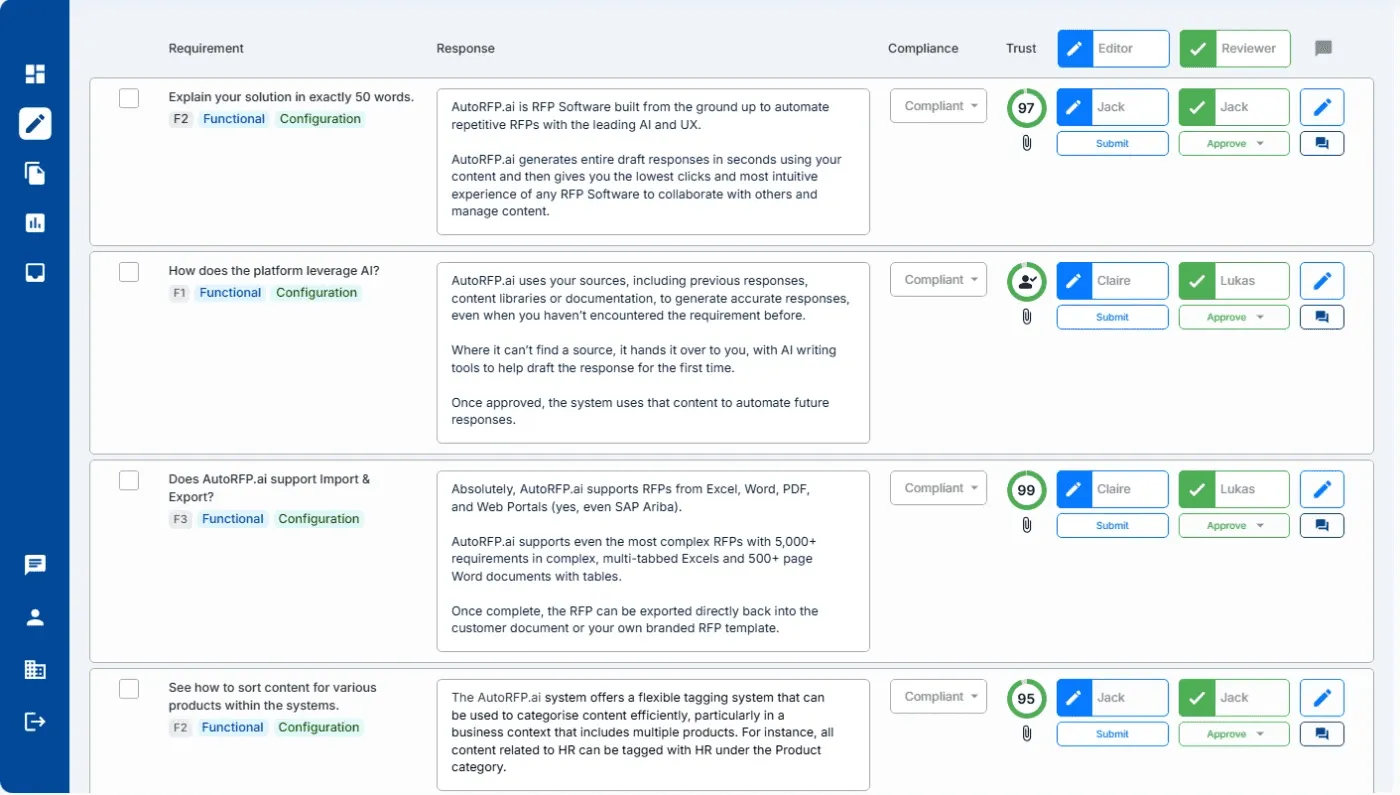
Use a tool like AutoRFP.ai to find the most relevant approved responses and generate answers that match the requirement.
Project manage reps, internal teams, and experts from a single dashboard to save time and reduce chaos.
Automate content operations to enable AI to assign relevant categories and keep content up to date.
Keep a single source of truth, so updated messaging flows into future responses automatically.
6. Pilot, Train, and Roll Out in Phases
Start with a controlled pilot before a full launch. This gives your enablement and RevOps teams time to refine prompts, governance, and reporting.
Run a 30 to 60-day pilot with one team, one segment, or one workflow.
Train reps and managers on when to use AI, how to review outputs, and what to escalate.
Collect feedback on speed, quality, and workflow friction before scaling.
7. Measure Adoption, Quality, and Business Impact
Implementation is not complete when the tool is live. You need a simple operating rhythm to track impact and keep improving.
Track adoption, output quality, and workflow outcomes by use case.
Check whether AI is reducing rework, speeding up cycles, or improving conversion rates.
Refresh content, scoring rules, and governance based on real usage.
For a category-by-category view of the leading platforms, see our roundup of the best sales enablement tools in 2026.
Expert Guidance on What to Look For When Choosing AI Sales Enablement Tools
Here is a practical checklist for choosing AI sales enablement tools, focused on operational fit, adoption, and measurable business value.
| What to look for | Why it matters |
|---|---|
| Operating model fit, not just AI features | Pick a tool that fits your RevOps tech stack, process, ownership, and approvals. Strong features alone will not drive adoption. |
| Deep CRM and workflow integration | The tool should work inside systems like Salesforce, Slack, and Gmail to reduce platform switching and improve usage. |
| Semantic AI search, not keyword-only search | Many tools only match keywords, resulting in weak answers. Choose context-based retrieval, like semantic AI search, to return accurate, on-brand responses. |
| Real-time conversation intelligence | Prioritize tools that record, transcribe, and analyze calls, flag objections, and support coaching. Bonus if they also update CRM notes. |
| Built-in ROI and efficiency reporting | Look for reporting on AI automation rate, time saved, cost savings, and team efficiency so you can prove impact without manual reporting. |
Build a Faster, Smarter Sales Enablement System With AutoRFP.ai
AI sales enablement works when reps get the right answers, content, and next steps inside their workflow, not buried in folders.
AutoRFP.ai helps you standardize responses, keep messaging current, and move complex deals faster with less rework across teams. Build your system around what reps actually use.
Frequently asked questions
When should businesses implement AI into their sales enablement workflow?
Implement AI when sales teams need to scale, improve efficiency, or address clear bottlenecks, especially when too much time is spent on non-selling work like data entry or content searching.
How can sales teams prevent AI "hallucinations" in customer-facing materials?
Use retrieval-augmented generation (RAG), so the AI pulls only from verified internal sources, such as product specs, pricing, and approved case studies. Also, add a human-in-the-loop (HITL) review, where a subject-matter expert reviews customer-facing content before it is sent.
What is the difference between "Generative AI" and "Agentic AI" in sales enablement?
Here are the key differences: | Feature | Generative AI | Agentic AI | | ------------------ | ------------------------------------------ | ------------------------------------------------------ | | Primary Function | Content creation and summarization | Task execution and autonomous reasoning | | User Interaction | Requires manual prompts for every task | Operates on high-level goals with minimal intervention | | System Integration | Often siloed or requires manual data entry | Deeply integrated with CRM, Email, and Calendar | | Impact | Increases individual productivity | Automates entire sales workflows and funnels |
Why does enterprise-grade security matter when choosing an AI sales enablement tool?
Enterprise-grade security protects sensitive sales data, especially customer information, pricing, and proposal content. Look for vendors that support standards like ISO 27001 and SOC 2 to reduce risk and meet internal security requirements.
