
2026 Sales Enablement Best Practices By Industry Experts
Learn the top sales enablement best practices for 2026: content strategy, rep training, coaching, AI adoption, and how to equip reps at every stage of the deal.

Robert Dickson
RevOps Manager, AutoRFP.ai··20 min read
If you want faster sales cycles and higher win rates, sales enablement is one of the cleanest levers you can pull. The opportunity is clear: sales reps spend 60% of their time on non-selling tasks, so improving enablement systems can directly increase effective selling time.
This is less about “doing it wrong” and more about building a high-performing enablement engine that scales with your team.
In this guide, we share expert best practices across content, training, coaching, alignment, and AI, plus how to implement them in a practical way.
What is Sales Enablement?
Sales enablement is the process of giving sales teams the content, training, tools, insights, and support they need to sell more effectively.
It is different from nearby functions because each one plays a specific role:
Sales training: Focuses on teaching reps specific skills, such as objection handling, discovery, and product knowledge.
Sales ops: Manages sales processes, systems, data, forecasting, territories, and workflow efficiency.
Marketing: Creates demand, brand messaging, campaigns, and content that attract and educate buyers.
Sales enablement: Connects these efforts so reps know what to say, what to share, and how to move deals forward.
You can also explore how presales enablement specifically supports technical validation and architecture alignment in our detailed guide.
A functioning sales enablement setup should help a revenue team produce:
Consistent messaging: Reps explain the product clearly across different buyers, markets, and deal stages.
Stronger buyer conversations: Sales teams can answer questions, handle objections, and tailor messages with confidence.
Faster sales cycles: Reps spend less time searching for information and more time advancing opportunities.
Better team alignment: Sales, marketing, customer success, and revenue leaders work from the same playbook.
Higher rep productivity: Teams reduce repetitive work and focus more time on selling.
More predictable revenue outcomes: Leaders can see what works, improve weak spots, and support better win rates.
13 Sales Enablement Best Practices
Sales enablement best practices should help revenue teams sell with more consistency, speed, and confidence. The goal is not just to give reps more tools or content, but to create a system that helps them know what to do, what to say, what to share, and how to move each deal forward. Here are a few best practices you can implement:
1. Use AI and Automation in Sales Enablement
Industry experts argue that artificial intelligence and automation are the only way to break this cycle; AI does not replace enablement professionals but “forces enablement to evolve”.
Why AI‑Enabled Sales Enablement Matters in 2026
AI sales enablement blends machine‑learning, natural‑language processing and large‑language models to help teams sell faster and stay consistent. Modern platforms deliver several core capabilities:
Smart content delivery and single source of truth: AI surfaces the right asset for each deal and pulls the latest approved answers from one central library. Automated libraries reduce rewriting, and 59% of high-win teams already use this automation.
Pipeline visibility and usage tracking: AI connects content, workflows, and buyer data so teams can clarify ownership and tie content use to revenue.
Drafting and coaching support: AI helps write replies, follow-ups, and summaries while giving coaching feedback from real calls.
Personalization and lead scoring: AI tailors content by buyer and stage while improving lead generation and scoring. Sales leaders forecast 25% higher revenue growth.
Key Use Cases for AI and Automation
RFP responses and proposal consistency: AI RFP platforms standardize responses with approved messaging and the latest product language. AutoRFP.ai’s Proposal Win Rate report shows that 65% of high-win teams use AI proposal technologies.
Conversation intelligence and coaching: AI transcribes and summarizes sales calls, flags coaching moments, and identifies trends in tone, pace, objections, and discovery quality. Managers can give more targeted feedback, while reps improve without relying only on manual call reviews.
Content personalization and generation: AI recommends the right case studies, pitch decks, and one-pagers, then drafts tailored emails and follow-ups. Messaging can adapt by industry, persona, and deal stage to improve buyer relevance and seller productivity.
Lead scoring and task automation: AI predicts which prospects are most likely to buy and automates admin work like data entry and meeting scheduling. This creates a low-drag selling environment, where research shows low-drag sellers achieve 1.7× higher quota attainment than high-drag sellers.

Video transcript
Transcript is auto-generated and may contain minor errors.
Have you ever wanted to use Claude to create your own custom word documents for sales proposals, RFIs, or other documents that you want to send to your prospects? I want to show you exactly how you can achieve this using Claude's brand new Claude skills. We're going to be creating a proposal just like this, completely AI generated, formatted to how exactly we want it, all based on the prospect's customer insights, so in relation to what they've told you in the sales proposal, their website, your website, and everything else you may want to include in this custom proposal for your prospect using AI. Let's jump into it. First, you can download this prompt and find it from the link in the description below, but this prompt is what we're going to be putting into our Claude project instructions to then be the basis of our document. So, you can see in this document in this prompt it has
the purpose, provides Claude with a role, and then a workflow to identify things like data sources. Here, if you've plugged in various MCPs, which are model contact protocol, or effectively integrations for AI into your other software, you can then have it talk to those tools to get relevant data. So, we use Grain for all our call recordings internally, but if you use something like Gong or other call recording software like Fathom, if they have an MCP available, you can connect it to Claude and have it then talk to that software for relevant discussions you've already had with your prospect for the sales proposal. So, first it identifies data sources. It also could be information from your CRM like HubSpot or Salesforce, and then it's going to research the prospect company. So, it might ask you for the prospect's website if it can't find it in the relevant information you've already provided, and it's going to look for relevant information about that prospect. It's then going to look at relevant case studies. A great proposal always talks about your customers and what they can achieve with your tool or
solution for the prospect that is relevant to that prospect. So, it's going to look for relevant case studies on your website. You can obviously provide it other information if you want if you It's not on your website, but it's going to look for case studies to understand your solution better. Then it'll look for current state information. So, this might be going through the call recordings and effectively looking for information about how the prospect currently works on there It's going to look for information on current state. So, that is how the prospect already solves the problem themselves. They might be an incumbent software or other solution they're using like an agency or something like that as well. Might be or they might be doing something a lot more manual. But effectively, hopefully through discovery and demonstrations and discussions you've had with the prospect, you would have a really solid understanding of their current state and that's what you're going to have here. So, that's step four. Step five, generate the proposal document. This is really cool. So, effectively skills you can either create your own custom skills or Anthropic have uploaded kind of base
skills to everyone's desktop instances. This is going to use the create skill that would already be in your instance especially on a paid plan. And then it's going to use that to create a which you can see here I've uploaded to Google Docs the finished thing, but you can upload it to Microsoft Word or any other kind of document editor as you see fit. It's going to look for consistent styling. Now, of course, you can go in and customize this prompt and or get AI I customize this prompt and have the styling be more specific to how you might do proposals. I've done it to how which is where I'm from does proposals. Then it's going to break that down and kind of present the finished document all AI generated to me that is really relevant to my company and relevant to the prospect and our solution for the prospect in the proposal. Then it will ask you additional questions have that if it can't find that information through the tooling and it will ask itself those questions to help kind of base it off of the document. Now, this is really cool. So, what kind of document is it actually going to create? So, we've looked at the steps that Claude will do to create the
document, but what is the document? And here, of course, you can go through and customize this prompt to make them all relevant for your proposals, but I've done something where it creates a cover page with relevant information, so that's what you can see here. I prepared by Where Software. It then does an executive summary. It creates a more information about understanding the prospect's business. You can see here, I've done Meridian Infrastructure Partners, which is just a made-up company for the example, but of course, this would be relevant for your prospect. Then it looks at current challenges. So, this is really cool. So, this would look at, for instance, call recordings or notes in your CRM or anything that you provided about the prospect's current challenges, and will weave that into the proposal to make it really relevant to the prospect. So, proposal cycle times and all these other kind of things that are relevant for this prospect in terms of their current challenges. And then here, you can see it's mentioned a number of stakeholders. So, Claude also then identifies and I've So, then Claude identifies some decision-makers and
mentions them in the proposal because they're who could be decision-maker, champion, economic buyer, exact sponsor, kind of different people in the sales process that you've talked to, and it's going to mention from those discussions and make that proposal very personalized and relevant for that prospect and whoever might be reading it. We also use in the prompt a good prompting technique, which is kind of Also, in our prompt, we use some prompt engineering skills. For instance, examples of good and bad, which the LM then understands better context around what kind of output it's trying to produce. So, here we have example of some bad framing, which might come across as like condescending to the prospect. You want to avoid that in our sales proposal. And then what good framing is. So, you can again update this prompt to make more relevant for your company, but it's a really good kind of starting point. Then you have challenge. Now we go to solution overview. So this is really cool. Based on your company and what Claude understands from your business and your solution, of course you can provide it more details, it's going to build out a solution overview and how your solution
is addressing those challenges for the prospect. And then finally kind of finish off with why why your company. What it's going to do there in the why company is it's going to look at kind of what your what the prospect is currently doing verse your solution and where the difference is and where the benefits are. Really powerful stuff. Then any relevant success stories and then look at implementation methodology, timeline, the team that'll be working with them. Then you kind of see it goes through and generates all these things in again in really nice formatting to my brand voice, colors, tone, and then generates that and provides a final output as well with the commercials and pricing. Of course you can provide things like a uh Notion or Google Drive link or PDF in your project that includes your pricing table and then kind of stand better in pricing. Or you can ask it to skip pricing and leave that for the rep to fill out. And then you can see there ROI and further information. So next step from here is you grab the prompt
then go to Claude desktop and this this is web browser we can do it in Claude desktop. Jump into your instructions and then paste the prompt in there. Also make any changes to the prompt that you would like. I've called out a couple of different things that you can make different I've called out a couple of ways you can customize this to make it more relevant for your business. First, you can add additional files. So I called out a pricing schedule. You could upload your case studies here as a PDF if you want and just add additional files as you would like that are relevant to what you would expect an AI to use to generate proposals. Could be a solution overview. It could be common pain points. Could be information about personas, industry analysis on the certain prospects industries that you sell to. So that's all going to be in your files. Then in your instructions, you can have Claude edit this prompt for you or you can edit it yourself and say, "Hey, when looking at case studies, look at this file." And so that way when the LLM goes to use these project instructions, it's going to know exactly what context it has to use from your project files for the relevant parts of
its output, its response, in this case the sales proposal. Then you can see here in instructions we can add tools. So I mentioned your MCP integrations or other integrations you might have with Claude. You can click here and add additional connectors. You can see we have a lot in our account, but you can add additional connectors here or have it to you can use recent web web search. I always use extended thinking. It uses more tokens, but it's very valuable. And then you can click there and say and turn on other tools. So if you use Gong for your sales recordings and transcriptions and you have the MCP enabled in Claude and you want it to use the relevant calls that you have with that prospect to generate the proposal, great. Connect the MCP tool, talk call it out in the prompt, use to do this X and Y, and then it's going to use that really efficiently and productively. So when you go into then create a Word doc, I've I've done one here and you really don't have to use too much. You can be like, "Hey, can you create me a sales proposal for this custom for this prospect?" That might be if you if you have Claude connected to your CRM, it could be of the deal opportunity. It could be an email if it
has connections to your calendar or emails and figure out those people or you can provide a longer prompt with a lot more information. And then effectively goes through, uses the project instruction prompt, uses the relevant skill for creating the document, and then it's going to output and present you with a file that you can then download or add or open in Google Drive. And that will download as you can see it's a file and this is what you're going to have left. So I just covered off how you can use Claude desktop or Claude to create a sales proposal with a lot of different ways you can do this. If not just for your sales proposals, but if you're constantly doing RFIs that are pretty stock standard, you could use it to help with that. It really thrives where either you're expecting a lot of the same responses and you can give it past context or you want really customized proposals or RFIs where you have the data available to give it to Claude. It's not going to do well if you can't give it any context, it's going to be very bland, a very basic proposal. Whereas if you can give it
information that is relevant to that prospect, then that will make the proposal just that much better. And of course, you can go through in a Word Doc or Google Google Doc and update it as you see fit. Thing I will mention, I've of course spoken about how you can use MTPs. Make sure you're on a paid plan with Claude and make sure you you have training turned off. Make sure you're working in line with your IT governance, that you're not accidentally sharing a bunch of prospect information and your customer data with an LLM and it's going into the model for training. So make sure that's all turned off and you're talking to your IT team if you have any questions about your specific use case. Awesome. Thanks. That's how you can use Claude skills to create sales proposals.
Implementation Guidelines
Industry experts caution that AI and sales enablement automation only work well when teams prepare the workflow, content, and governance first. AutoRFP.ai’s team on their AI sales enablement guide, recommends this approach:
Start with high-drag workflows: Prioritize repetitive tasks like RFP responses, call reviews, and content lookup. Map the workflow, then identify where time is lost or errors happen.
Clean and organize your content: Update outdated information and centralize approved messaging. AutoRFP.ai can also learn from each approved response, so the knowledge base improves through normal work.
Set governance early: Define qualification criteria, security rules, and review standards before scaling AI. Choose software based on workflow fit, semantic search, integrations, and data protection.
Connect your systems: Integrate AI with tools like your CRM, content library, and collaboration platforms so teams work from one source of truth. Mapping out your broader sales enablement tech stack ensures that data flows seamlessly between your existing software and your new automation tools.
Pilot, measure, and improve: Test AI on one high-impact workflow first. Track response time, content reuse, and win rates, then refine the process regularly.
Spotlight: AutoRFP.ai as a Sales Enablement Example
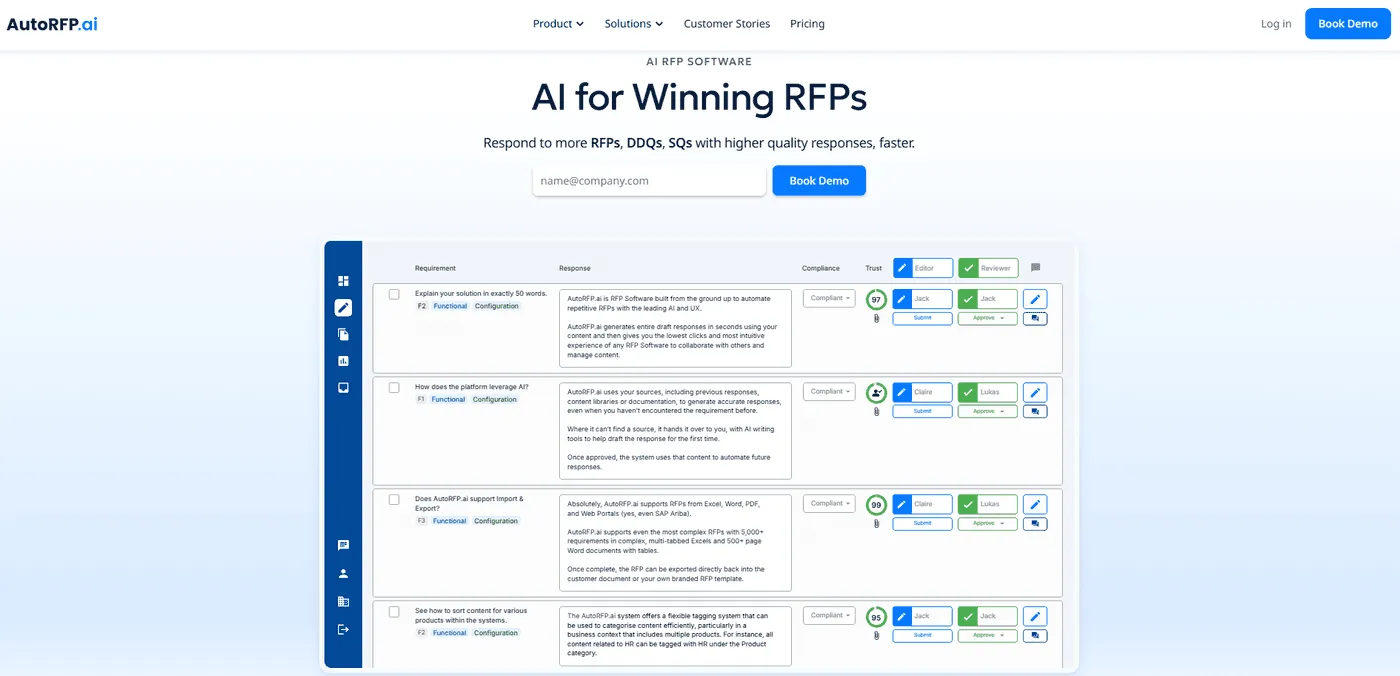
AutoRFP.ai, an AI RFP automation platform, exemplifies how AI and automation can transform sales enablement.
It converts approved sales messaging, past responses and company knowledge into consistent, buyer‑ready answers without forcing reps to start from a blank page.
Key features include:
AI RFP Response Engine
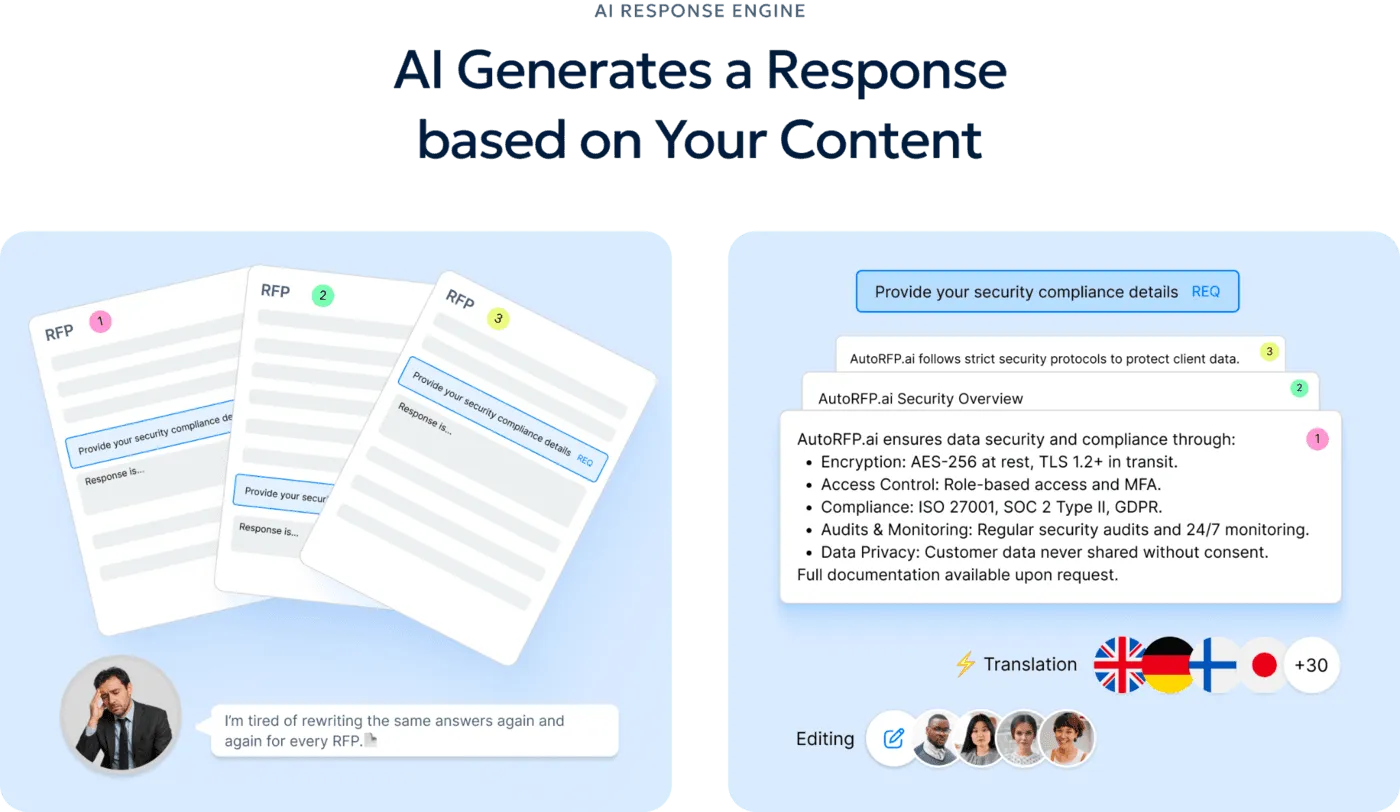
Drafts responses from approved messaging, prior submissions and the company knowledge base. This standardizes language so all reps describe the product consistently.
AI Go/No-Go Screening
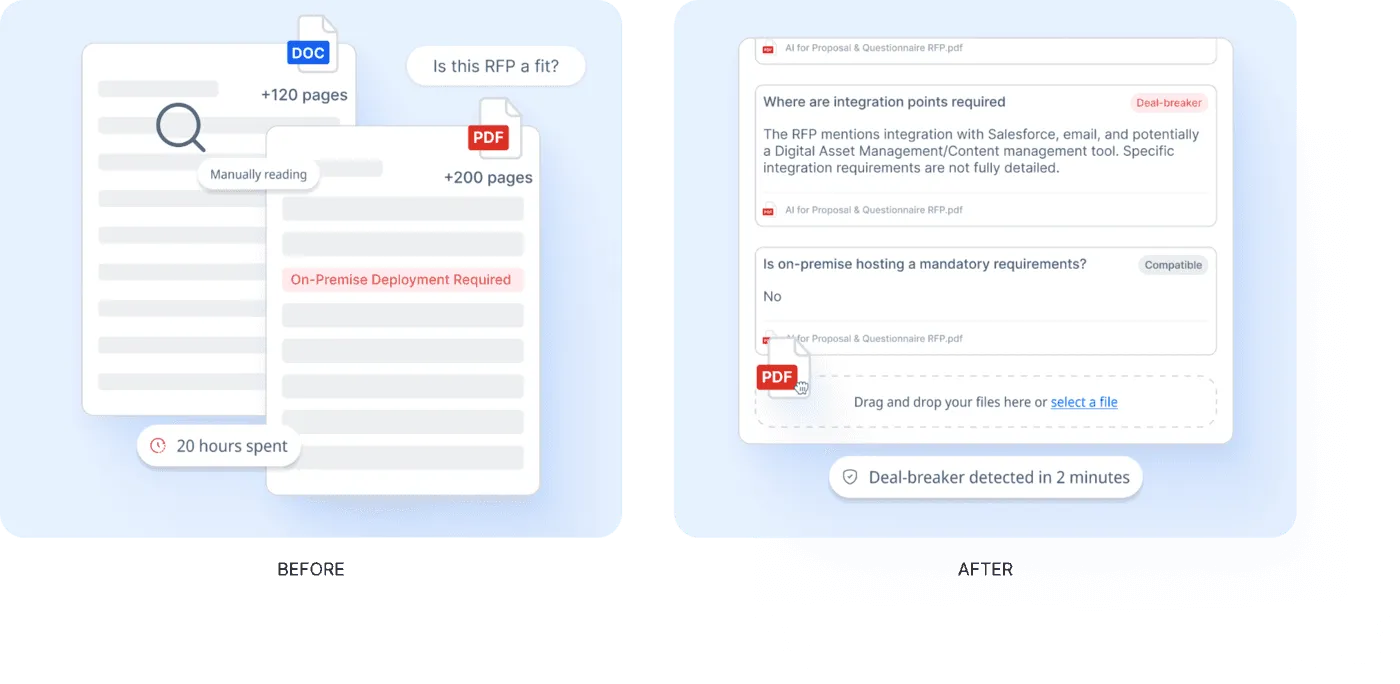
Screens each RFP against qualification criteria such as compliance, implementation fit and commercial alignment. Poor-fit opportunities are flagged early, preserving resources for high-value deals.
Self-Updating Content Library
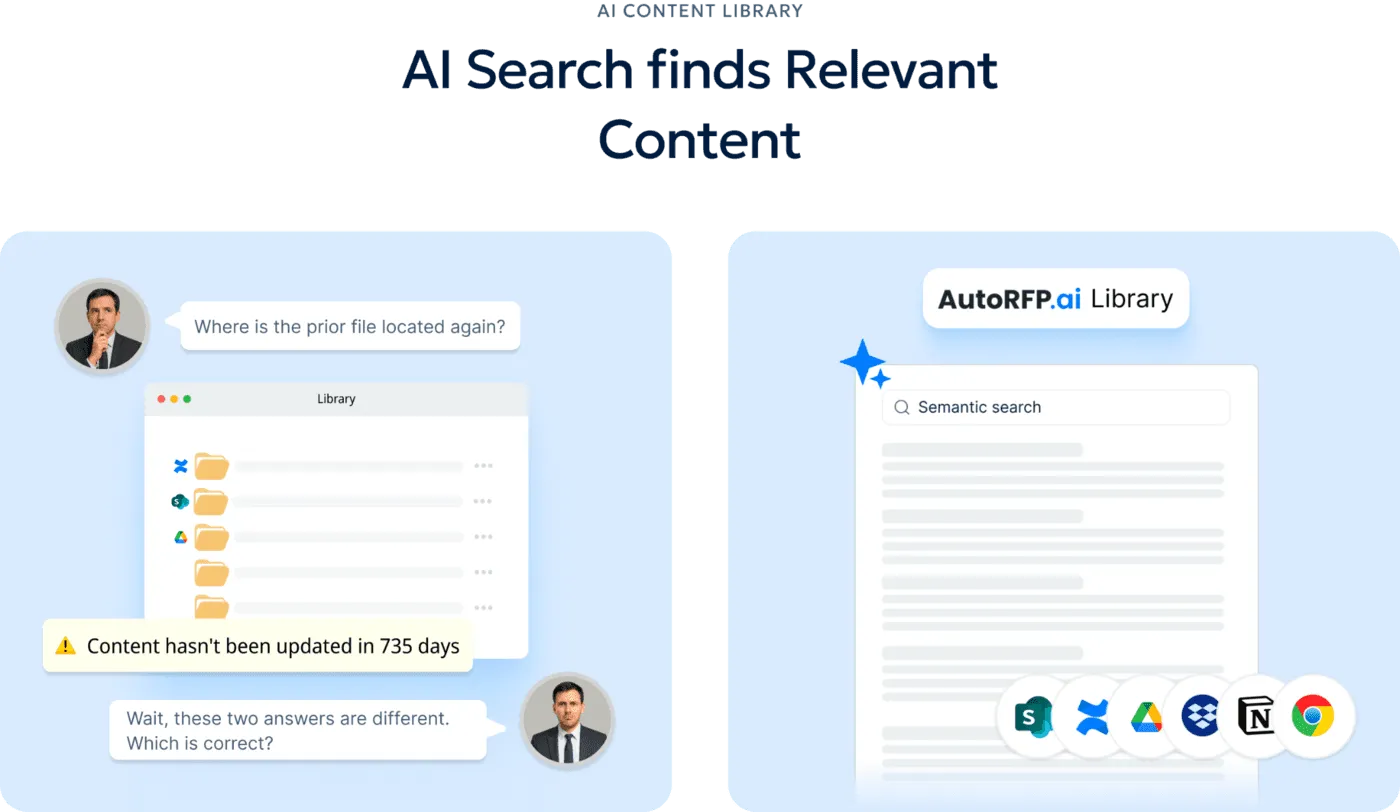
Keeps approved response content tied to the latest source material. When product messaging or security language changes, teams update it once instead of chasing old versions across decks and spreadsheets.
AI Q&A Chatbot
AutoRFP.ai provides a sourced AI bot that gives fast answers from your approved content library.
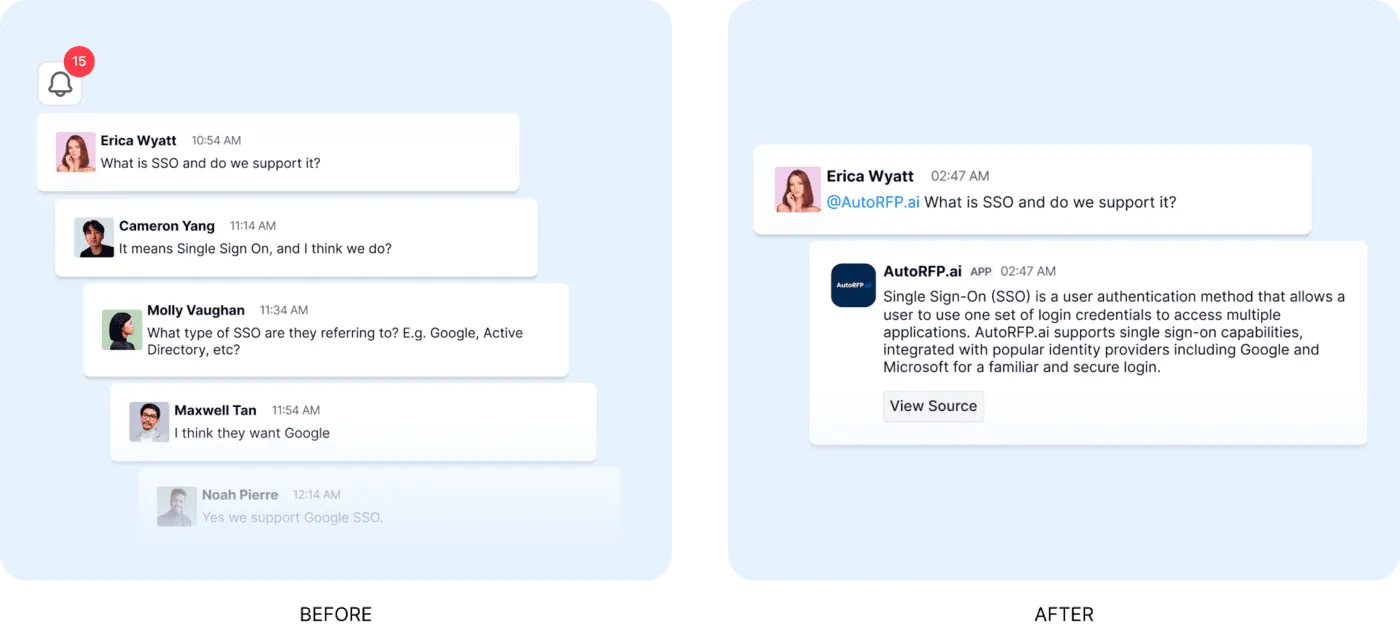
Reps can ask questions like “What is our GDPR approach?” and get a trusted answer in seconds. Slack and Teams support also means they can search from the tools they already use. Battlecards, response templates and product notes become searchable support rather than static documents.
Project Agent And Personalization
AutoRFP.ai’s Project Agent Researches buyer context, reviews public materials and rewrites answers around the customer’s specific requirements.
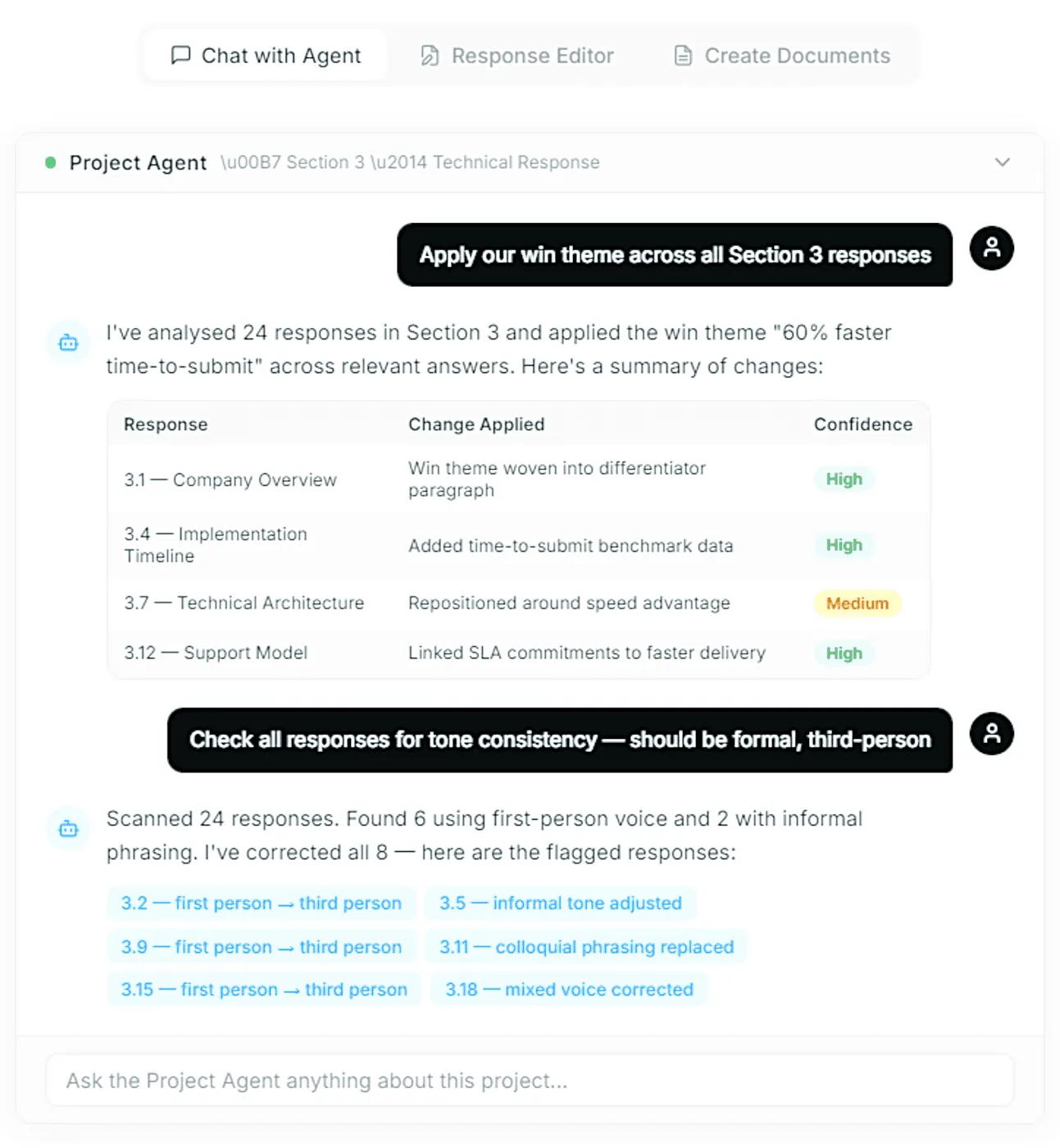
A generic data-residency answer becomes a prospect-specific response about regions, certifications and hosting details.
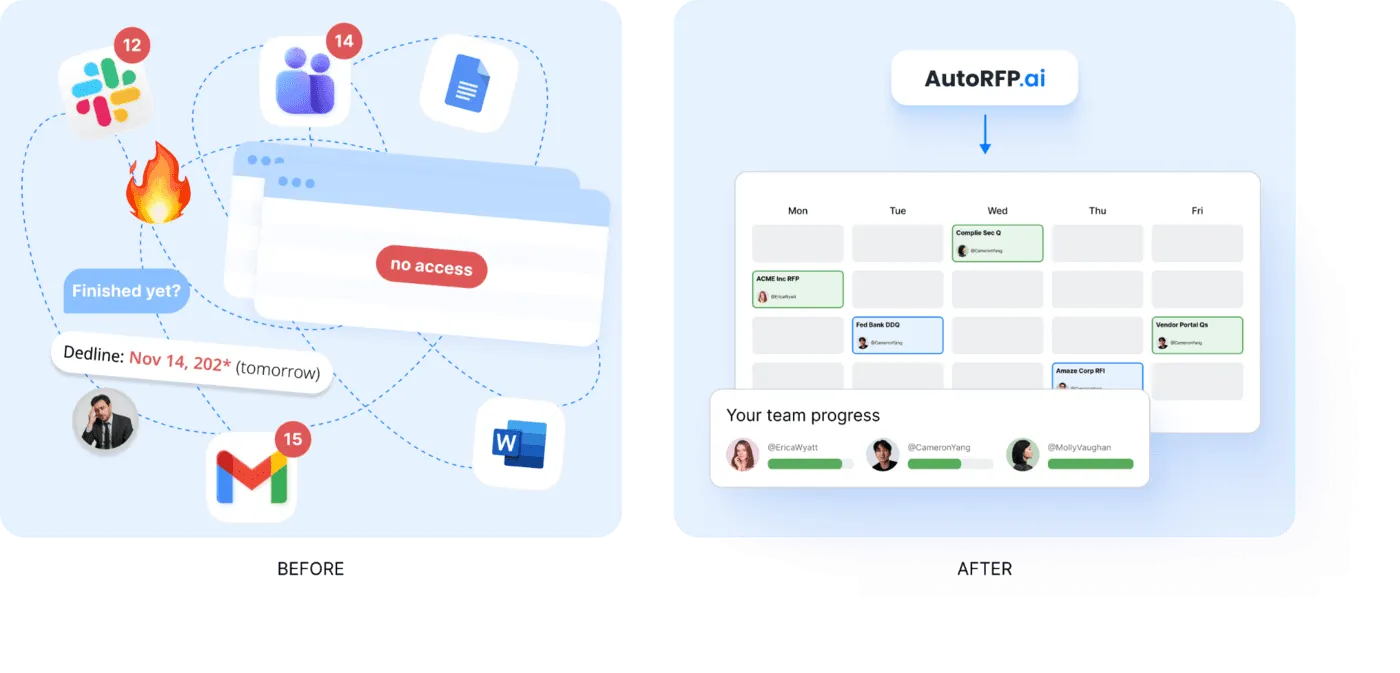
RFP Project Management And Integrations
Provides shared visibility into active RFPs, owners, deadlines, blockers and completion status, and integrates with CRM and SSO systems.
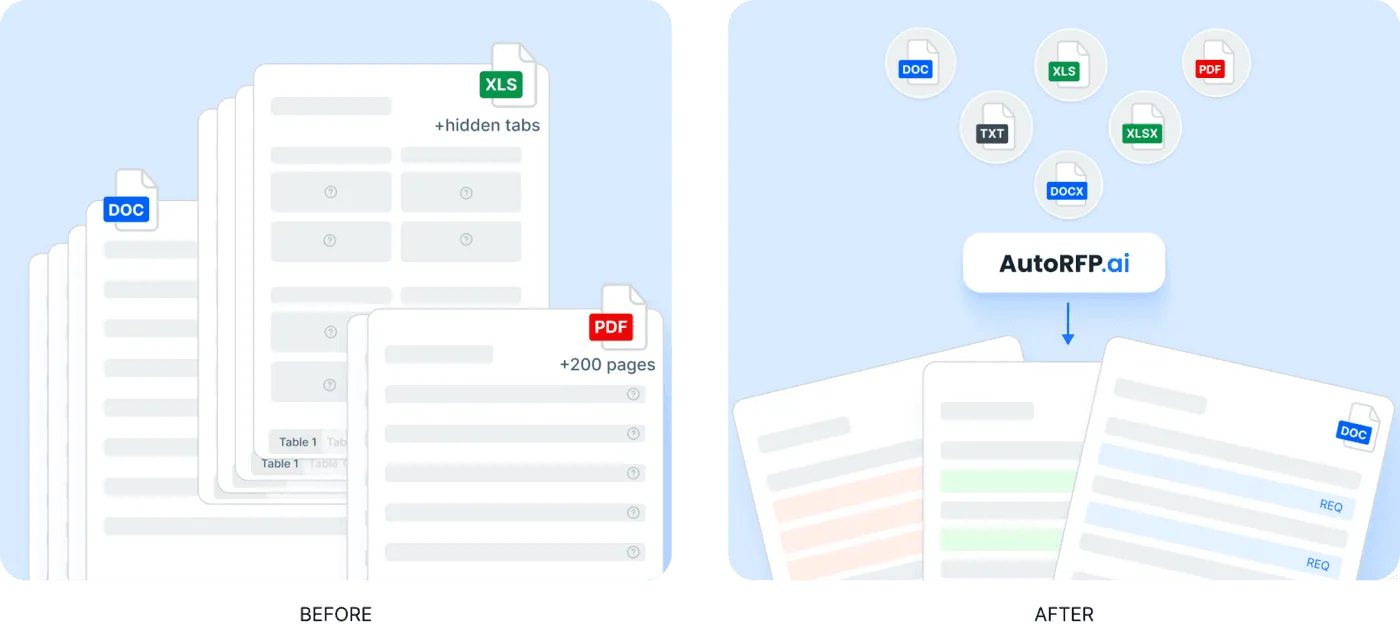
It can pull RFP requirements from Word, Excel, PDFs or web portals and export answers back to platforms such as SAP Ariba. Chrome extensions allow teams to respond directly in online portals.
2. Define A Clear Sales Methodology
A clear sales methodology gives reps a consistent way to qualify buyers, understand deal risk, and move opportunities forward. Without one, every rep may sell differently, which makes coaching harder and revenue performance less predictable.
How to implement:
Choose one core methodology: Use a framework that matches how your team sells, such as MEDDICC, SPICED, Challenger, Sandler, or another structured approach.
Connect it to real deal actions: Define what reps should uncover in discovery, how they should qualify pain, and when a deal is ready to progress.
Train managers to coach against it: A methodology only works when managers use it in pipeline reviews, call coaching, and deal strategy sessions.
Side note: Revenue teams gain a shared operating system for qualification, coaching, and deal progression, instead of relying on scattered sales tips or individual rep habits.
3. Set SMART Sales Enablement Goals
SMART (specific, measurable, achievable, relevant, and time-bound) goals help sales enablement stay focused on measurable business outcomes instead of general improvement.
A goal like “improve sales performance” is too broad, while a goal tied to win rate, ramp time, or sales cycle speed gives the team something clear to optimize.
| Weak enablement goal | Stronger SMART goal |
|---|---|
| Improve onboarding | Reduce new rep ramp time from 90 days to 60 days by the end of Q3. |
| Create better content | Increase usage of approved late-stage sales assets by 30% this quarter. |
| Help reps sell better | Improve win rate for qualified enterprise opportunities by 5% within six months. |
| Improve training | Get 90% of reps certified on the new discovery framework by the end of the month. |
How to implement:
Make the goal specific: Name the exact behaviour, metric, team, segment, or sales stage you want to improve.
Set a measurable target: Tie the goal to a number, such as win-rate lift, ramp-time reduction, asset usage, or quota attainment.
Review progress regularly: Check whether the goal is changing rep behaviour and revenue outcomes, not just creating more enablement activity.
Side note: Clear goal-setting makes sales enablement easier to prioritize, justify to leadership, and improve based on measurable results.
“Setting SMART goals helps your sales team stay focused and motivated. When goals are clear, measurable, and achievable, your team knows exactly what they need to do. By aligning goals with company priorities and setting deadlines, you ensure everyone stays on the same page.” - Laura Cumini, Marketing Automation & Funnel Specialist at Dark Horse Commercial Real Estate
4. Align Enablement With Revenue Goals
Sales enablement should produce outcomes that matter to revenue leaders, which is why it works best as part of a broader RevOps strategy. That means every major initiative should connect to a business problem, such as slow deal progression, low win rates, poor qualification, long ramp time, or inconsistent messaging.
How to implement:
Start with the revenue gap: Identify whether the team needs to improve pipeline conversion, deal quality, sales cycle length, or quota attainment.
Prioritize based on impact: Focus enablement work on the biggest blocker to revenue performance, not the easiest content to produce.
Report on business outcomes: Measure performance through win rate, quota attainment, revenue generated, ramp speed, and sales cycle movement.
Side note: Useful enablement metrics often connect content usage, coaching, certification, win rate, and ramp speed to sales pipeline health.
“Most revenue teams won’t see it coming, but a major shift is already underway: in 2026, Revenue Enablement won’t just be important, it’ll be mission-critical as the engine room of go-to-market performance, especially as sales cycles get longer, buying committees grow bigger, and C-suite scrutiny becomes sharper than ever.” – Chris Orlob, CEO at pclub.io
5. Build Playbooks Around Deal Stages
A strong sales playbook should help reps act with confidence during real selling moments. It should not be a long internal document that reps only read during onboarding.
How to implement:
For discovery: Include qualification questions, pain-point prompts, buyer research steps, and common red flags.
For proposal: Include proof points, objection handling, pricing guidance, internal approval steps, and stakeholder messaging.
For late-stage deals: Include legal, security, procurement, executive alignment, and mutual action plan guidance.
Side note: Sales playbooks are most useful when they give reps stage-specific guidance, templates, objection handling, and resources based on buyer personas and the sales cycle.
6. Create Content Reps Can Actually Use
The outcome of enablement content should be better buyer conversations, not a bigger content library. Reps need assets that answer real questions, support deal progression, and help buyers make decisions.
| Content type | Best use case |
|---|---|
| Case studies | Show proof for similar industries, company sizes, or use cases. |
| Battlecards | Help reps handle competitor objections during active deals. |
| ROI calculators | Support business case conversations with finance and leadership. |
| Security documents | Help late-stage deals move through IT, risk, and compliance reviews. |
| Email templates | Help reps follow up with clearer messaging after key conversations. |
How to implement:
Map content to the buyer journey: Label each asset by persona, deal stage, objection, industry, and use case.
Remove low-value assets: Archive outdated, duplicated, or unused content so reps do not waste time searching.
Add usage guidance: Tell reps when to use each asset, who it is for, and what conversation it should support.
Side note: Clear content governance makes each asset easier to trust, find, and use when reps need support during live deal conversations.
“Content quality alone does not differentiate winners. Adoption of content libraries or reuse systems shows only a weak relationship with win rate. High-performing teams win because they embed capture insights, customer intelligence, and defined win themes into their responses.” – AutoRFP.ai x stargazy
7. Standardize Sales Messaging
Standardized messaging helps reps explain the product clearly across calls, proposals, follow-ups, and stakeholder conversations. Without it, buyers may hear different value propositions depending on which rep, marketer, or customer-facing team member they speak to.
How to implement:
Create a core messaging framework: Include the value proposition, target pain points, proof points, objections, and competitor positioning.
Align every customer-facing team: Sales, marketing, customer success, and leadership should use the same narrative.
Update messaging after market shifts: Refresh messaging when buyer priorities, pricing, competitors, or product capabilities change.
Side note: Consistent messaging helps the revenue team explain value more clearly, build buyer trust, and stay aligned across calls, proposals, and follow-ups.
“Good copywriting isn’t about shouting about your amazing product. It’s about understanding them – their challenges, their desires – and positioning your solution as the answer in a way that feels like a conversation, not a sales pitch.” - Chase Dimond, Co-Founder at eCom Email Marketer
8. Turn Training Into Ongoing Coaching
Training gives reps knowledge, but coaching helps them apply it. If training only happens during onboarding or one-off sessions, reps may understand the concept but fail to use it during real sales conversations.
How to implement:
Coach from real examples: Use call recordings, deal reviews, email threads, and proposal feedback to show what good execution looks like.
Focus on one skill at a time: Reinforce specific behaviours, such as discovery depth, objection handling, stakeholder mapping, or next-step control.
Make managers accountable: Sales managers should coach the methodology, messaging, and deal strategy consistently.
Side note: Ongoing coaching turns enablement into a repeatable performance improvement system, rather than a one-time training session that reps quickly move past.
“Without the right training and coaching, most are left to figure out on the job - neither of which is optimal for the individual or the company.” - Penny Orme, Revenue Specialist in Residence at Revelesco
9. Make Enablement Easy To Find In The Workflow
Enablement should reduce friction, not create another place reps need to check. If reps cannot find the right answer, asset, or talk track quickly, they may use outdated content or create their own version.
How to implement:
Put enablement where reps already work: Make key assets available inside the CRM, sales engagement platform, proposal workflow, or communication tools.
Organise by selling context: Structure content by deal stage, buyer persona, product, industry, objection, and competitor.
Reduce content clutter: Keep fewer, stronger assets instead of forcing reps to choose between too many similar files.
Side note: A workflow-friendly enablement setup helps reps spend less time searching for answers and more time using the right guidance, content, and messaging to move deals forward.
10. Personalise Enablement By Role and Segment
Generic enablement often fails because different reps face different sales motions. An SDR, account executive, enterprise seller, and customer success manager do not need the same training, content, or coaching.
| Team or segment | Enablement focus |
|---|---|
| New sales reps | Product basics, discovery structure, onboarding, and first-call confidence. |
| SDRs | Prospecting messaging, objection handling, qualification, and handoff quality. |
| Account executives | Deal strategy, stakeholder mapping, business case creation, and negotiation. |
| Enterprise reps | Security reviews, procurement, executive alignment, and complex buying committees. |
| Customer success teams | Expansion messaging, renewal risk, adoption stories, and customer value proof. |
How to implement:
Segment by role: Build enablement tracks for SDRs, AEs, managers, customer success, and enterprise teams.
Segment by sales motion: Separate guidance for SMB, mid-market, enterprise, inbound, outbound, renewal, and expansion motions.
Segment by buyer need: Give reps examples that match the buyer’s industry, pain point, use case, and urgency.
Side note: A more personalised approach makes enablement feel practical, relevant, and easier for reps to apply in real sales conversations instead of feeling generic.
11. Use Deal Reviews To Improve Execution
Deal reviews should help reps improve how they sell, not just explain what is in the pipeline. The best reviews reveal patterns in qualification, stakeholder coverage, objections, messaging, and next steps.
How to implement:
Review deal quality: Look at buyer urgency, decision criteria, budget, stakeholders, timeline, and competitive risk.
Spot repeat blockers: Identify where deals often slow down, such as discovery, proposal, security, procurement, or legal.
Turn patterns into enablement: Use repeated deal issues to create coaching sessions, better content, sharper messaging, or new playbook guidance.
Side note: This best practice makes enablement more connected to real revenue problems.
12. Measure Leading And Lagging Indicators
Sales enablement should be measured through both activity and business impact. Leading indicators show whether reps are adopting enablement, while lagging indicators show whether that adoption improves revenue performance.
| Metric type | Examples |
|---|---|
| Leading indicators | Content usage, training completion, call score improvement, coaching participation, methodology adoption, and playbook usage. |
| Lagging indicators | Win rate, sales cycle length, average deal size, quota attainment, revenue generated, and ramp time. |
How to implement:
Use leading indicators to spot adoption issues: If reps are not using the content or playbook, revenue results may not change.
Use lagging indicators to prove business impact: Connect enablement to outcomes such as closed revenue, quota attainment, and deal velocity.
Compare before and after performance: Measure results before and after major enablement changes to see what actually improved.
Side note: Sales enablement measurement often includes performance, proficiency, and productivity metrics, including win rate, quota attainment, revenue generated, and ramp speed.
“You need both. Lagging indicators tell you whether you won or lost. Leading indicators tell you whether you’re about to. Think of it this way: you can’t back out of your driveway without a rearview mirror. But you’d never drive through a busy intersection while looking backwards. Your business works the same way.” – Dave Crysler, Founder and Principal Consultant at the Crysler Club
13. Keep Updating Based On Buyer Feedback
Sales enablement should evolve with the market. Buyer priorities, competitor claims, product positioning, and objections can change quickly, so outdated enablement can make reps sound disconnected from real conversations.
Collect feedback from sales calls: Look for repeated buyer questions, objections, doubts, and competitor comparisons.
Use lost deals as input: Review why deals were lost and whether messaging, content, pricing, or qualification played a role.
Refresh content regularly: Update playbooks, battlecards, proposal answers, training materials, and proof points when patterns change.
Side note: This keeps enablement useful because it reflects what buyers are actually saying.
14. Build A Clear Sales And Marketing Feedback Loop
A strong feedback loop helps marketing create content that sales actually uses, while sales gets sharper assets for real buyer conversations. Without this loop, marketing may produce content that looks good internally but does not help reps move deals forward.
Create a regular review cadence: Sales and marketing should review content usage, content gaps, buyer objections, and campaign performance together.
Share field insights: Reps should report what buyers ask, what competitors say, and where deals get stuck.
Agree on content priorities: Marketing should prioritize assets that support active revenue needs, not just awareness campaigns.
Side note: A structured sales and marketing feedback loop improves alignment, reduces wasted content production, and helps teams prioritize assets that support active revenue needs.
15. Create A Governance System For Content And Tools
Enablement can become messy when no one owns content quality, tool adoption, or process updates. Governance keeps the system clean, current, and usable.
Assign clear ownership: Decide who owns playbooks, battlecards, training, content updates, tool administration, and reporting.
Set review cycles: Review key assets monthly or quarterly so reps do not rely on outdated messaging.
Remove what no longer works: Retire content, tools, or workflows that create confusion, duplicate work, or low adoption.
Side note: Clear governance helps the enablement system stay organized, current, and scalable as the sales team grows.
Why Some Sales Enablement Strategies Fail Despite Serious Investment
Sales enablement strategies often fail because:
| Reason sales enablement strategies fail | What this means in practice |
|---|---|
| They invest in tools before fixing the process | A new LMS, or learning management system, content platform, or AI tool will not help much if reps still lack clear messaging, qualification discipline, and deal strategy. This is why 77% of sellers still struggle to complete assigned tasks efficiently, even with higher investment in sales tech, training, and enablement. |
| They overload teams without matching capacity | Too many initiatives, assets, playbooks, tools, and training sessions can slow reps down instead of helping them sell. Around 42% of sales reps feel overwhelmed by too many tools, and overwhelmed sellers are 45% less likely to hit quota. |
| They use AI as the engine instead of the accelerator | AI should scale a strong enablement system, not replace one. If the process is weak, AI can also scale unclear messaging, generic content, and poor deal strategy faster. |
| They treat sales enablement as training only | Training is only one part of enablement. Without content, coaching, workflow support, and manager reinforcement, reps may learn the idea but fail to apply it in real deals. |
| They create content without a clear usage plan | More content does not always mean better enablement. Around 60% to 70% of B2B marketing content can go unused when reps cannot find it, trust it, or apply it to buyer conversations. |
| They do not reinforce new skills after training | One-off training fades quickly if there is no coaching, practice, or follow-up. Within 90 days, people may forget 84% to 90% of what they learned during training. |
| They ignore how much time reps lose to non-selling work | Enablement fails when it adds more tasks instead of removing friction. Sales reps spend about 60% of their time on non-selling tasks, including admin, searching for content, and internal follow-ups |
| They do not measure what improves revenue outcomes | Teams may track content output, training completion, or tool adoption without connecting them to sales cycle speed, win rates, quota attainment, or deal quality. Without that link, enablement can look active without improving revenue performance. |
How to Measure Sales Enablement Optimization ROI
Sales enablement ROI should show whether your investment improves revenue performance, not just whether reps completed training or opened a playbook.
Calculate The ROI Formula
Use this formula before tracking individual metrics:
Sales enablement ROI = [(Revenue gain + cost savings - enablement investment) / enablement investment] × 100
This follows the standard ROI logic of dividing net return by investment cost and expressing it as a percentage.
For this formula:
Revenue gain: Extra revenue from higher win rates, faster sales cycles, larger deals, or better quota attainment.
Cost savings: Time saved from fewer admin tasks, faster onboarding, reusable content, or AI-assisted workflows.
Enablement investment: Tools, training, content production, coaching, implementation, and team time.
Here are the key sales enablement ROI metrics you should track to connect enablement investment to revenue performance.
| Metric | What it is | How it connects enablement to revenue |
|---|---|---|
| Win rate | The percentage of opportunities that become closed-won deals. | Shows whether better messaging, coaching, and content help reps convert more qualified deals. |
| Sales cycle length | The average time it takes to move a deal from qualified opportunity to closed-won. | Shows whether enablement helps reps move buyers faster through discovery, proposal, legal, and approval stages. |
| Quota attainment | The percentage of reps who reach or exceed their sales targets. | Shows whether enablement improves rep performance across the team, not just for top sellers. |
| Revenue generated | The revenue is linked to enabled reps, supported deals, or trained segments. | Shows whether enablement activity contributes to actual closed revenue. |
| Rep productivity | How much time reps spend on selling versus admin, searching, or internal follow-ups. | Shows whether enablement reduces friction and gives reps more time for revenue-generating work. |
| Time to productivity | How long new reps take to reach expected performance after onboarding. | Shows whether onboarding, training, and coaching help reps start selling effectively sooner. |
| Content usage and influence | How often reps use enablement content and whether that content appears in won deals. | Shows which assets support real buyer conversations and revenue outcomes. |
| Training retention | How well reps remember and apply training after the session. | Shows whether enablement improves real selling behavior, not just training completion. |
| Deal quality | The value, fit, discount level, and long-term potential of closed deals. | Shows whether reps are winning stronger deals, not just more deals. |
| Enablement cost per outcome | The cost of enablement compared with revenue, time saved, win-rate lift, or productivity gains. | Shows whether the investment is producing enough return to justify the spend. |
Equip Your Sales Enablement Team to Win More with AutoRFP.ai
Sales enablement works best when reps can find the right answer, share consistent messaging, and move deals forward without drowning in manual work.
AutoRFP.ai helps teams turn approved content, past responses, and company knowledge into accurate, buyer-ready answers for every RFP.
With AI drafting, go/no-go screening, project visibility, and a self-updating content library, your team can reduce repetitive work, protect response quality, and focus more time on winning the deals that matter.
Book Demo today and see how AutoRFP.ai can support your next proposal workflow.
Frequently asked questions
1. Why Should Companies Measure “Freed Capacity” Instead of Just “Time Saved”?
Measuring "time saved" only shows efficiency. Measuring "freed capacity" shows the strategic value of that time, proving that your team is now able to handle more RFPs or spend more time on the strategic work that actually wins deals, rather than just doing the same work faster.
2. How Does AutoRFP.ai Calculate the Revenue Impact of Specific Product Gaps?
The platform aggregates the deal value of every RFP where you've marked a requirement as "non-compliant." This allows you to see the total "stalled pipeline" associated with each gap, providing a clear financial justification for product improvements.
3. How Can Identifying Compliance Gaps Early in the Sales Cycle Save Resources?
By knowing your common gaps, sales and pre-sales teams can qualify deals more effectively. If a prospect's mandatory requirements match your known gaps, you can address them early or make a data-driven "No-Bid" decision before wasting hours of team resources.
4. Does AutoRFP.ai’s Report Show How Much “Strategic Capacity” Has Been Freed up for Our Team?
Yes, the "Editor Workload Analysis" specifically visualizes the capacity freed by automation. This helps bid managers show leadership that their team is now spending more time on high-value tasks, like strategic tailoring and win-theme development.
5. Why Is It Common for Companies to “Lose the Same Deal Twice” Due to Recurring Gaps?
This happens when a company lacks a systematic way to track why they are being disqualified. Without automated gap analysis, the same missing requirement can block multiple deals across different sales teams before the product team even realizes it's a systemic issue.
6. How Can Automated ROI Reporting Help in Justifying a Request for More Headcount?
Automated reporting shows exactly when your team is at peak capacity, even with AI assistance. By demonstrating that the team is maxed out despite high automation rates, you can present a data-driven business case for additional staff to handle rising RFP volumes.
7. Why Is It So Difficult for Proposal Managers to Justify Headcount Without Data?
Without clear data on team capacity, requests for more staff often sound like "anecdotal complaining" to executives. Hard data on rising RFP volumes and maxed-out SME capacity turns these requests into a logical, data-driven business case for investment.
8. Can I Export Reporting Data to Other Business Intelligence (BI) Tools?
Yes, AutoRFP.ai allows you to export your reporting data, including win rates, capacity metrics, and ROI data. This makes it easy to integrate RFP performance into your broader company-wide BI dashboards or quarterly business reviews.
9. What Is the Cost of “Overcommitting” to Rfps That Your Team Doesn’t Have the Capacity to Finish?
Overcommitment leads to rushed, lower-quality responses and severe SME burnout. This not only lowers your win rate for those specific bids but also damages your company's reputation and long-term team morale.
10. Does the AutoRFP.ai’s ROI Report Distinguish Between “Perfect Match” and “Minor Edits” Responses?
Yes, the AutoRFP.ai’s report breaks down responses into granular levels of AI involvement. This allows you to see exactly how much "heavy lifting" the AI is doing and where your team is adding the most value through strategic editing.
