
Win-Loss Analysis: How to, Benefits, Tips & More (2026 Guide)
Your sales strategy deserves a boost! Learn win-loss analysis & optimization, and finally get it right, the easy way.

Robert Dickson
RevOps Manager, AutoRFP.ai··10 min read
You closed one deal with ease, but another slipped away immediately after the proposal stage, despite the same effort and process.
Coincidence? Probably not. There’s a reason hidden in every win and every loss, and decoding it can completely change how you compete and win future bids.
This article will walk you through what makes win-loss analysis valuable, how to conduct it step by step, and how to calculate accurate win-loss ratios.
You’ll also learn the key pillars of an effective process, common mistakes to avoid, and the best tools to help you win more with real-life case studies.
What Is Win-Loss Analysis?
Win-loss analysis is a structured process where you review past bids to understand why you won or lost them.
It involves gathering insights from sources like your sales team debriefs, CRM data, and customer interviews to identify what influenced each outcome.
You can then use these findings to refine your bidding strategy, pricing, and product positioning for better results in future bids.
Benefits of Conducting a Win-Loss Analysis
Here’s how win-loss analysis helps you build a stronger and more efficient bidding strategy:
| Benefit | How it helps you |
|---|---|
| Enhance sales strategy | Create a repeatable playbook, double down on what works, and fix weak spots in your sales approach. |
| Improve product development | Use customer feedback to refine features, close gaps, and improve product-market fit. |
| Gain competitive intelligence | Understand how buyers see competitors and position your strengths more clearly. |
| Optimize pricing | See whether pricing affected outcomes and align your value with market expectations. |
“The biggest ‘aha’ moments often come from the losses you didn’t expect.” – Laure Brosseau, Investor & Strategic Advisor at Green4Cloud
Step-by-Step Guide to Conduct a Win-Loss Analysis
Follow this step-by-step guide to run your own win-loss analysis and turn insights into action:
Step 1: Define Your Goals and Scope
Decide exactly what you want to learn and from which deals. Clear goals set the direction for your entire analysis and prevent you from collecting irrelevant data.
For instance:
Are you trying to discover why you lose to specific competitors?
What drives higher win rates in certain industries?
Are pricing and messaging turning buyers away?
Why did certain deals end up with no decisions
Pro tip: Start small. Analyze the last 10-20 closed opportunities (won and lost) within the past 3-6 months to keep your scope focused and insights actionable.
Step 2: Gather Your Data
You’ll need both internal and external perspectives to get a full picture of why bids succeed or fail.
Start by gathering all available information on recent won and lost deals, including:
| Data type | What to review |
|---|---|
| Sales data | Review deal size, close rates, and timelines to identify patterns in successful and unsuccessful bids. |
| Customer demographics | Look at buyer segments, industries, and regions to see where you perform strongly and where you lose traction. |
| Marketing analytics | Examine lead sources, campaign engagement, and conversion paths to understand how prospects enter and move through your funnel. |
Collect internal data such as:
CRM records (opportunity owner, deal value, close reason, sales stage)
Proposal or pitch materials
Communication logs or call notes
Collect external data such as:
Customer or prospect feedback through interviews or surveys
Competitive intelligence (pricing, product, features, value perception)
Pro tip: Clean your data before analysis. Remove duplicates, fill gaps, and verify entries to keep your insights accurate and reliable.
Step 3: Conduct Win-Loss Interviews
This is where you learn why buyers made their decisions. Before conducting the interviews, there are two things that you must do:
1. Deciding the Interview Structure
Your interview structure can include the following:
Who to talk to: Buyers who recently decided for or against you
When: Within 2-4 weeks of the decision (while it’s still fresh)
How: 20-30 minute phone or video call
2. Listing the Relevant Questions
Create a questionnaire covering aspects like their initial motivation, evaluation criteria, comparison of solutions, and the sales experience.
Here are some examples of questions you can ask them:
| Discussion points: | Questions: |
|---|---|
| Context | What problem were you trying to solve, and what triggered your search for a solution? |
| Alternatives | Which other vendors or options did you seriously consider during the process? |
| Criteria | What 3-5 factors mattered most in your decision, and how did you weigh them? |
| Decision path | Who was involved in the evaluation, and who had final say or veto power? |
| Product fit | Where did our offering meet your needs well, and where did it fall short? |
| Pricing | How did our pricing feel compared to the value you expected and what others offered? |
| Proof | What convinced you or turned you away during the evaluation? (e.g., proposal, reference, presentation) |
| Process | Was there any friction in our bidding or communication process, such as unclear steps or delayed responses? |
| Outcome | What ultimately sealed your decision, and what nearly changed it? |
| Open | If you could change one thing about our product, pricing, or approach, what would it be? |
Step 4: Interview Your Internal Team
Get insights from the people closest to the deal, those who interacted directly with the buyer and influenced how the opportunity played out.
You can interview your:
Sales reps and account managers (to understand buyer interactions and deal dynamics)
Pre-sales or bid managers (to review proposal quality, accuracy, and submission timelines)
Product or technical teams (to assess how well your solution met buyer requirements)
Marketing team members (to evaluate lead quality, campaign messaging, and alignment with sales)
Ask questions like:
| Topic: | Question: |
|---|---|
| Relationship | How did the relationship with the buyer evolve throughout the sales or bidding process? |
| Decision drivers | What factors do you believe had the biggest influence on the buyer’s final decision? |
| Objections | What objections or concerns came up most frequently during discussions? |
| Pricing & proposal | Was our pricing and proposal strategy aligned with the buyer’s needs and expectations? |
| Value communication | How effectively did we communicate our value proposition compared to competitors? |
| Internal process | Were there any internal delays, approval challenges, or process issues that impacted the outcome? |
| Responsiveness | How did the buyer respond to our communication style and responsiveness? |
| Lead accuracy | Did the marketing or lead handoff accurately reflect the buyer’s expectations? |
| Early signals | What early signs suggested we were likely to win or lose the deal? |
| Improvements | What would you do differently next time to improve our chances of winning similar bids? |
Pro tip: Capture every response in a shared document or tracking form to spot recurring themes and make it easier to align future strategies across teams.
Step 5: Analyse the Data
Look for patterns that explain your results. Combine quantitative data (like CRM metrics and deal values) with qualitative insights (from interviews, debriefs, and customer feedback)
Look for recurring themes such as:
Common win reasons: Strong brand reputation, flexible pricing, reliable delivery, strong product fit
Common loss reasons: Slow response times, unclear differentiation, missing product features, and limited customization
Competitor trends: Which competitors you lose to most often, what their perceived strengths are, and where your bids outperform theirs
Buyer behaviour patterns: How decision criteria vary by industry, region, or deal size, and what buyers value most in each segment.
Internal process gaps: Approval delays, inconsistent messaging, or lack of follow-up that may have affected the bid outcome.
Pro tip: Create a “Win-Loss Summary Table” with columns like Deal ID, Competitor, Reason Won/Lost, Decision Factors, and Key Takeaways, like below.
Step 6: Turn Insights Into Actions
Once recurring patterns are clear, turn those insights into concrete steps that strengthen future bids and strategies.
| Action: | What to do: |
|---|---|
| Refine your sales strategy | Build playbooks around winning approaches and strengthen objection handling, negotiation, and customer engagement. |
| Enhance product offerings | Share buyer feedback with product teams to close feature gaps and improve product-market fit. |
| Improve internal processes | Fix delays, approval bottlenecks, and handoff issues between sales, marketing, and bid teams. |
| Sharpen marketing & messaging | Update proposals, campaigns, and communication to reflect what buyers truly value. |
| Train & coach your teams | Use recurring insights to guide targeted sales training and skill development. |
Step 7: Share the Findings
Prepare a short, visual report or presentation highlighting the win/loss breakdown, top 3-5 reasons for each outcome, and key recommendations with next steps.
Share your findings with:
Sales teams: Highlight winning tactics, objection patterns, and buyer preferences they can apply immediately.
Product and technical teams: Communicate recurring feature requests, performance gaps, and usability feedback to guide roadmap priorities.
Marketing teams: Share insights on buyer perception, messaging impact, and lead quality to refine campaigns.
Leadership and pricing teams: Present high-level trends, competitive benchmarks, and areas for investment or repositioning.
Pro tip: Summarize in one slide: “What you learned, what you’re changing, and what you’ll monitor next quarter.”
Step 8: Repeat Quarterly
Make win-loss analysis a continuous process, not a one-off task. Each quarter, update your dataset, refresh insights, and track whether previous improvements increased your win rate.
“If you’re not using win/loss feedback to guide your marketing, you’re leaving serious impact on the table (and revenue).” – Daniel Codd, Founder at Winxtra
How to Calculate the Win-Loss Ratio?
Your win-loss ratio indicates the frequency of wins compared to losses, providing a quick snapshot of your bidding performance. It helps measure improvement over time and spot patterns across teams, industries, or deal sizes.
Use this formula: Win-Loss Ratio = Number of Losses ÷ Number of Wins
For example:
- If you won 15 bids and lost 10, your win-loss ratio is 15 ÷ 10 = 1.5. That means you win 1.5 bids for every loss or a 60% win rate if you convert it to percentage form:
Win rate = Wins ÷ (Wins + Losses) × 100
4 Pillars of Effective Win-Loss Analysis
These four pillars form the foundation of a structured and sustainable win-loss program. Together, they ensure your analysis stays objective, consistent, and actionable across every team.
| Pillar | What it means |
|---|---|
| Leadership & culture | Secure executive support and build a learning-focused, blame-free culture so that win-loss analysis is prioritised and embraced across the company. |
| Data collection & quality | Gather accurate, timely, and balanced data through structured interviews, sales debriefs, CRM records, and both quantitative and qualitative inputs. |
| Data synthesis & analysis | Organise and interpret findings to uncover patterns, root causes, buyer perceptions, competitive positioning, and value drivers behind deal outcomes. |
| Adoption & action | Share insights across teams and turn them into coaching, product updates, and aligned marketing strategies for continuous improvement. |
Avoid These Common Mistakes in Win-Loss Analysis
Watch out for these frequent pitfalls that can distort your findings or limit their impact:
Skipping the process entirely: Failing to conduct win-loss analysis at all prevents learning from past successes and failures.
Not formalizing the process: Conducting the analysis infrequently, inconsistently, or without a structured approach leads to unreliable results.
Relying only on internal feedback: Asking only your sales team for input provides a limited view of why deals were won or lost. Without customer interviews, you miss firsthand insights from the people who actually made the decision.
Ignoring lost deals: Focusing only on won deals while ignoring lost ones provides an incomplete picture of what needs improvement.
Best Tools and Software for Winning More Bids

Video transcript
Transcript is auto-generated and may contain minor errors.
Hey, I'm Rob from Auto RFP.ai. We're going to go into the best RFP software in the market. What is RFP software? And jumping into it, looking at some of the different major players, and helping you hopefully decide which ones are worth having a look at. If you are interested in having a look at them, I recommend going to their website. RFP software in the market in 2025, you can break down some of the best players into two main markets or two main camps. You've got your legacy RFP software providers, like Loopio, Responses, Qvidian, which I'm going to go into detail. And then you've got your AI native players, like Auto RFP.ai I'm from. You've got Tribal, HeyRFP, Shift Hub, and and plenty of others as well. So, what are the difference between the two? Your legacy RFP software, they have generally been around since early 2000s. They brought software to the RFP process. RFP software providers
effectively built an ability for a company to store all their documentation and information and kind of questions and answers. So, it's like a question and answer bank. They built these big banks of answers and questions for companies. Then when they would get a new response or new RFP, it would use keyword search to copy and paste from the Q&A bank into that new RFP uh that they just received. So, that's what a legacy RFP software is. Then you have your AI native players who have launched since the huge uptick in AI with ChatGPT in uh what was that? 2021. So, Auto RFP.ai, we actually launched a couple of weeks just before ChatGPT came out. I've been building the product over the last three or four years with hundreds of customers. And effectively, your native AI players don't have all that legacy tech debts. They're built with a basis of being a vector database, which is a specific term with AI. They then use AI semantic
search, which effectively takes in the context of responses. And when you get a blank RFP, it'll pull in not just information from your Q&A bank, but from your website, from your case studies, from your integrations and different knowledge sources, and eventually use that to answer the RFP. So, that's kind of the nuts and bolts of it. You've got your legacy players who some do actually have AI now as well. And then you've got your AI native players. As I mentioned, you have all your content. That is generally your Q&A banks, your past responses, it might be your Google Docs, your SharePoint, Confluence, Notion, all your different information that you think holds relevant content for an RFP response. You upload that to the system or you integrate great and pull it through automatically. Then, when you have an RFP, you upload the RFP, create a new project. The AI, generally speaking, your AI native players, this is how it works.
It's going to automatically start drafting the responses or using a powerful AI semantic search to use to find relevant verbatim responses and effectively draft responses. It's going to allow your team to collaborate, set project deadlines, bring in subject matter experts to help answer that RFP. The really big thing about AI RFP software is it uses reinforcement learning to continually improve. And from your new responses, as you approve them, it gets better and better as time goes by. That's your RFP software in a nutshell. Now, how you can help determine what are the best RFP software. I would really recommend jumping on G2 or Gartner, having a look through actual verified user reviews. They'll have lots of different information regarding the RFP software. You can kind of click into each of those and understand it a bit better, the pros and cons, and so on. The RFP software is a pretty fast-moving
market, so I'd definitely recommend looking at a number of tools. Most of the providers here that you'll that I'll go into, you can book in for, you know, a 30-minute, 45-minute online demo just from their website. Hopefully, they don't have to do too many discovery questions. They jump on that call and they show you through the platform. So, your RFP software, like I said, you've got your Responsive, your Loopio. So, when you're looking at G2, you can look at, you know, the number of responses, but also you want to focus on the quality of responses, so what the actual total score is. And I would say anyone who has more than 50 or so reviews, as you can see, that's kind of how I made the short list today, is generally kind of worth a consideration to have a look at as well. Then you have Gartner. So, Gartner for your best RFP software has all the relevant information in relation to those different providers. Again, the reviews. You can understand more about each of those providers and what people are actually saying about those software. So, we've had a look at the review slides. Let's jump into some of the RFP software market's providers for 2025.
Loopio is an RFP software provider, one of those what you might classify as a legacy provider. They have a lot of really great large logos. They have been in the market for quite a long time now. Effectively, the basis of that product is kind of a question and answer bank using your past responses to then copy and paste when you bring in a new empty RFP. It's kind of the general gist of the product, and you can find out more information about Loopio from their websites. You can book in for a demo to chat to their team to understand more about them, and so on. Under plans, they have some information about their pricing. They don't have public pricing, but you can request a quote and get more information regarding their pricing. I believe their pricing plan has add-ons, so you can take that into account in relation to finding the right package that meets your requirements for what you're looking at. Responsive or responsive.io, they are also acquired a company called RFP360. If someone's referencing RFP360, that also is responsive.io or responsive.
Responsive is an RFP software. Again, one of those legacy providers that have been around for quite a while, have a lot of really large customers, and you can kind of get to know more about their product by going to their website. So, you can see here like I said, you effectively have a question and answer bank of your past responses, and then you can upload documents, your blank RFPs, and it helps answering those and has your different reporting and project management capabilities, and so on. If you want to chat to their team, you can request a demo, get to know them better. Or, in their pricing, the yeah, their pricing isn't available on the website, but you can obviously get a quote from their team, and I believe they also have paid add-ons as well in some ways. There you go, paid add-ons as well to find a plan that meets your your business's requirements as well. So, that's responsive.io. Now, jumping onto the next best RFP software, we have Qvidian. So, Qvidian is part of a much larger
family called Upland. They have a lot of products across their entire suite. Qvidian is one of those legacy RFP software providers that is a Q&A bank and uses your past RFP answers to help answer RFPs. You can, of course, find out more information on their websites. You can request a demo, and so on. What we found is that Qvidian generally has a lot of financial services customers, so those in managed investment funds, and so on. Next you have order rfp.ai. So that's where I'm from. Order RFP, we were one of the first AI native RFP software. So like I mentioned, that means our entire premise of product is based on effectively a vector database which is all your relevant context that might be used to answer an RFP. Then when you have a blank RFP, it comes in and then our system uses AI to generate responses, provide trust scores to see if you can trust the responses, has AI
actions to iterate and improve on the responses as you go and kind of work through your RFP. Then you then export that RFP back into the exact same format, translate it if necessary to different languages and so on. You can of course find out more about order to our team. If you'd like to book a demo with our team across the globe, we have global offices. You can find out more about some of our customers on our website as well. And then in our pricing, we do show our pricing in relation to some of our different plans there as well. So you can kind of see what makes sense for you. Our pricing is based off projects per year. Oh, I didn't mention about Loopio and Responsive. As far as I'm aware, their pricing is based off like seats. So number of team members that you might have used the tool. So you might actually come across different pricing models across some of the RFP software in a list of top best RFP software. You can find out more about order rfp.ai and chat to our team if you'd like. Go Jumping on to next, you've got Hey Iris. So Hey Iris is another AI RFP native
software provider. Again, one of the newer ones. They've got a video there that kind of showcases and goes through parts of their product, some of their customers as well if those are relevant customers to yourself. I don't believe they have pricing on their websites, but if you'd like to get in touch with their team, you can of course book a demo to understand more about them as well. Then you've got another one which I wanted to throw in is Shift Hub. Shift Hub is a little bit different to some of the others where they just focus on security questionnaire automation. Although all the RFP software I mentioned, whether it's Loopio, Auto RFP, Hey Iris, they all can do security automation questionnaire automation. Shift Hub just focus just on that. And you can find out more about their site by going there. And again, similar to Auto RFP and Hey Iris, you know, using AI to help answer those security questionnaires and so on. And you can kind of I don't believe they have pricing on their website, but you can understand more about them by obviously booking a demo and chatting to their team as well.
Next, you have Tribble. So, Tribble or tribble.ai is a little bit different to the other ones as well. Tribble, as far as I'm aware, isn't necessarily a product you log into, but it's a Chrome extension that then works in where you work. So, that might be Google Docs, Google Spreadsheets, you know, kind of completing RFPs in G Suite. It then comes in and answers different questions within those documents for you. So, that's Tribble. Yeah, they they again still integrate with like your knowledge base and support docs and those different information just like Auto RFP does. And you know, pulls in different information to help to help answer that as well. Don't believe they have pricing on the their website, but I'm sure there's some more information here as well so you can understand you can get to know them better. And you of course can book a demo as well and chat to their team if you'd like to learn more. So, that was our comprehensive list of best RFP software for 2025. So, we've got your legacy players, like I mentioned, your Loopio, Responsive, Qvidian. And then you've got your AI
native players or kind of like disruptors in the space, you know, your Auto RFP, Hey Iris, Tribble, Shift Hub, and so on. If you'd like to find out more about Auto RFP, obviously get in touch or any of the others, you can obviously visit their website and book in for a demo. So, that was the best RFP software for 2025. Thank you.
Here’s a quick overview of these platforms that reduce manual work and give you the structure you need to deliver consistent, high-quality bids.
| Tool | Key strengths | Best for |
|---|---|---|
| AutoRFP.ai | AI-first drafting, semantic search, real-time collaboration, auto-updating content library, multi-language support | Mid-large B2B SaaS & financial services teams |
| Loopio | Strong content reuse and readiness tracking | Mid-enterprise proposal and bid teams |
| Responsive | Unlimited content storage and collaboration feature | Cross-functional teams (Sales, Marketing, InfoSec, IR) |
1. AutoRFP.ai
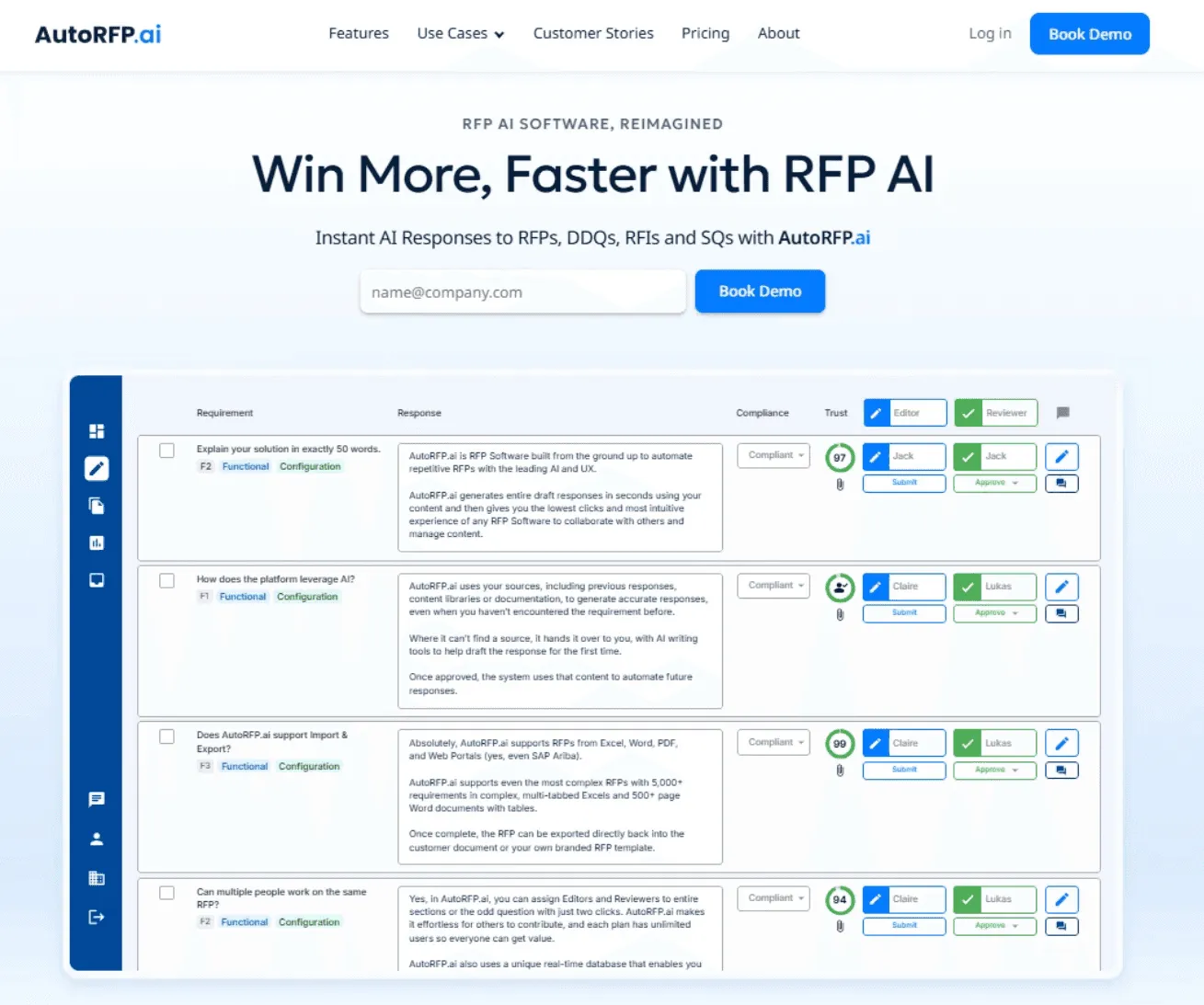
AutoRFP.ai is an AI-first platform that generates instant, high-quality responses for RFPs, RFIs, DDQs, and security questionnaires. Upload any RFx, and the AI will answer the requirements using your company’s approved content and context.
Key features
Here’s how AutoRFP.ai’s features help you win more bids,
1. AI Content Management
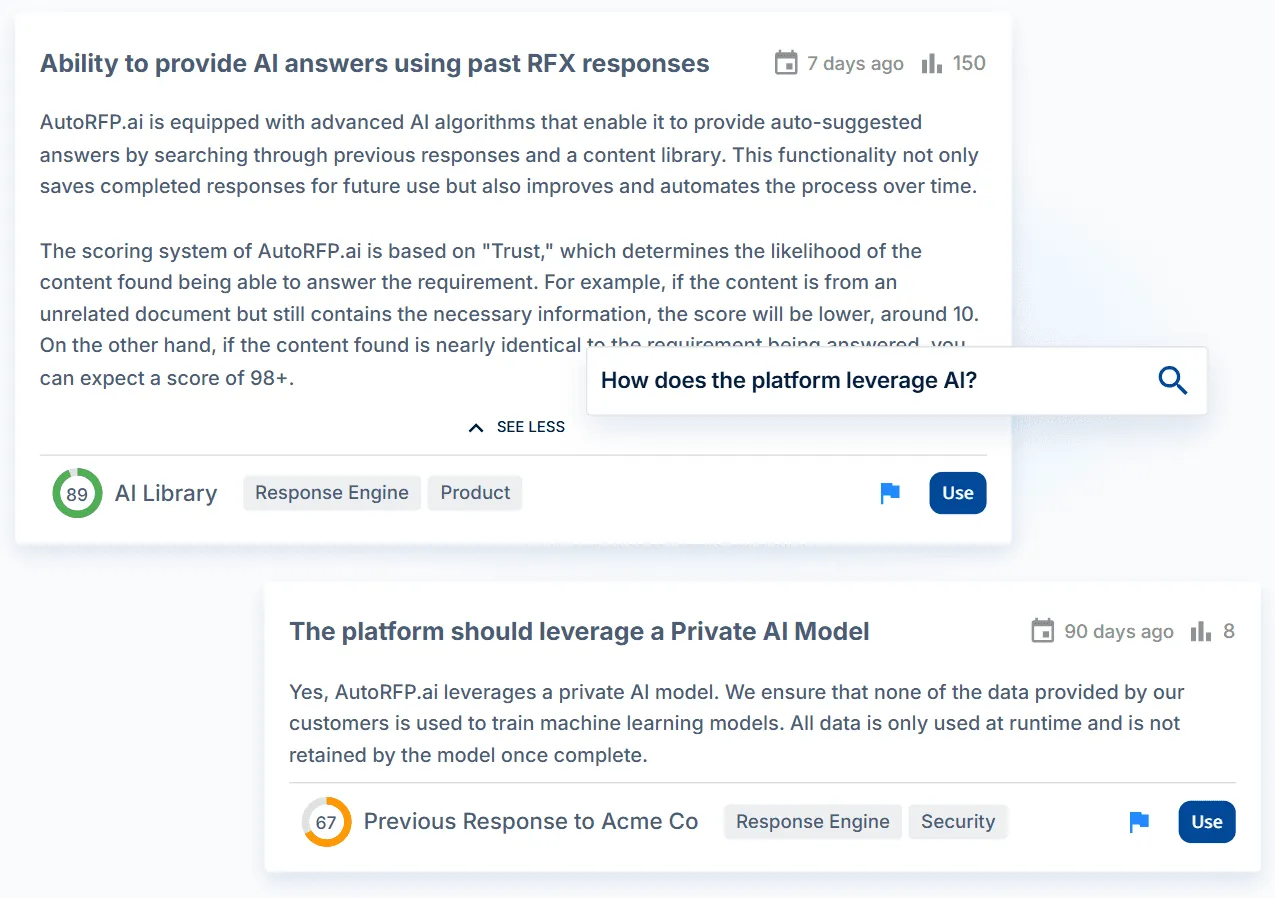
Semantic search and advanced AI pull the best answers from past responses and documents, not just keyword matches.
2. Work With Your Entire Team
Unlimited users collaborate across proposals with source validation, notifications via Email, Slack, and Teams, and real-time progress tracking. Everyone sees what changed, who approved it, and why.
3. Real-Time Win Rates Insights
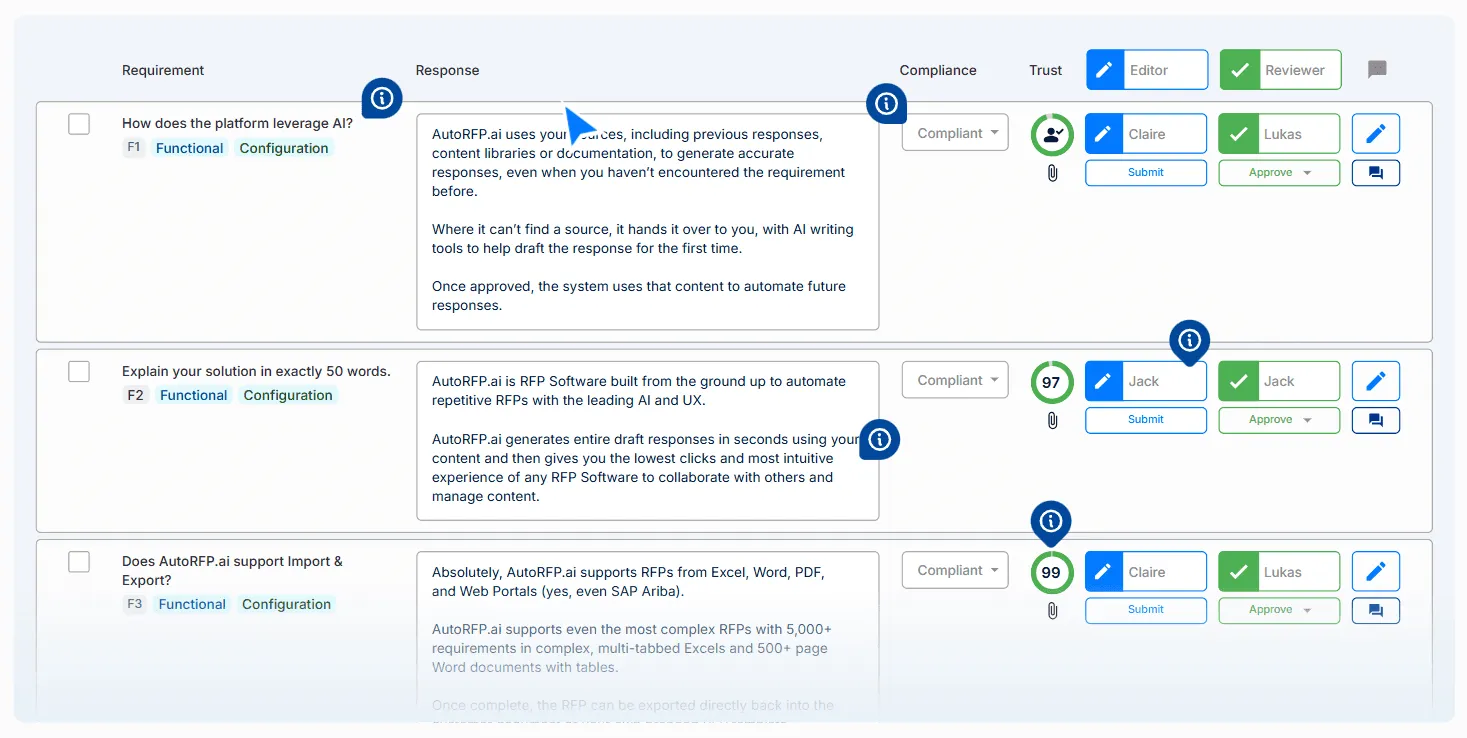
Tracks volumes, win rates, workloads, and trends across active and past RFx to show team impact and performance at a glance.
4. Import and Export Any Rfx Format
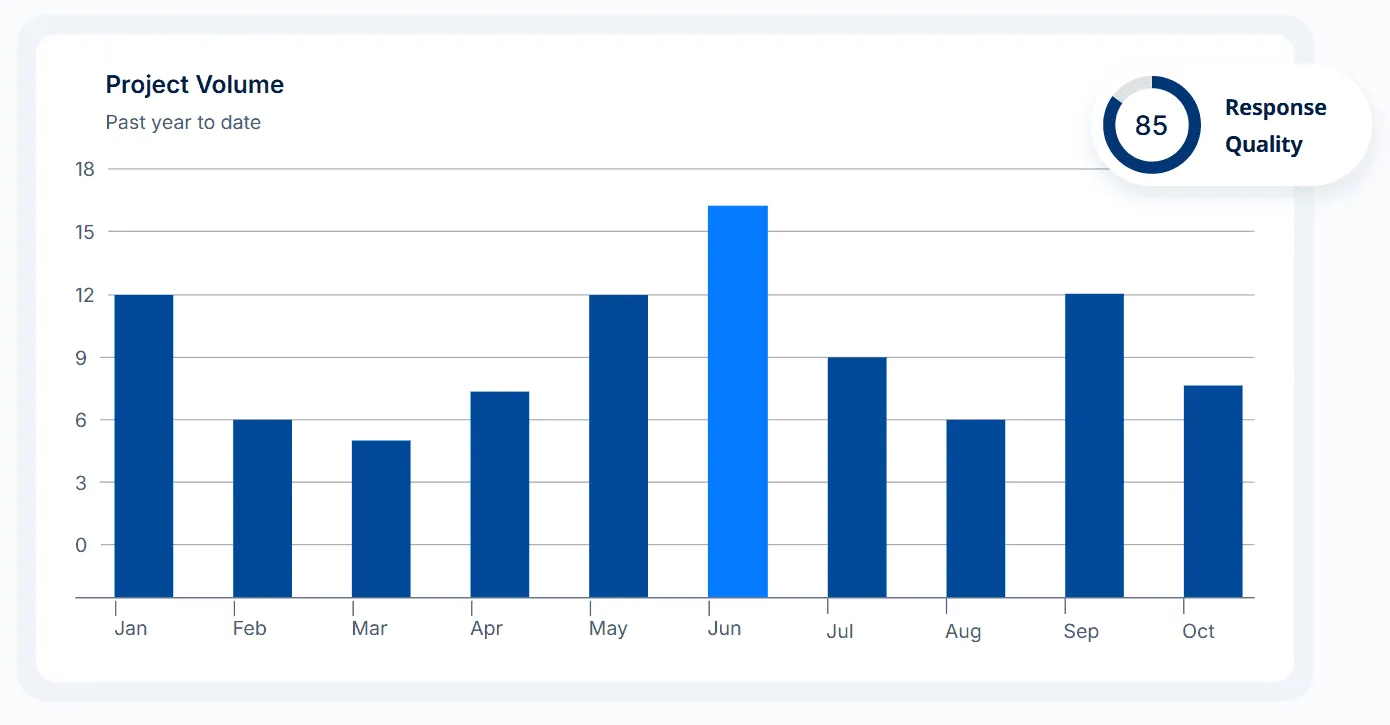
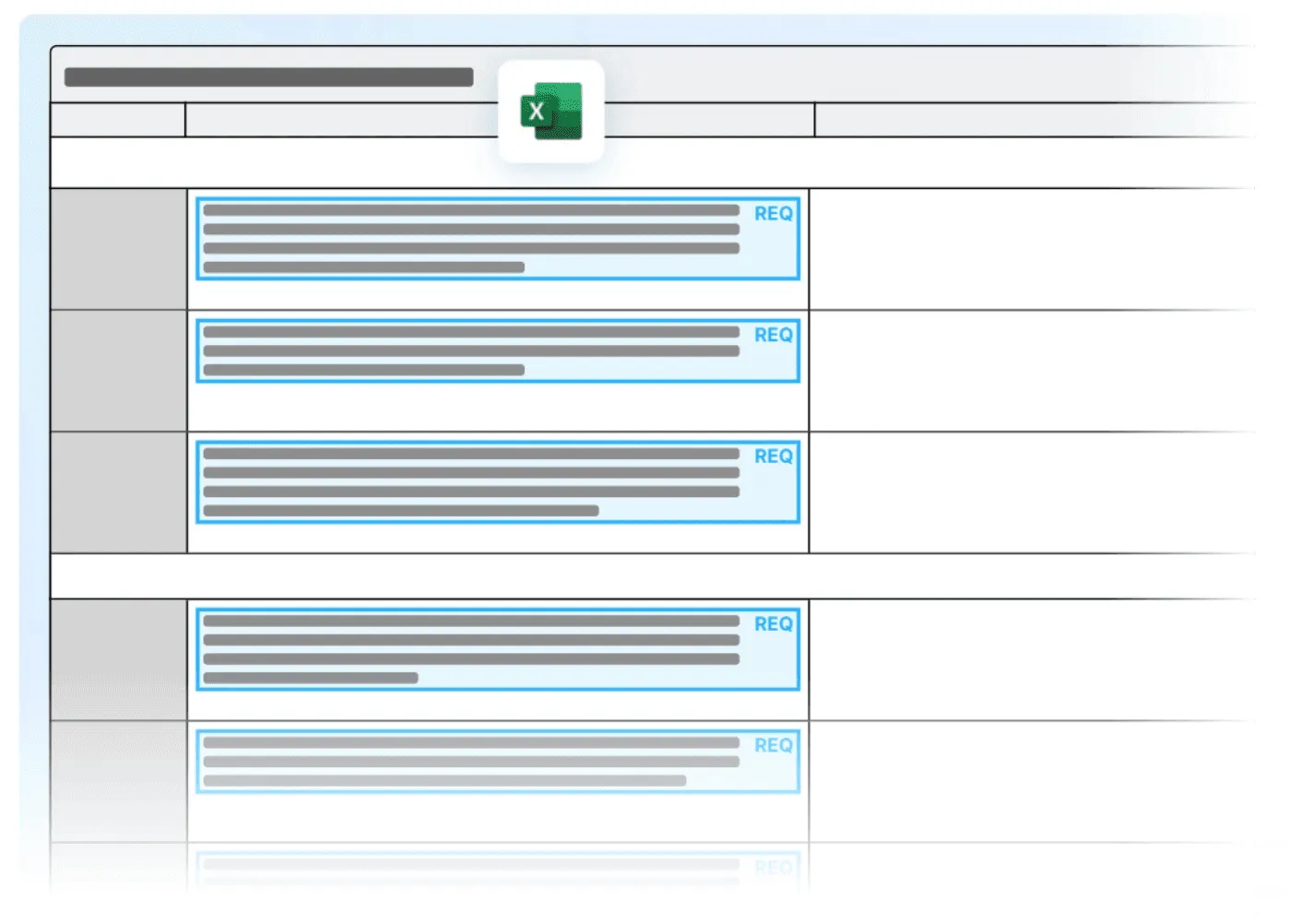
Excel RFx files are detected across tabs and mapped instantly to requirements. PDF and Word customer formats are filled in directly without reformatting.
Pros
The system learns from every approved response and adapts without a rigid Q&A library.
A trust score accompanies each response, so you know exactly how reliable it is before submitting.
Supports 30+ languages with accuracy checks and a visible trust score.
Cons
- Reporting is simple today and lacks deeper analytics. The team is actively expanding these capabilities.
Best for
- Mid-to-large B2B SaaS selling to enterprises. Also ideal for financial services teams, especially Managed Investment Funds.

Video transcript
Transcript is auto-generated and may contain minor errors.
Hey, I'm Rob from autoRFP.ai. What is autoRFP.ai? Well, autoRFP.ai is an AI software as a service or SaaS application that does AI for proposal or RFP responses. That includes RFIs, like request for informations, includes due diligence questionnaires or DDQs, and includes security questionnaires. So, you can find all about us at autoRFP.ai. So, we're a technology company. We have offices all across the globe including Brisbane, Australia, Vancouver as well. And effectively, our tool allows, whether it be bid managers, sales people, proposal writers, RevOps team members, sales leadership, answer complicated request for proposals. So, what is a request for proposal? You can see one of our other videos below in the description. But effectively, our system
looks something like this. And it lets team members, and you can have unlimited number of people log in to autoRFP.ai, good product, allows people to go in, create projects, which would be for instance an RFP. I can go in here, create my information from my zip file, and that includes, you know, like an Excel spreadsheet, PDF, Word doc. We can run an AI go no go project analysis on the RFP. And then effectively from that, we can bring in all the information in terms of what are the questions, where our AI automatically scans the documents and figures out what is being asked of the RFP, whether it's multiple tabs in an Excel spreadsheet and everything else, whether it's drop-downs. And that all happens automatically through the power of AI. Then, we generate our response, and we can do it in in 40 plus different languages and adding languages all the time. Once you've imported your RFP into order rfp.ai,
you can collaborate with your team members assigning different people to answer the questions, review the questions, looking at an overview of the entire project and project managing due dates. Now AI effectively starts automatically answering those different questions based on your knowledge documentation. So that might be your website, your help docs, your technical documentation, your past RFP answers or security questionnaires, your security policies. But effectively all that different company information you import into order RFP and then our AI leverages that to create an AI first draft of an RFP response. Once we're happy with all those requests, we can approve it. That goes into the model to learn from and add to. So your current responses are automatically used for new responses and then you can export that as well. And then the final cool thing about order RFP is you have a lot of different
integrations that you can pull in, whether it's knowledge documentation from places like Notion, Google Drive and so on. So that's order RFP. We're an AI SaaS app. Uh you can host globally. We do not use customer data for training purposes or to send it back to LLMs. So we're secure and private. We have our ISO 2701 certificate and our SOC 2 certificate and then you can find up-to-date pricing and information on our website. Or if you came to learn more, you can book a demo and schedule time with our team. Thanks.
2. Loopio
Loopio is an RFP software powered by Response Intelligence and trained on 10+ years of data and 500k+ projects. It streamlines analysis, trusted answers, and collaboration across portals.
Key features
AI response intelligence: Evaluates proposals and suggests high-quality answers from prior work, improving speed and consistency.
Team collaboration & readiness: Works with Salesforce and Copilot 365 to assign tasks, track milestones, and spotlight proposal readiness.
Pros
- Fast analysis, strong content reuse, smooth SME collaboration, and precise project tracking.
Cons
- AI features built on GPT 3.5 (not modern large language models) and trained on customer data
Best for
- Proposal/Bid, Sales, Pre-Sales, and InfoSec teams at mid-enterprise organisations.
To see how Loopio stacks up against competing RFP tools, check out this full analysis of the best Loopio alternatives
3. Responsive (formerly RFPIO)
Responsive (formerly RFPIO) is an AI-driven response platform that drafts, improves, and tailors answers for RFXs, DDQs, and security questionnaires, centralizing knowledge to speed accurate responses.
Key features
AI response automation: Generates first drafts and recommends pre-approved answers from your library.
Collaboration & workflows: Comments, @mentions, role-based access, tasks, and automated reviews.
Pros
Unlimited storage for governed, searchable content.
Strong collaboration and review automation features.
Cons
- Less mature AI features compared to AI-native Bid Software
Best for
- Bid/Proposal, Sales, Marketing, InfoSec/IT, Investor Relations, and leadership teams.
Case Studies of Businesses Successfully Winning More & How
These real-world examples demonstrate how teams utilize AI-powered automation to enhance bid capacity, improve quality, and secure more wins.
1. Workforce.com: Won Over 50 Bids with AI RFP Software
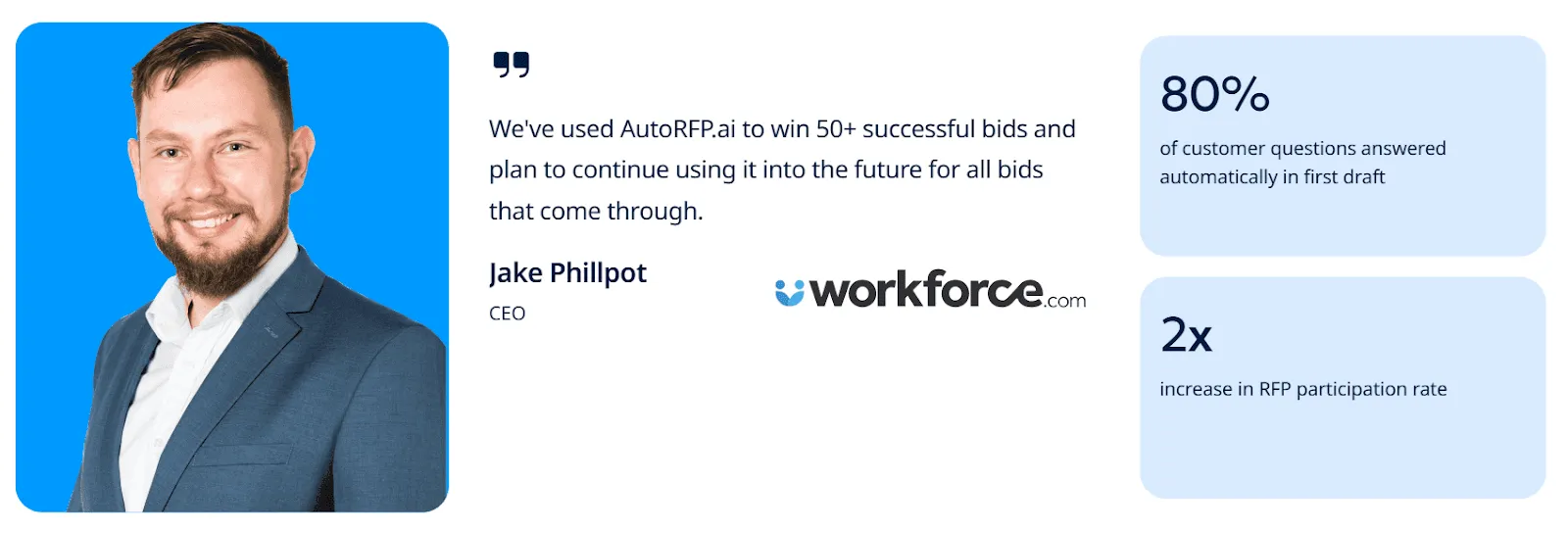
Challenge: Workforce.com needed to manage the rising volume of RFPs across multiple product lines and international markets while maintaining quality.
Solution: They implemented AutoRFP.ai’s AI RFP software to automate response creation, organize product libraries, and deliver consistent multilingual responses.
Result: 80% of customer questions were answered automatically in the first draft, doubling RFP participation and leading to 50+ successful bids.
Jake Phillpot, CEO of Workforce.com, said, “I’m really impressed that when we go and bid with AutoRFP.ai, in most cases 80% of the questions the customers have are answered with the first instance.”
2. SugarCRM: Wins 60% of Top Enterprise Customers with AI RFP Automation
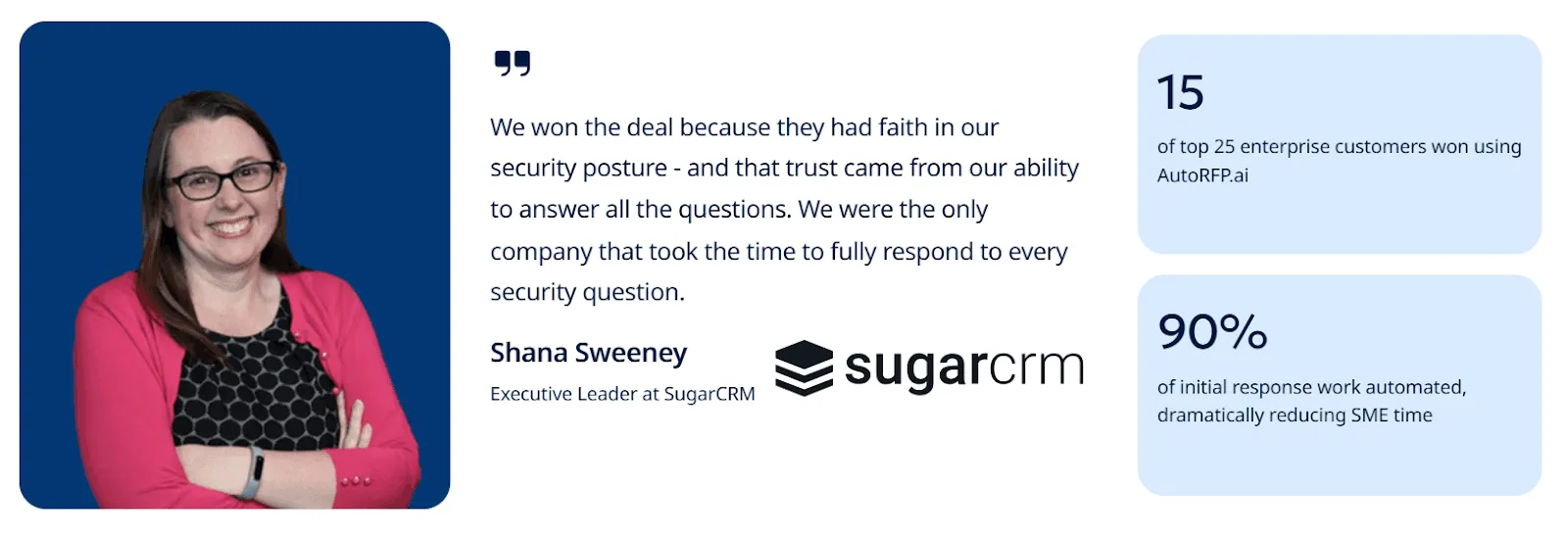
Challenge: SugarCRM’s lean team struggled to keep up with surges of complex, 2,000-question RFPs that consumed valuable SME hours.
Shana Sweeney, Executive Leader at SugarCRM, said, “A lot of the security questionnaires we get can contain 500 - 2,000 questions. These sometimes take several hours to complete. There were always 15 - 20 questions that required our Subject Matter Experts, using up their valuable time.”
Solution: They deployed AutoRFP.ai within two weeks to automate 90% of initial responses, enabling faster and higher-quality submissions across every proposal.
Result: SugarCRM won 60% of its top 25 enterprise customers, including a $2M ARR client, by delivering complete, accurate RFPs ahead of competitors.
Win More Bids With AutoRFP.ai
You know why you win. You know why you lose. Now, win more.
AutoRFP.ai automates the tedious parts of proposal writing, generating accurate drafts in seconds.
This lets your team focus on the strategic moves that close deals. Spend less time searching and more time winning.
