
Tender Bidding: Key Steps, Process, and Best Practices (2026)
Learn what tender bidding is, how the tender process works, key stages, common mistakes, and how to win more bids consistently.

Robert Dickson
RevOps Manager, AutoRFP.ai··8 min read
For many organizations, tender bidding still looks like organized panic. A notice lands, sales says “we have to go for this,” and suddenly everyone is scrambling for inputs, old answers, and approvals.
There is rarely a shared view of what “good” looks like, which tenders are actually worth bidding on, or how to avoid repeating the same mistakes from the last loss.
In this guide, you’ll get a clear explanation of what tender bidding actually is, plus how it differs from general bids and Request for proposals (RFPs), without getting stuck in terminology.
We’ll walk through the tender bidding process step by step, show practical ways to improve tender success, flag common mistakes teams repeat, and finish with how an AI-powered tender software can automate the repetitive work so your team can focus on winning strategy, not admin.
What Is Tender Bidding?
Tender bidding is the process where a buyer (like a government agency or company) invites suppliers to submit formal offers to deliver a product, service, or project at an agreed price and terms.
Suppliers respond with a bid that explains how they’ll meet the requirements, their approach, timeline, pricing, and proof of capability.
The buyer then evaluates bids against set criteria such as compliance, value for money, quality, and risk, and awards the contract to the best-fit supplier.
To see how these elements fit into the broader procurement cycle, you can explore our detailed breakdown of the Tender process.
Tender vs Bid vs RFP (And Why People Mix Them Up)
Teams use these terms interchangeably, but they’re different artifacts in the same purchasing flow.
| Term | Purpose | What it includes | When it appears |
|---|---|---|---|
| Tender | The buyer’s invitation to compete plus the rules of participation (public or private procurement). | Scope summary, eligibility, timelines, submission rules, evaluation criteria, compliance requirements, and contract terms. | First: when the buyer opens a competitive procurement. |
| RFPs | A type of tender document used when the buyer wants to compare solution approaches, not just price. | Problem statement, desired outcomes, requirements, response format, evaluation scoring, questions on methodology, team, risk, and pricing structure. | Early: issued as part of the tender pack when the buyer needs a proposed approach. |
| Bid | The supplier’s submitted response (technical + commercial) to the tender/RFP (or request for quotations (RFQ)/ITT). | Executive summary, compliance matrix, methodology, project plan, proof points, team CVs, risks, assumptions, pricing and commercials, legal forms. | Later: submitted before the deadline, after the supplier prepares the response. |
The Tender Bidding Process (Key Stages)
Let’s walk through the key stages of the tender bidding process so you can clearly see what happens at each step, who’s responsible, and how every stage impacts your strategy for how to win a bid.
Stage 1: Tender Capture and Logging
You collect new tenders from every channel and log them in one place so nothing gets missed.
Inputs:
New tender alerts from portals, partners, email, or frameworks
RFP/RFQ documents, attachments, deadlines, and submission instructions
Activities:
Register the tender in a central tracker or bid tool
Capture key details (client, scope, value, deadline, portal steps, internal owner)
Outputs:
A single, up-to-date tender pipeline
Clean baseline data ready for qualification (sector, size, timeline, risk)
Typical timing: same day to 1 day
Stage 2: Qualification and Bid No-Bid Decision
You decide whether the opportunity is worth pursuing instead of chasing every RFP.
Inputs:
Logged tender details from Stage 1
Go no-go criteria (fit, risk, price pressure, capacity, margin, competition)
Internal view of expertise, delivery capacity, and strategic priority
Activities:
Score the opportunity using a simple go no-go framework
Check for knockouts early (must-have requirements, mandatory formats, eligibility)
Align quickly with sales, delivery, finance, and leadership on bid, no-bid, or revisit
Outputs:
A clear decision (bid, no-bid, revisit later)
A short documented rationale
If “bid”: assigned bid manager and core team
Typical timing: 1 to 3 days
Pro tip: An AI RFP tool (like AutoRFP.ai) can scan the docs against your go/no-go criteria and flag impossible requirements early.
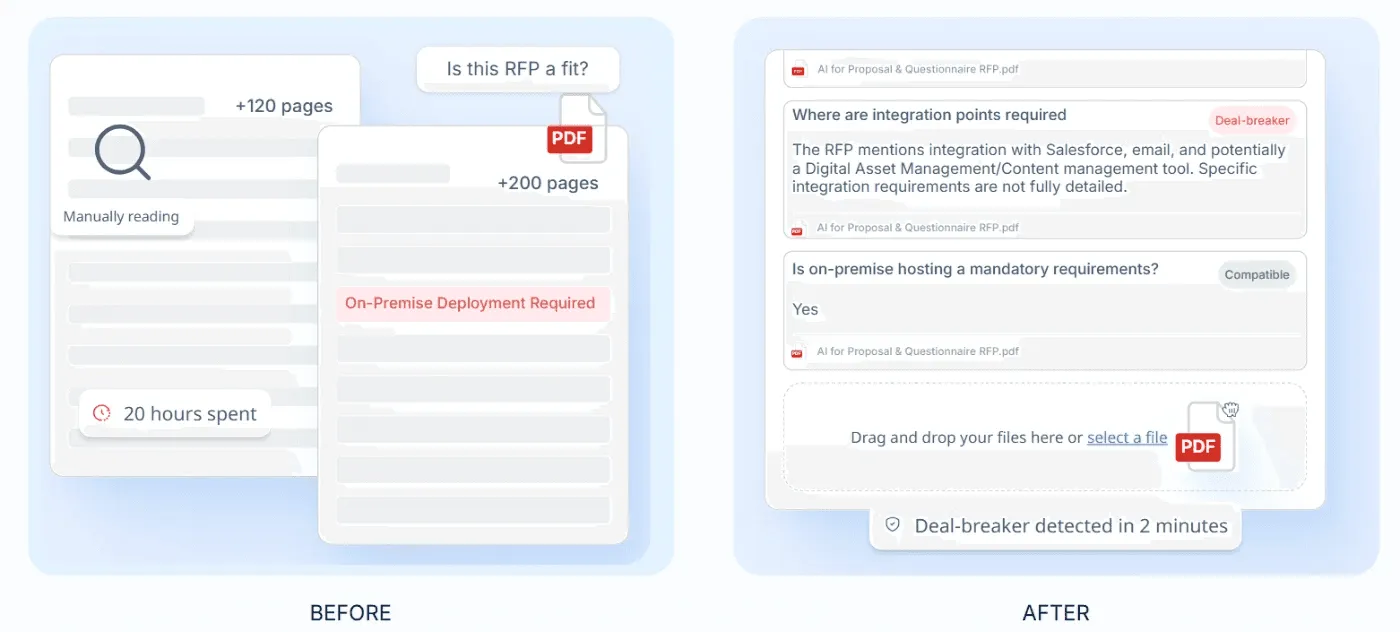
“Part of me doesn’t want to recommend it as I want to keep it for myself, but the product( AutoRFP.ai) is just too good not to share!” - Aref Abedi, Co-Founder, CEO of Jobylon
Stage 3: Bid Strategy and Solution Design
You align on how you will win and what you will propose before anyone starts drafting.
Inputs:
Full tender documents and requirements
Qualification outcome and initial win signals
Past bids, case studies, reference projects, and differentiators
Activities:
Clarify the client’s pain points, success criteria, and evaluation approach
Define win themes, key messages, and differentiators
Shape the solution approach, delivery model, and commercial direction
Schedule review gates (for example: Pink Team, Red Team, Gold Team)
Outputs:
A short bid strategy doc or slide deck
Pricing guardrails and assumptions
Clear messaging guidance for writers and SMEs
Typical timing: 2 to 4 days
Stage 4: Response Planning and Content Development
You break the response into sections, assign owners, and build the first full draft.
Inputs:
Bid strategy and solution outline
RFP questions, scoring criteria, and compliance requirements
Content library, boilerplate, CVs, case studies, certificates, policies
Activities:
Build a tender response outline and an assignment matrix (who writes what, by when)
Draft answers, tables, and supporting documents
Reuse and adapt approved content where it fits, then tailor it to the client
Track gaps and questions for SMEs so they can respond fast
Outputs:
First full draft of the response
Completed annexes (CVs, case studies, certificates, policies)
A clear list of gaps, risks, and SME questions to resolve
Typical timing: 2 to 6 weeks (depending on complexity)
Side note: Plan resourcing realistically: Many bids take 40 to 80 hours across 5 to 15 people, and large bids can run 200+ hours.
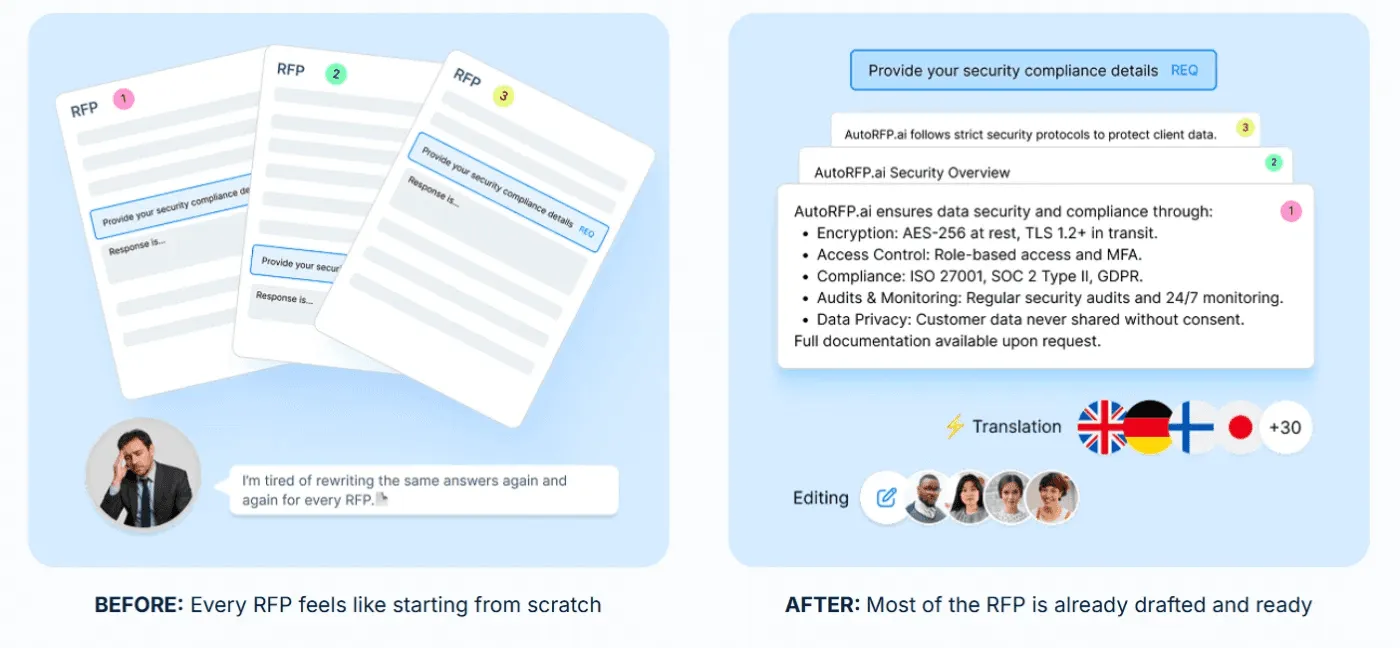
Pro tip: Tools like AutoRFP.ai can surface accurate answers fast using semantic search, so writers spend more time tailoring and less time searching.
Stage 5: Review, Pricing Finalization, and Approvals
You tighten the response, confirm compliance, and lock pricing with the right sign-offs.
Inputs:
First full draft and annexes
Draft pricing model, assumptions, and commercials
Internal review requirements (legal, risk, margin, executive sign-off)
Activities:
Run reviews for compliance, technical accuracy, clarity, and consistency
Finalize pricing with finance and leadership, and confirm margin guardrails
Secure approvals and record key assumptions and risks
Outputs:
Final approved response content and pricing
Checked, compliant files ready for submission
Internal approval trail and assumptions log
Typical timing: 2 to 5 days
Stage 6: Submission and Clarification Management
You submit correctly and handle clarification questions without losing control of the narrative.
Inputs:
Final approved response package
Client submission instructions, portal access, and formatting rules
Clarification questions and best and final offer (BAFO) requests (if issued)
Activities:
Run a final quality and compliance check, then submit exactly as instructed
Confirm receipt and keep proof of delivery
Coordinate clarification responses quickly with SMEs and bid leadership
Outputs:
Confirmed submission and proof of delivery
Clear owners and responses for clarifications and BAFOs
A complete audit trail of what was submitted and when
Typical timing: 1 day for submission, then as-needed follow-up
Stage 7: Presentation or Interview
If required, you bring the written response to life and address evaluator concerns directly.
Inputs:
Submitted proposal and evaluation themes
Presentation requirements, agenda, and attendee list
Likely objections, risks, and key proof points
Activities:
Build a tight story that mirrors your win themes and differentiators
Prepare roles, demos, and Q&A handling
Outputs:
A clear, rehearsed presentation pack
Q&A notes and objection-handling playbook
Typical timing: 1 to 2 days (plus rehearsal time)
Stage 8: Award, Debrief, and Transition
You either transition into delivery fast or capture learning so the next bid is stronger.
Inputs:
Award notice or loss notice
Debrief feedback (if available)
Final proposal, assumptions, and delivery commitments
Activities:
If win: run handover into delivery (scope, risks, assumptions, timeline, owners)
If loss: request a debrief and document what changed the outcome
Update your content library, templates, and playbook with the lessons
Outputs:
Smooth transition plan (for wins) or actionable improvement list (for losses)
Updated reusable content and stronger future bid practices
Typical timing: 2 to 4 weeks
How to Improve Tender Success
Here are the key ways high-win-rate teams consistently improve tender success and win more bids.
1. Start With Customer Insight Before Drafting
High-performing teams systematize customer insight and treat it as the starting point, not a last-minute add-on. According to AutoRFP.ai’s Proposal Win Rate Report, 88% of high-win teams have a defined customer-insight process, and 71% do formal customer research.
Capture what the buyer is optimizing for, what they fear, and what “success” looks like internally.
Pull signals from annual reports, strategy updates, and stakeholder priorities.
Turn insights into a one-page brief that the whole bid team aligns on.
2. Tighten Qualification and Protect Capacity
High-winning teams qualify rigorously, so effort goes into bids they can win. 71% of high-win teams run a Go/No-Go qualification step.
Define deal-breakers once (legal, delivery, security, margin, capacity), then screen every RFP early.
Avoid “must-bid” habits that overload the bid engine and slow decisions.
Selectivity matters: Low-volume teams with limited capacity often win more because they focus on high-fit opportunities.
Side note: Watch the quick Gemini walkthrough video below to see how to run a Go/No-Go decision framework faster and spot deal breakers early

Video transcript
Transcript is auto-generated and may contain minor errors.
Hey, have you ever wanted to use Gemini for your AI go no go analysis? We're going to jump into it today using Gemini to do our tender analysis to understand if we want to bid on this tender or not. I'm going to be using Gemini Flash 2.5 Pro which currently available on the paid Gemini plan. Uh, and we're going to be looking at a tender actually from the Australian government. Uh, so this one specifically is the ATO, the Australian Tax Office. And interestingly enough, this tender is for a coding assistant. So like an AI coding software SAS application. I use an AI coding SAS application that I love to use every day and that's cursor. So we're going to look at cursor who have an enterprise plan. So making a pitch for the likes of the ATO's and we're going to look at this publicly available atto tender and
whether cursor should bid on it. So we're going to be using our AI go no go analysis tool with Gemini. So let's jump into it and and wait until the end because the results of the AI go nogo analysis may actually surprise you. So, first of all, um I've got this prompt, and I'm going to leave a Google doc uh or page where you can download this uh prompt and then customize it for your business down in the description below. Uh but of course, um you know, I you can customize to your heart's content. When we're prompting, it's really important to a make it contextual to our business, which is where we have the inputs here. So, I'm going to enter the cursor URL. Uh we have our persona. So effectively that's telling the Gemini flash 2.5 what you know what kind of uh person is going to be what skill set should it have what context should it have when it answers this question in this case it's an expert RFP manager uh then we have
our context and objective so what are we asking the prompt effectively to do what are the instructions and then what should the output be so from this case I want a comprehensive document detailing against my red flags or amber flags or green flags around whether cursor should bid on this tender or not. So, I'm going to just, you know, copy and paste that prompt, chuck it in here. Then, uh, really cool thing is I'm actually going to turn on deep research. So, deep research is a tool readily available in a lot of your uh common LLMs whether that's uh Gemini as I'm showing here, Chat GPT or Claude. Gemini's deep research can be used not only to search the web but also search your documents. So, with Gemini, you can upload up to 10 documents. And for this, I'm actually going to be using my own go nogo
template. The go no-go template. Again, I'll chuck a link in the description below where you can download that from our website at autoirfp.ai/d downloads, but effectively this will have information. And this is my go no-go framework. What I'd recommend is downloading the template, changing the go no-go framework uh to make it more relevant for your business as needed. But it's a good starting point. Uh for for instance, this really focuses on RFP origins and relationship. uh it looks at resource requirements from our team and then effectively it gives you a scoring matrix and depending on that scoring matrix matrix should tell me whether we should proceed or not uh as well and it has all the different information you can like play around with your hearts content it's just an Excel spreadsheet um but really useful for your go no-go decision framework all righty so jumping back uh I've turned my deep research on and now I'll upload my documents from drive. And so
here are my tender documents. Uh just clicking shift, I'm just going to select all the relevant ones. I can only upload maximum of 10 documents. So I'm actually going to upload the original tender documents, not the indenments. We'll up upload those later. So I'm going to insert those documents. And there's one other document I want to add from my drive. And that actually is that go no-go decision template. So now I have my go no-go decision template. I've got my atto documents uh for the tender and I've got my prompt of what I want Gemini Flash 2.5 Pro to do for my AI go no-go analysis strap in it's pretty cool what you're actually going to see here as well all my tender documents and it's deep researchers on but before I submit this I want to make sure here in the prompt that you can download below is I'm going to update this information so uh tender documents uh see attached As you can see, I've attached them. And in terms of the company URL, well, here
I just want to make sure I I'm just going to enter cursor here. This is a AI coding assistant tender for the Australian tax office. And you know, in this example, we're being cursor. I do not work at cursor. I work at autofp.ai. But for my example, I click submit. And then what I really like about Gemini is it's going to provide a research plan for my AI go no-go analysis. So with that plan, it'll provide a lot of details in terms of the steps it's going to take to try to answer my prompt. And then I can actually edit that plan if I'd like to. And here we have our plan from Gemini. So clicking through I can go through I can read this information. First it's going to browse the cursor docs and all the information regarding cursor. It's going to go and analyze all the tender documents and then it'll make its way through and start to answer my go no-go questions. So, what I recommend here again is a edit the analysis template, the go no-go decision
template. Make that really relevant for your company and when you decide to bid or not to bid for tenders uh and RFPs. And then second is uh in this prompt, make sure you update what questions you're asking. if there's any specific questions like red flags you want for cursor. It might be well cursor doesn't do uh on premise hosting. So want to make sure that's flagged and then uh there's the information and then I can click start research and Gemini flash is going to start doing our AI go no-go analysis. All righty. I've given it some time. time it probably took oh jeez uh maybe about 10 minutes all up which is what you expect for the deep research uh especially for something that goes through you know 10 different tenor documents probably hundreds of pages and uh uses the organizational context that we provide it in the website of cursor to then run a go nogo analysis against that go no-go decision template. So jumping into it, uh before I show kind
of the output, what you have here for deep research is you can look at the thoughts. And so this kind of explains or at least in some cases LMS do hallucinate their thoughts, but in this case we can hopefully trust it and see that what it kind of looked to and what it did uh in completing that analysis. So it looked at the different websites. It then uh looked at the research uploaded folder files and then use that against the decision template to then try to provide an overall go no go as well. Here are the sources it used. Again, it can refer to those Google Drive documents I provided which is really powerful for that Gemini has such a good integration. Obviously, probably no surprise with Google Drive. And then scrolling up here is our analysis. So Gemini has provided an AI go nogo analysis based off the ATO tender documents for an AI coding assistant which we've mocked up as cursor.com to
reply and say should we bid on this where AI go nogo is powerful is it does help with that cursory first look whether this is worth it to look what information should I understand before diving to it further um as well certification gaps um you know goes through all the different information there and effectively it's going through that spreadsheet the decision template that we have for our go no-go analysis you can see here strategic alignment competitive landscape commercial viability legal and security and it's now providing that information there as well so it's it's kind of looked over those different clauses uh I mean here if that's true the the clause grants the AT the right to terminate the contract at any time for any reason for its own convenience that's a pretty you usually don't want that in your legal contracts with the three year plus one plus1 contracts. That's pretty rude. Uh but yeah, anyway, you can have a look at that and uh obviously make up your own mind as well for uh the different information. Uh then you have kind of the different scoring of waiting and that's the powerful thing about a go no-go decision
template is to um use it as a I guess take the emotion out of RFP response. You might have an enterprise AE salesperson run up to you and say I have to bid on this RFP. we have to do it. Uh and if you kind of boil it down to just numbers and what the scoring is, then you can make a more informed decision hopefully without the emotion of that uh as well. Uh and then so it kind of does that scoring for me that I provide in the spreadsheet. And then that's why it's a no-go is because the weighted score was 44.3%. Uh and so told me to go not go for it. I can actually then expand on this. And in the drive there's actually three indentments. And so uh I'll say uh please find attached I'm typing here. Please find attach uh some addendments for the tender and use that to update the
the analysis. So and that's a great thing. You have this chat. You might have Q&A later. You might have addenments. might have uh mistakes in the original tender that are provided to you and with that chat history you can then come back to it and provide additional documents to then do the further analysis with the context of your original. Now with uh LLMs you will uh hit like a token limit for that. For instance I I believe Gemini's token limit is around 1 million uh for Gemini 2.5 Flash Pro. Uh so it's a very fast model but effectively it's going to start start forgetting the original context that you provided. Uh and so you need to be cautious of that. It's good for initial we think of this AI go no go analysis initial cursory first look. It's it's not going to be our full in-depth look. Effectively it's it's saving me time of places I need to look at uh and so on before we kind of get into it. So I it's not going to replace the human to do the go no-go. This is going to help uh help the human do the
go no-go as well. Hope that this video was really useful for you on how to do an AI go nogo analysis with Gemini Flash 2.5 Pro. Uh you can use this for all your tendering needs. Uh make sure to still have the human in the loop. AI can hallucinate. And then final just that last privacy and security uh comment on making sure that the training is turned off. This is a that you're using a paid subscription. Do not upload private RFPs into an LLM because that maybe then you send into uh training data uh without you make sure that the training is turned off. You're paying for your subscription uh as well. Uh, and then yeah, this one, my example is a public tender, uh, but you can, of course, uh, use it as well. So, I'm Rob from Auto RFP. Uh, we're actually an AI RFP software. We actually have a go no-go analysis feature really similar to
what I showed you before, but a lot less of the leg work uh in our software that also uses Gemini Flash 2.5, which is why I had a lot of confidence that could kind of handle the large documents that you would often find in tenders. So yeah, if you're interested, find us at auto rfp.ai. You can pick a book a demo and learn more about us as well. I thanks.
3. Formalize Win Themes and Build Narrative Before Content
High-winning teams do not treat win themes as optional. 71% of high-win teams use win themes to keep their responses persuasive and consistent.
Lock 3-to-5-win themes tied to evaluator priorities.
Use them to guide your executive summary, solution story, proof points, and commercials.
Keep one narrative across sales, proposal, and review comments.
4. Make SMEs Validators, Not First-Draft Writers
SME-led drafting is one of the strongest predictors of low performance. High-win teams retain authorship with the proposal team: 94% use proposal-led drafting with SME review or joint collaboration, while only 6% rely on SMEs writing first drafts.
The proposal team owns structure, clarity, and persuasion.
SMEs validate accuracy, supply proof points, and pressure-test claims.
Use short SME interviews to capture technical detail fast, then draft centrally.
Side note: With AutoRFP.ai, you can see who has started and who is still pending, so you can keep SMEs accountable from one dashboard instead of finding out too late. It gives you real-time progress across every RFP, tender, RFI, DDQ, and security questionnaire in flight.
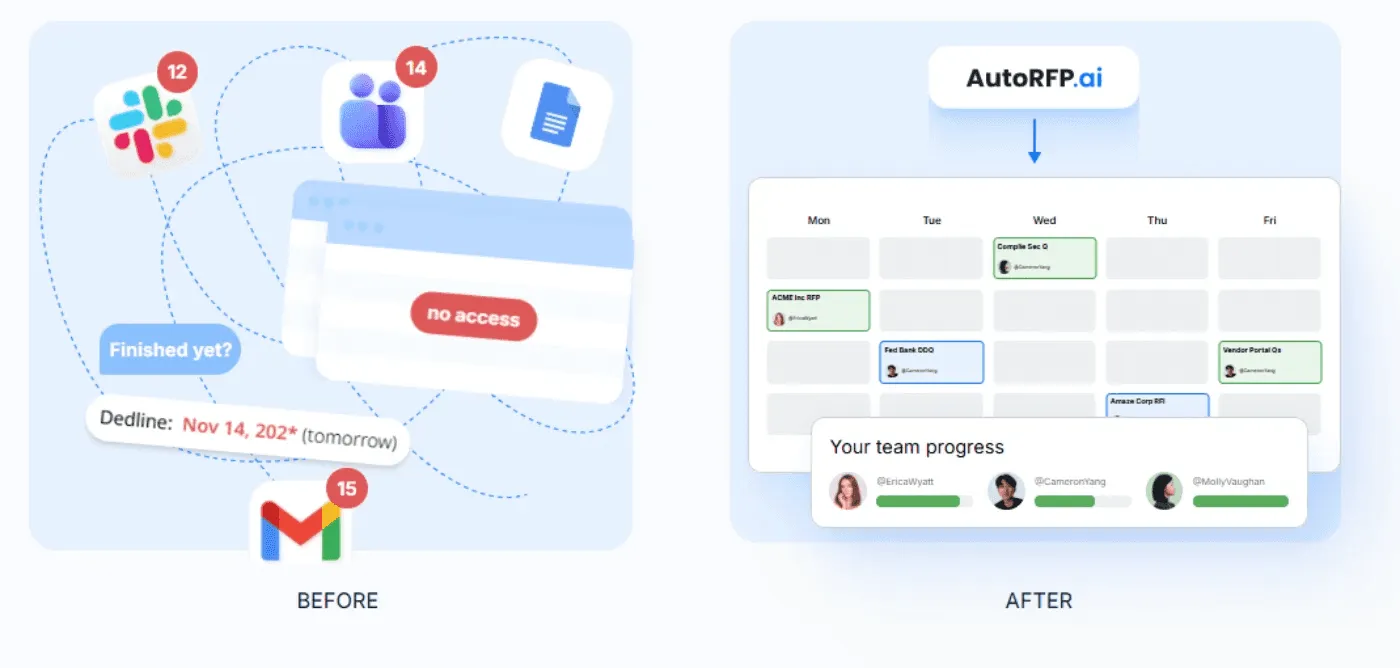
“Project management of all the different parts of a bid is often overlooked. Ensure you have clear responsibilities and when you want content, answers, and revisions completed by. I would know, I once lost an RFP because I submitted it 26 seconds late.” - Jasper Cooper, CEO & Co-Founder at AutoRFP.ai
5. Run A Governed Operating Model, Not Midnight Heroics
High win rates come from a repeatable operating model, not last-minute heroics.
Do not begin drafting until insights are documented and approved.
65% of high-win teams use formal review and governance.
When proposals drive more than 30% to 50% of revenue, treat proposals as a core revenue function with dedicated ownership and process maturity.
6. Track Shortlist Rate and Use It as an Early Warning Signal
Teams that combine automation, high reuse, and systematic customer insight see stronger shortlist performance.
With all three capabilities in place, 63% of teams report shortlist rates of 51% or higher.
Use shortlist drops to trigger a quick audit: insight quality, compliance misses, weak proof, or unclear differentiation.
Feed lessons into the next bid so the same gaps do not repeat.
7. Use AI Tender Tools to Scale Without Losing Quality
AI adoption alone does not separate top performers, because AI amplifies the operating model it is plugged into.
Tools like AutoRFP.ai can help you scale by:
- Library-less semantic search: Finds the most accurate answers from past responses and internal data without manual tagging or ongoing library maintenance.
