
How to Write a Winning Bid Proposal in 2026: Expert Tips & Examples
Learn how to write a winning bid proposal with proven steps, expert tips, and templates to help you stand out and win more contracts.

Robert Dickson
RevOps Manager, AutoRFP.ai··10 min read
What if your next bid proposal didn’t read like a document, but like a conversation your buyer wants to finish?
That’s the difference between getting shortlisted and getting signed. If your proposal doesn’t do that, someone else’s will.
So, how do you make yours the one that stands out?
In this guide, you’ll learn exactly how to write a winning bid proposal step by step. You’ll see real examples and templates, understand best practices, and learn how to avoid the mistakes that cost you deals.
And before we wrap up, you’ll learn how automation makes it possible to win more bids through faster workflows and higher accuracy.
Understanding the AI tender writing process can further streamline your proposals management, ensuring precision and consistency while saving valuable time
Let’s get into it.
What Is a Bid Proposal?
A bid proposal is a formal document a supplier submits to a buyer, usually in response to a Request for Proposal as part of RFP bidding, Request for Quotation (RFQ), or tender notice that explains what will be delivered, how, when, and for how much.
It is a critical component of the tender bidding process, ensuring your offer is considered seriously and evaluated alongside competitors’ submissions
A strong bid proposal clearly outlines your solution, scope, timeline, price, terms, and proof (credentials, case studies, certifications) to win a specific contract.
Its main purpose is to convince the client or buyer that you are the best choice, not just in terms of price, but also in expertise, reliability, and value.
How to Write a Bid Proposal: Step-by-Step Guide
Here’s a step-by-step guide to help you write a strong bid proposal that stands out and wins your client’s confidence:
Step 1: Bid/No-Bid Decision Making

Video transcript
Transcript is auto-generated and may contain minor errors.
Hey, have you ever wanted to use Gemini for your AI go no go analysis? We're going to jump into it today using Gemini to do our tender analysis to understand if we want to bid on this tender or not. I'm going to be using Gemini Flash 2.5 Pro which currently available on the paid Gemini plan. Uh, and we're going to be looking at a tender actually from the Australian government. Uh, so this one specifically is the ATO, the Australian Tax Office. And interestingly enough, this tender is for a coding assistant. So like an AI coding software SAS application. I use an AI coding SAS application that I love to use every day and that's cursor. So we're going to look at cursor who have an enterprise plan. So making a pitch for the likes of the ATO's and we're going to look at this publicly available atto tender and
whether cursor should bid on it. So we're going to be using our AI go no go analysis tool with Gemini. So let's jump into it and and wait until the end because the results of the AI go nogo analysis may actually surprise you. So, first of all, um I've got this prompt, and I'm going to leave a Google doc uh or page where you can download this uh prompt and then customize it for your business down in the description below. Uh but of course, um you know, I you can customize to your heart's content. When we're prompting, it's really important to a make it contextual to our business, which is where we have the inputs here. So, I'm going to enter the cursor URL. Uh we have our persona. So effectively that's telling the Gemini flash 2.5 what you know what kind of uh person is going to be what skill set should it have what context should it have when it answers this question in this case it's an expert RFP manager uh then we have
our context and objective so what are we asking the prompt effectively to do what are the instructions and then what should the output be so from this case I want a comprehensive document detailing against my red flags or amber flags or green flags around whether cursor should bid on this tender or not. So, I'm going to just, you know, copy and paste that prompt, chuck it in here. Then, uh, really cool thing is I'm actually going to turn on deep research. So, deep research is a tool readily available in a lot of your uh common LLMs whether that's uh Gemini as I'm showing here, Chat GPT or Claude. Gemini's deep research can be used not only to search the web but also search your documents. So, with Gemini, you can upload up to 10 documents. And for this, I'm actually going to be using my own go nogo
template. The go no-go template. Again, I'll chuck a link in the description below where you can download that from our website at autoirfp.ai/d downloads, but effectively this will have information. And this is my go no-go framework. What I'd recommend is downloading the template, changing the go no-go framework uh to make it more relevant for your business as needed. But it's a good starting point. Uh for for instance, this really focuses on RFP origins and relationship. uh it looks at resource requirements from our team and then effectively it gives you a scoring matrix and depending on that scoring matrix matrix should tell me whether we should proceed or not uh as well and it has all the different information you can like play around with your hearts content it's just an Excel spreadsheet um but really useful for your go no-go decision framework all righty so jumping back uh I've turned my deep research on and now I'll upload my documents from drive. And so
here are my tender documents. Uh just clicking shift, I'm just going to select all the relevant ones. I can only upload maximum of 10 documents. So I'm actually going to upload the original tender documents, not the indenments. We'll up upload those later. So I'm going to insert those documents. And there's one other document I want to add from my drive. And that actually is that go no-go decision template. So now I have my go no-go decision template. I've got my atto documents uh for the tender and I've got my prompt of what I want Gemini Flash 2.5 Pro to do for my AI go no-go analysis strap in it's pretty cool what you're actually going to see here as well all my tender documents and it's deep researchers on but before I submit this I want to make sure here in the prompt that you can download below is I'm going to update this information so uh tender documents uh see attached As you can see, I've attached them. And in terms of the company URL, well, here
I just want to make sure I I'm just going to enter cursor here. This is a AI coding assistant tender for the Australian tax office. And you know, in this example, we're being cursor. I do not work at cursor. I work at autofp.ai. But for my example, I click submit. And then what I really like about Gemini is it's going to provide a research plan for my AI go no-go analysis. So with that plan, it'll provide a lot of details in terms of the steps it's going to take to try to answer my prompt. And then I can actually edit that plan if I'd like to. And here we have our plan from Gemini. So clicking through I can go through I can read this information. First it's going to browse the cursor docs and all the information regarding cursor. It's going to go and analyze all the tender documents and then it'll make its way through and start to answer my go no-go questions. So, what I recommend here again is a edit the analysis template, the go no-go decision
template. Make that really relevant for your company and when you decide to bid or not to bid for tenders uh and RFPs. And then second is uh in this prompt, make sure you update what questions you're asking. if there's any specific questions like red flags you want for cursor. It might be well cursor doesn't do uh on premise hosting. So want to make sure that's flagged and then uh there's the information and then I can click start research and Gemini flash is going to start doing our AI go no-go analysis. All righty. I've given it some time. time it probably took oh jeez uh maybe about 10 minutes all up which is what you expect for the deep research uh especially for something that goes through you know 10 different tenor documents probably hundreds of pages and uh uses the organizational context that we provide it in the website of cursor to then run a go nogo analysis against that go no-go decision template. So jumping into it, uh before I show kind
of the output, what you have here for deep research is you can look at the thoughts. And so this kind of explains or at least in some cases LMS do hallucinate their thoughts, but in this case we can hopefully trust it and see that what it kind of looked to and what it did uh in completing that analysis. So it looked at the different websites. It then uh looked at the research uploaded folder files and then use that against the decision template to then try to provide an overall go no go as well. Here are the sources it used. Again, it can refer to those Google Drive documents I provided which is really powerful for that Gemini has such a good integration. Obviously, probably no surprise with Google Drive. And then scrolling up here is our analysis. So Gemini has provided an AI go nogo analysis based off the ATO tender documents for an AI coding assistant which we've mocked up as cursor.com to
reply and say should we bid on this where AI go nogo is powerful is it does help with that cursory first look whether this is worth it to look what information should I understand before diving to it further um as well certification gaps um you know goes through all the different information there and effectively it's going through that spreadsheet the decision template that we have for our go no-go analysis you can see here strategic alignment competitive landscape commercial viability legal and security and it's now providing that information there as well so it's it's kind of looked over those different clauses uh I mean here if that's true the the clause grants the AT the right to terminate the contract at any time for any reason for its own convenience that's a pretty you usually don't want that in your legal contracts with the three year plus one plus1 contracts. That's pretty rude. Uh but yeah, anyway, you can have a look at that and uh obviously make up your own mind as well for uh the different information. Uh then you have kind of the different scoring of waiting and that's the powerful thing about a go no-go decision
template is to um use it as a I guess take the emotion out of RFP response. You might have an enterprise AE salesperson run up to you and say I have to bid on this RFP. we have to do it. Uh and if you kind of boil it down to just numbers and what the scoring is, then you can make a more informed decision hopefully without the emotion of that uh as well. Uh and then so it kind of does that scoring for me that I provide in the spreadsheet. And then that's why it's a no-go is because the weighted score was 44.3%. Uh and so told me to go not go for it. I can actually then expand on this. And in the drive there's actually three indentments. And so uh I'll say uh please find attached I'm typing here. Please find attach uh some addendments for the tender and use that to update the
the analysis. So and that's a great thing. You have this chat. You might have Q&A later. You might have addenments. might have uh mistakes in the original tender that are provided to you and with that chat history you can then come back to it and provide additional documents to then do the further analysis with the context of your original. Now with uh LLMs you will uh hit like a token limit for that. For instance I I believe Gemini's token limit is around 1 million uh for Gemini 2.5 Flash Pro. Uh so it's a very fast model but effectively it's going to start start forgetting the original context that you provided. Uh and so you need to be cautious of that. It's good for initial we think of this AI go no go analysis initial cursory first look. It's it's not going to be our full in-depth look. Effectively it's it's saving me time of places I need to look at uh and so on before we kind of get into it. So I it's not going to replace the human to do the go no-go. This is going to help uh help the human do the
go no-go as well. Hope that this video was really useful for you on how to do an AI go nogo analysis with Gemini Flash 2.5 Pro. Uh you can use this for all your tendering needs. Uh make sure to still have the human in the loop. AI can hallucinate. And then final just that last privacy and security uh comment on making sure that the training is turned off. This is a that you're using a paid subscription. Do not upload private RFPs into an LLM because that maybe then you send into uh training data uh without you make sure that the training is turned off. You're paying for your subscription uh as well. Uh, and then yeah, this one, my example is a public tender, uh, but you can, of course, uh, use it as well. So, I'm Rob from Auto RFP. Uh, we're actually an AI RFP software. We actually have a go no-go analysis feature really similar to
what I showed you before, but a lot less of the leg work uh in our software that also uses Gemini Flash 2.5, which is why I had a lot of confidence that could kind of handle the large documents that you would often find in tenders. So yeah, if you're interested, find us at auto rfp.ai. You can pick a book a demo and learn more about us as well. I thanks.
If you chase the wrong opportunity, you risk wasting weeks (even months) of time, effort, and money. That’s why, before you start writing, it’s important to decide whether the bid is truly worth pursuing.
Before committing, ask yourself:
Does your company have the expertise, resources, and capacity to deliver the project profitably and within the required timeline?
Does the opportunity align with your strategic goals or existing client base?
You can evaluate this using:
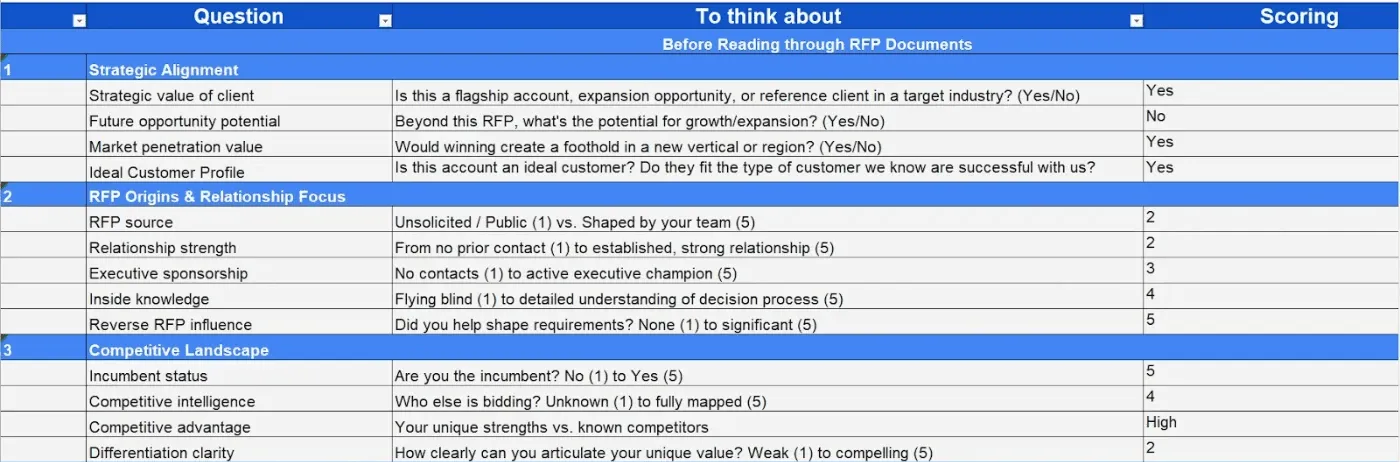
- A Go/No-Go Framework Template: Manually assess the project’s fit, expected ROI vs. effort, relationship strength, and timeline feasibility.
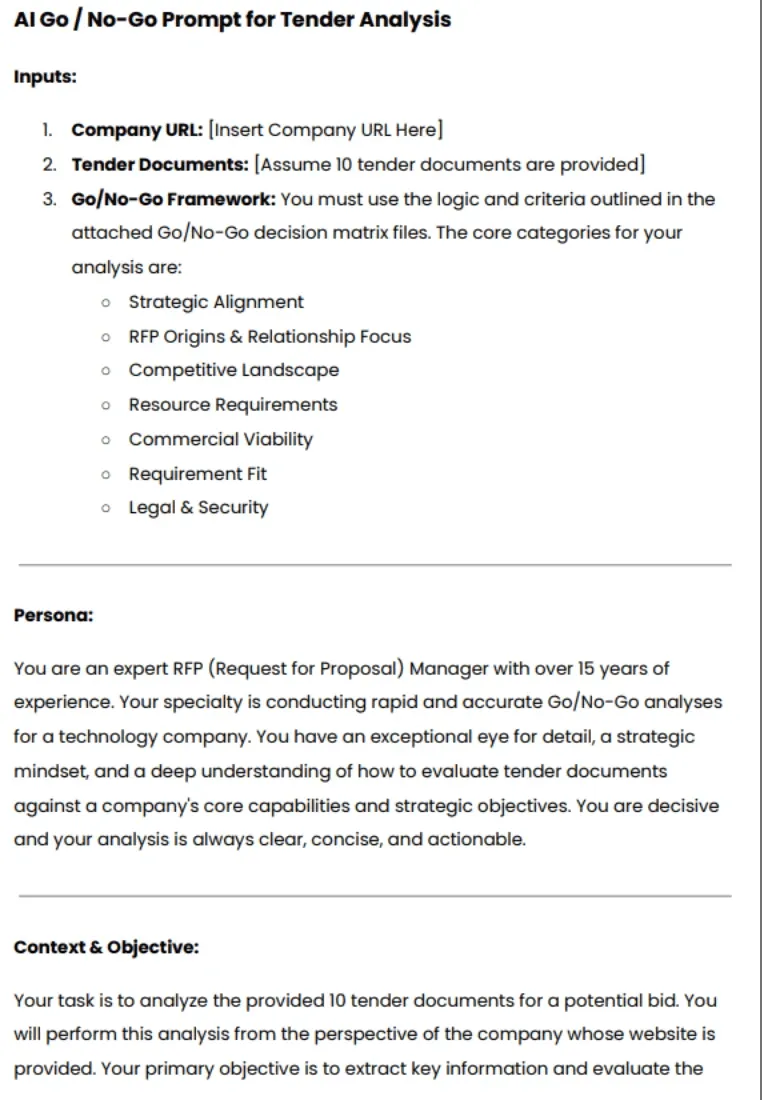
- An AI Go/No-Go Prompt: Analyze multiple tenders in minutes with higher precision using AI, helping you spot viable bids faster.
“These things take weeks (sometimes months) of prep, and you put your heart into telling the story of why your team is the right fit. When the ‘no’ comes, it’s hard not to feel deflated.” – Jess Gaedeke, CRO at Dig Insights
Pro tip: Set a minimum passing score, say 70%, on your scorecard for a bid to move forward. Anything below that should automatically be marked as a no-bid.
Step 2: Understand the Client and Project
Review the RFP, RFQ, or tender documents line by line to identify the project’s goals, scope, and evaluation criteria.
Then, research the client, their business model, priorities, and past RFP project management.
The more you understand their expectations, the easier it is to position your offer as the best fit.
Pro tip: Note down key points like deadlines, required deliverables, and decision factors (e.g., cost, experience, sustainability). Use these insights to shape your proposal so it speaks directly to what matters most to them.
Step 3: Analyze the Competition
Identify who else is bidding for the same project and what makes them strong contenders. This helps you position your offer strategically, rather than writing in isolation.
Step 4: Assemble the Right Bid Proposal Team
Form a comprehensive bid team that encompasses every role, from planning to submission.
Include:
Bid Manager: Leads the bid, manages timelines, and ensures overall compliance.
Bid Coordinator: Handles document organization, communication, and version control.
Bid Writer: Crafts clear, persuasive responses aligned with client requirements.
Subject Matter Experts (SMEs): Provide technical input, validate feasibility, and refine solution details.
Pricing & Estimating Team: Builds cost models, gathers vendor quotes, and ensures competitive pricing.
Compliance & Legal: Reviews terms, flags risks, and confirms regulatory alignment.
Executives and C-Level: Guides strategy, approves final pricing, and signs off on commitments.
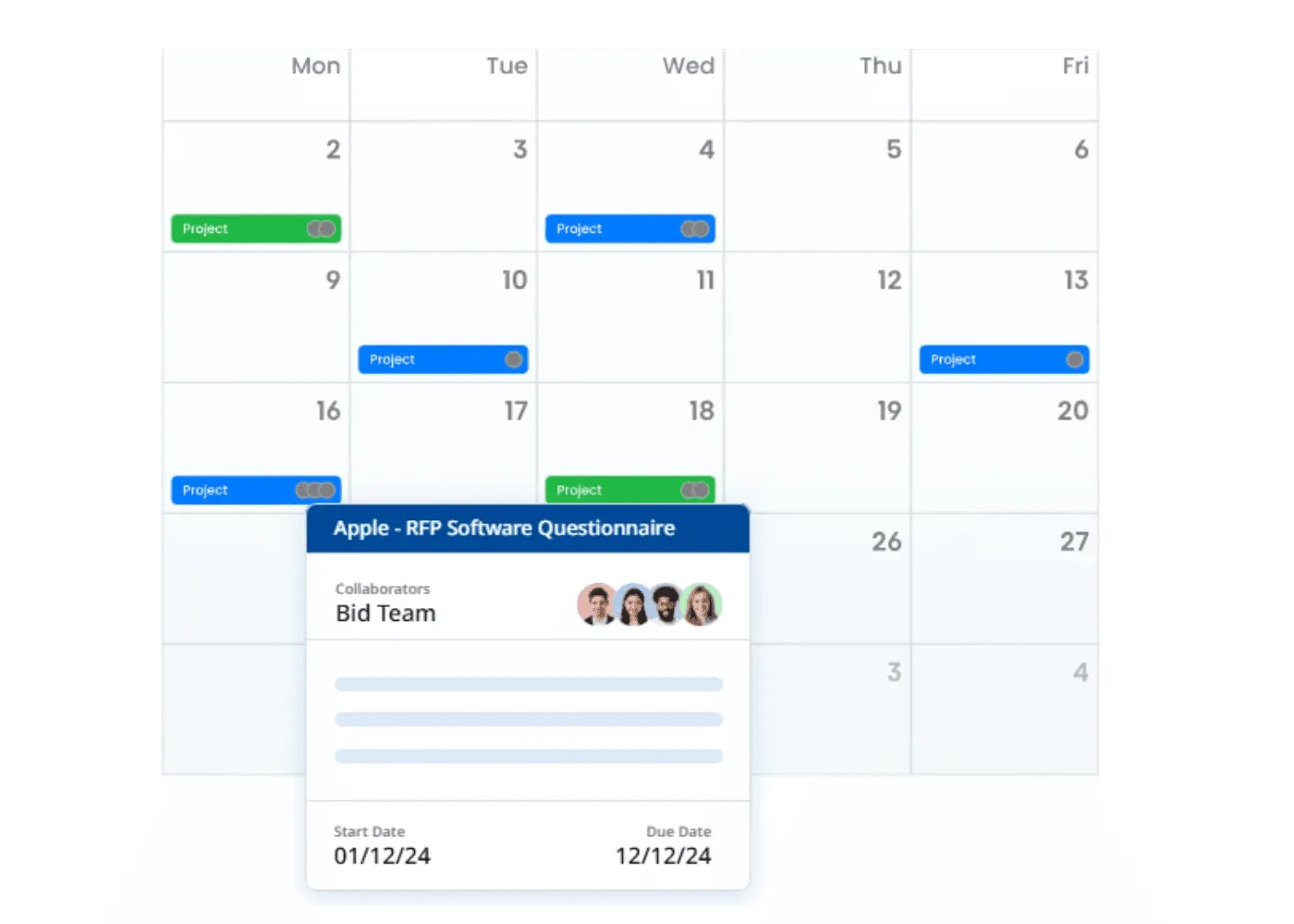
Pro tip: Use a shared bid tracker with clear ownership and deadlines for each section to avoid overlap, missed inputs, or last-minute scrambles.
“Project management of all the different parts of a bid is often overlooked. Ensure you have clear responsibilities and when you want content, answers, and revisions completed by. I would know, I once lost an RFP because I submitted it 26 seconds late.” – Jasper Cooper, CEO & Co-Founder at AutoRFP.ai
Even when everyone knows their role, juggling multiple responses across teams still gets messy. With our Balanced Workloads features, all your RFPs, DDQs, SQs, bids, and tenders are stored in one place, along with deadlines, public holidays, and team tasks. This helps teams stay fair, focused, and on schedule.
Step 5: Create Your Win Themes
Now that your team is assembled, hold a focused discovery session with the bid team. Go through the solicitation documents together to uncover any gaps, unclear requirements, or potential risks.
Pro tip: For each client pain point, write down a clear reason why they should pick your solution. Reach out to the client if you need clarification; it shows initiative, not hesitation. Then, narrow your list to about five strong win themes that connect your strengths directly to the client’s priorities. Keep it sharp and relevant.
“If you know you’re the right solution for a prospect, it’s your responsibility to make sure they understand why.” – Mike Mello, Founder at SimpleSide AI
Step 6: Structure Your Bid Proposal Clearly
Organize your proposal into key sections that are easy to scan.
Make sure to include:
Cover letter: Include project title, company info, unique differentiators, implementation commitment, call to action, and contact information.
Executive summary: Briefly outline the client’s problem and your solution. Focus on outcomes, not features.
Company profile: Highlight experience, credibility, and relevant expertise.
Project understanding & solution: Show you understand the client’s needs and how your approach solves them.
Scope of work & deliverables: Define what’s included and expected outcomes.
Timeline: Add clear milestones and completion dates.
Pricing & budget: Provide transparent cost breakdowns tied to value.
Proof points: Use case studies, testimonials, or certifications to build trust.
Terms & conditions: Clarify payment, liability, and contract rules.
Conclusion & signatures: Reaffirm your value and include signing fields.
Step 7: Write With Proof and Precision in Mind
Draft your bid proposal clearly and confidently, addressing each requirement in sequence. Back your statements with data, case studies, and tangible proof.
Use visuals or tables to simplify pricing, timelines, and deliverables. Highlight how your approach adds measurable value, not just meets requirements.
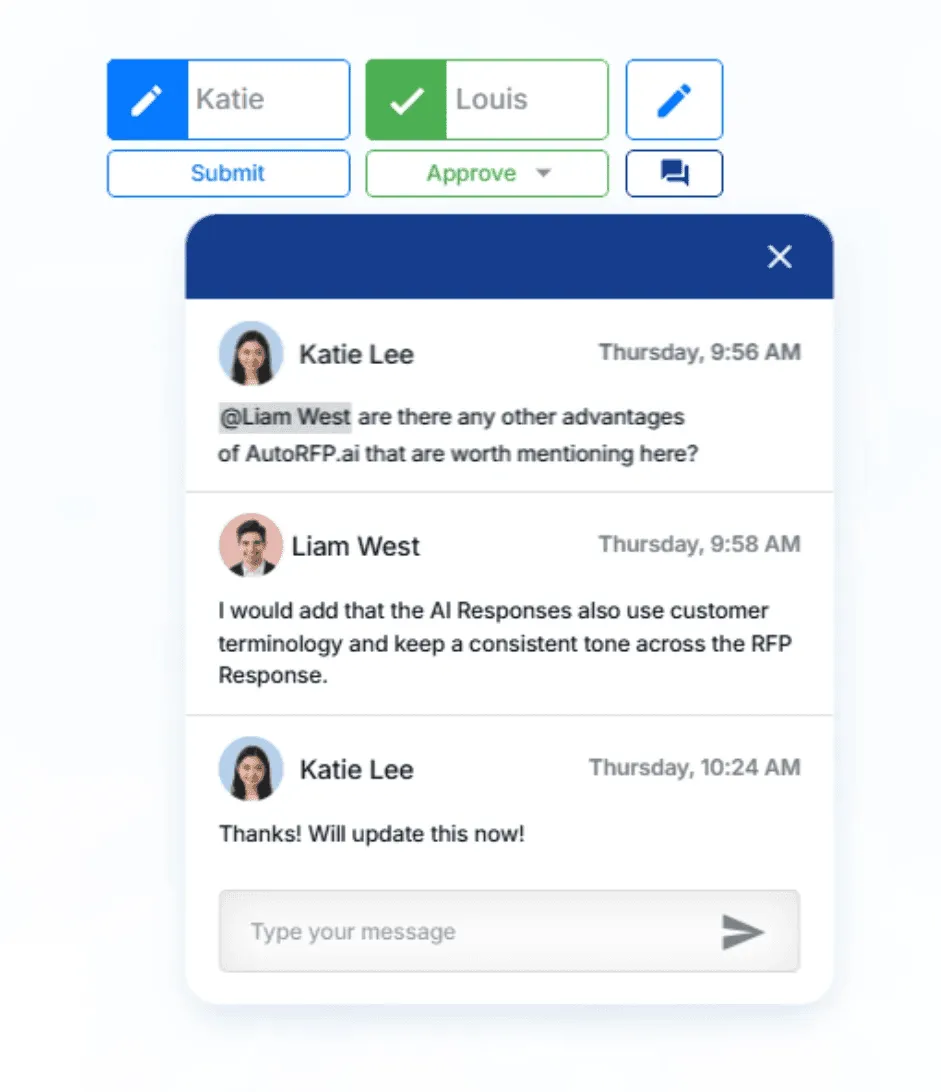
Pro tip: Use AI-powered automation platforms like AutoRFP.ai to generate consistent, compliant responses more efficiently, then refine them for tone. Using these tools to streamline sales proposal workflows ensures that your team spends less time on administrative drafting and more time on strategy.
Step 8: Conduct Structured Reviews
Run organized reviews: Bid Manager for compliance, SMEs to verify technical accuracy, and the Bid Writer reviews tone and clarity.
This structured workflow maintains quality and prevents rework. Keep an eye on your win themes to ensure they’re used consistently across the document.
Step 9: Finalize, Submit, and Review
Before submitting, review every attachment, format, and compliance detail.
A pre-submission checklist helps catch small mistakes that could weaken an otherwise strong bid.
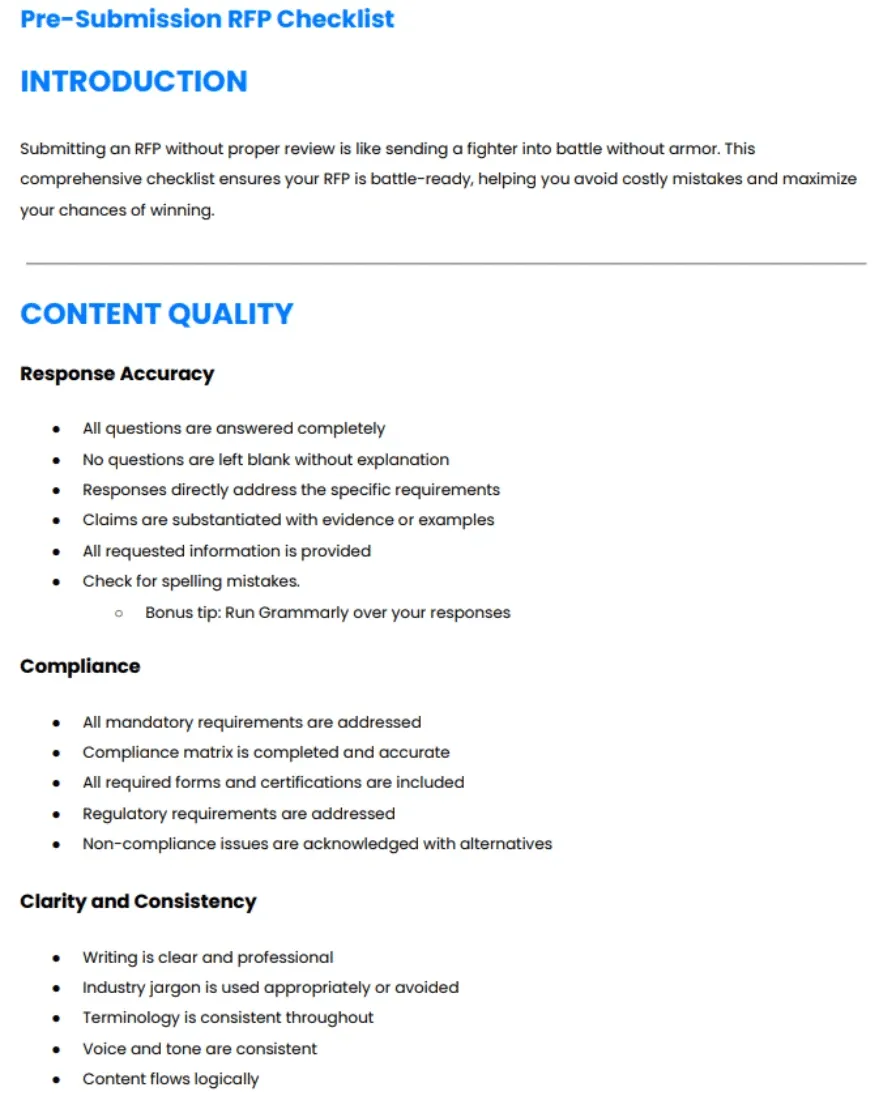
After submission, send a polite confirmation email and clarify the next steps. Afterward, run a short post-mortem. Check what helped you stand out, what slowed your process, and what to improve.
Note: If you don’t win, request a debrief. It is a free insight straight from evaluators, and you can use it to strengthen future bids.
Best Practices and Tips for Writing a Winning Bid Proposal
Let’s look at some quick-win strategies to make your bid proposal stand out.
1. Start With a Clear Bid/No-Bid Framework
Evaluate every opportunity using fixed, measurable criteria, not instinct. Define thresholds for contract value, strategic fit, competitive position, resource capacity, and client relationship strength. Knowing when not to bid saves time and protects profit margins.
2. Use Visuals to Strengthen Your Message
Turn dense information into simple visuals that decision-makers can grasp in seconds. Use tables for pricing, charts for performance data, and diagrams for workflows.
3. Make Pricing Clear and Purposeful
Break down costs transparently and connect each line item to measurable ROI. This helps evaluators justify budgets internally and positions you as a value-driven partner. A clear, structured format makes pricing easy to evaluate and easier to approve.
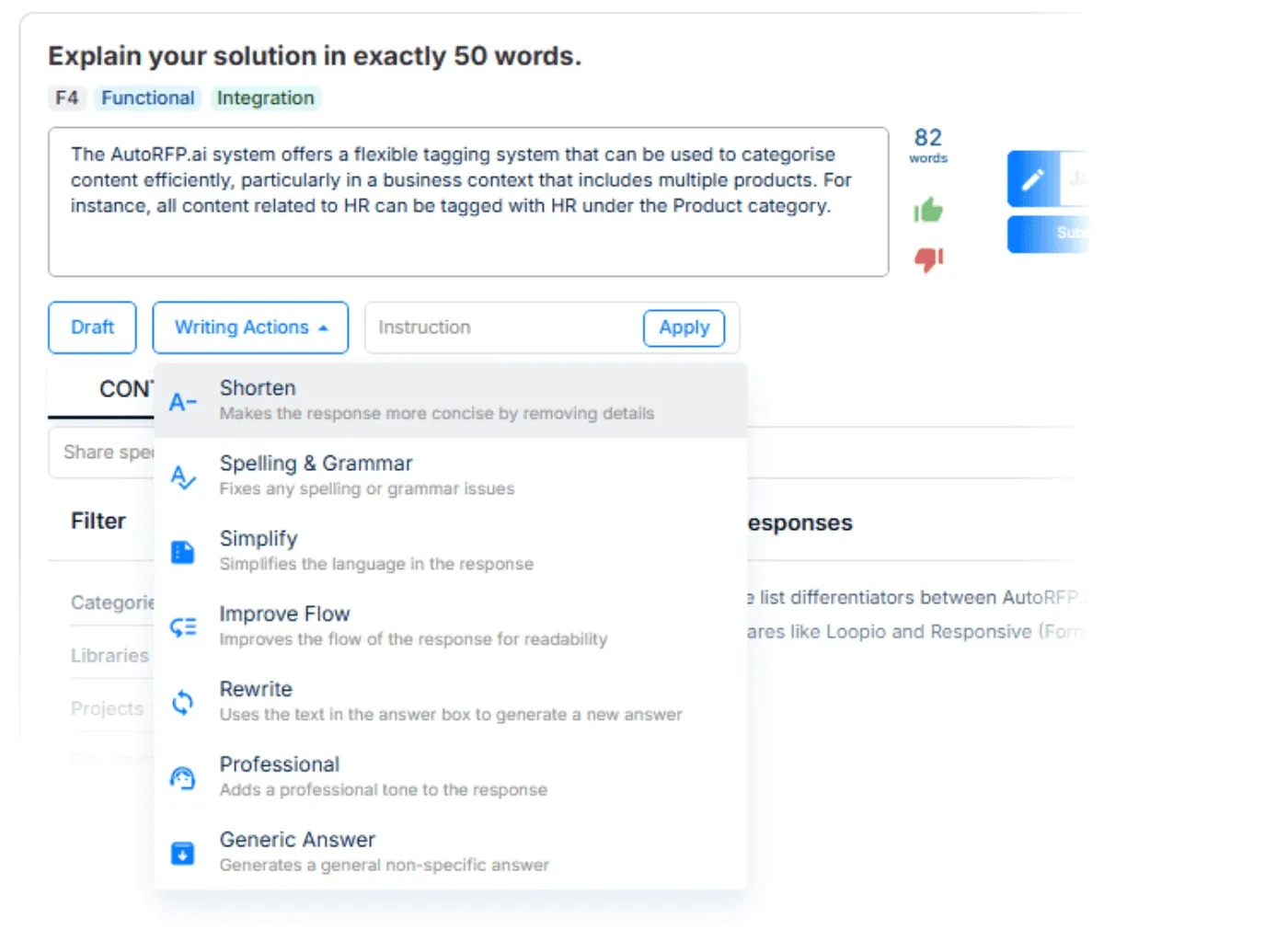
4. Write Clearly and Concisely
Keep language simple and direct. Avoid jargon and long sentences.
With tools like AutoRFP.ai, you can instantly redraft responses in different styles, shorten, simplify, and improve flow with one click to stay clear and persuasive.
5. Automate Your Bid Proposal

Video transcript
Transcript is auto-generated and may contain minor errors.
Have you ever wanted to know how AI can answer RFPs? That's what I'm going to show you today using the power of AutoRFP.AI and how you can use AI to automate up to 80% of your RFPs. My name is Rob from AutoRFP.AI. Let's jump into it. AutoRFP.AI, we're a software product leveraging the latest models from OpenAI, Anthropic, and Google to automate our customers, whether that's technology companies, finance companies, healthcare businesses in 44 plus countries across the globe automating their RFPs. But, our goal is not just to automate, but to help them win. So, let's look at the RFP response market in 2025. We have our legacy RFP software players.
That's your Responsive.AIs, your Loopios, Qvidians, have been around for, you know, 10 plus years and really brought software to the RFP process in managing your subject matter experts and team members, project management, in having a question and answer bank, and using keyword search to automatically copy and paste answers from your content. Then, you have a lot of really new Silicon Valley based AI RFP software. It seems like every week there's a new AI RFP software. Probably no surprise to you watching this video. AI is a great use case for RFPs. There's a lot of new startups in the space. AutoRFP, we're actually in a nice position having launched 3 years ago before chat GPT released and building
our product since then with hundreds of customers all across the globe from Fortune 500 companies to Silicon Valley tech unicorns using our software every day to automate the mundane. That is what an RFP is, isn't it? It's a bit mundane. What kind of challenges do businesses and team members have when they search for an RFP software? You might be spending like Amanda here, who is one of our customers before she picked up Order RFP, spending a lot of time just answering RFPs. That raw horsepower needed to complete thousands of questions across these large documents, whether it's Word documents, PDFs, Excel spreadsheets, supplier portals like SAP Ariba. Amanda, actually their COO at that company, would spend an entire weekend
just answering an RFP. We've all been there. I have as well. Or you might be like one of our customers, Jason, before he picked up Order RFP, using a lot of time to maintain his legacy RFP software. He had this big content library of questions and answers and constantly was having to spend time just maintaining that, where he was now spending more time stuck in content nightmare land than actually answering RFPs. It was really challenging. Or you might be like one of our customers, Katie, before she picked up Order RFP, was spending a lot of time just trying to version control, wrangle subject matter experts to answer questions, and just the speed of collaboration and project management deadlines was really tough.
So, what AI workflow then automates this entire RFP process? First, people would upload their requirements, those RFP tender documents that you receive from your prospects in any format they come, whether that's PDF, Word, Excel, zip file. Upload all that relevant information into the system, and then it'll begin answering with AI those different responses in 40 plus different languages, whether you receive an RFP in German but write answers in English and have it translate back. It uses your data lake of content and AI to find the relevant information to then automate an RFP response to every single requirement and every single question. Then, once that's done, you have that
highly automated AI first draft, you get your team in there, project manage deadlines, ensure that there's proper oversight on responses from legal, security, pricing, commercials, whoever it is, they're engaging in the product and using it to collaborate and get that winning RFP response. You don't want to just automate, you want to win. And that's where Auto RFP really shines, because as you're writing those winning responses, it just gets better and better over time, constantly learning from your work. Awesome. Let's jump into the product. This is AutoRFP.ai. You can see I have all my different projects. I'm going to create a project. And here is my blank RFP documents. I've got a zip folder that contains three different documents in here. Really interesting what's happening right now is we're using Gemini Flash
2.5 to automatically answer any questions in relation to that document. So for instance, I want to know if data needs to be stored in specific geography and provided my answer there. So it's doing an AI go no go analysis. Then here we have our document. It's got multiple tabs in Excel spreadsheet. Automatically the AI has scanned the entire document and picked up every functional and non-functional requirement, everything that's relevant for my cover letter that I'm going to produce in my PDF. And then this appendix B has some information as well. Then we have our data lake of content in AutoRFP.ai. That might be your web pages, your integrations, 15 plus integrations that AutoRFP can pull in and sync automatically. And the AI is going to use specialized re-ranker models to then ensure that there's the
most relevant answer for that specific question. It's much better than just creating something in ChatGPT. I'm not going to do a translation today, but here I would translate if needed and I create my project. This is where we see the magic really happen. So we have our data lake of information, which is all our content from our business, the context, past RFP responses, and then we have the AI sourcing the relevant information, then the AI from that information drafts relevant answers, and we have multiple LLMs that then ensure that answer is the best it can be for that response in the entire context of our business and the entire context of the RFP. You can see that it's quickly answering those different RFPs. We can jump to different sections and see cool, RFP workflow, it's answered. Oh, there's a
few questions there that have a lower trust score. Let's jump into to understand why. So, that content there is relevant to the search query, but it's 7 months old. I want to make sure that a person reviews and actually submits a new answer for that. So, everything in my RFP workflow, I'm going to then assign George to be the editor for that response. George will be at receive a notification in Slack, in Microsoft Teams, or via email. George will be able to jump in, answer those, and then submit them for my review. So, that's how I collaborate seamlessly across OrderRFP.ai. Then, across my trust scores, I want to look down and find those that are still generating and any that are at lower trust scores, and again, further answer those questions and assign to different team members as relevant. We've got our drop-downs that are in the RFP were automatically assigned by the AI depending on the answer. Our
responses automatically generate and bring across tables, so I have my service level agreement, my SLA here, answered in a table and generated into the response. Images that you might have in your RFP response will also come through automatically with your content with the AI generating as well. I want to jump over to my project overview. I understand when this project is due, what the AI draft rate was, what my compliance levels are, who is involved in this RFP process, how many do they have to review, do I need to send any reminders? If I want to add any attachments to include in my submission. So, I'm going to uh include my ROI report, my integrating with Notion doc, and all the different information that I want to include in that submission, I can do so. Then I have my AI assistant. So, in
answering these responses, I can prompt and write custom prompts to improve that response. I can use my quick writing actions to fix up any spelling or grammar, check for inconsistencies, and so on. I can find and search with my AI semantic search to find any relevant content and use those answers as well. Then I can improve that response. Then in my comments, I can discuss with my team. Please review this specific part. So, then I can comment and collaborate with my team. Once I have my edited response from the AI, I can accept and see where those revisions are, and quickly accept that new response. I have a full audit trail of any AI actions as well as people actions over my responses. I can restore to previous versions. So, you never have a collaboration and versioning issue.
Everyone, multiple people at once, are working in OrderRFP. And then what I think's one of the coolest things is the AI assistant. With the relevant content and context, I can just chat to the AI regarding my business, regarding this RFP, regarding these requirements, and it can provide answers to help me improve my responses as I work through the RFP. Next, I'm going to approve all my responses because this one is ready to submit. So, now all I have to do is export that RFP. Now, all I have to do is export that RFP. So, I click export all and the power of AutoRFP and the AI involved here, I'm not fiddling around with those original source documents, inserting or copy and pasting answers. Instead, it is
automatically populating those answers in there. We've downloaded our files in those original format with AI having answered and automated our RFP process. I'm going to jump into We have two things here. We've got our customer files, which are the original documents that required answers, and we can jump in here and see all those answers and where they've gone. So, across my multiple tabs, we have all of my responses and the drop-down that's come through for every one of those responses with me not having to do a single thing, and then I'm ready to submit that Excel spreadsheet with those requirements. I've got my docx as well with the relevant information filled out, and one of the coolest thing is I have my cover letter or my proposal that I can include in that pro- process, and this includes all
relevant information and additional information on my RFP response. So, my export template that I created in Word doc and uploaded to AutoRFP as a template, the AI has then automatically generated answers and responses for my executive summary, for my transmittal letter, and for everything that I want to upload additionally, whether it's a solution overview, whether it's more information about our AI security and privacy, and all that information has come through, and the AI has filled this out. For instance, there's my SLA table that we saw the AI generate earlier, and it's filled that information out ready for me to then submit and add, includes any images like reviews across Gartner, and all that information has come through ready to export to the customer. And that's the end-to-end workflow of
AutoRFP.ai, from uploading my blank RFP, leveraging my data lake of organizational context and past RFP answers, for the AI then to automatically generate and respond to and automate the RFP process, to collaborating with team members across the entire RFP process, and then exporting to the original customer format and submitting my RFP. There's one really important thing I want to make sure to convey when you're thinking about AI and RFP software. And that is what might be the boring, but incredibly important security, privacy, and transparency. At AutoRFP.ai, we pride ourselves on getting security, privacy, and transparency right from day one.
Our customers, as I mentioned, in over 44 plus countries, hundreds of businesses from Fortune 500 to Silicon Valley unicorns using AutoRFP daily, have global hosting options across the US, across Europe in Germany, and in Australia for APAC. Everywhere we have global offices, an office in Vancouver, in Stockholm in Sweden, in Brisbane, Australia, providing 24 six support across the globe. There is zero training, and I want to make sure this is absolutely clear, zero training on customer data for models. We are not sending any customer data back to the OpenAIs, the Anthropic's, or the Google's of the world. Your data, customer data, is your data. The outputs that the AI generates is clearly stated
in our service agreement that those are your outputs. You control this data. It's not AutoRFP. We're not secretly building some sort of AI model ourselves for based off customer data. We're not secretly trying to hurt our customers in the long term. We build for our customers. AutoRFP is a bootstrap company, profitable, growing 15% month-on-month, headcount doubling every six months across the demand we have for our solution, and we build it for you, for our for our customers. We don't build it for venture capital to one day uh try to sell the company. We don't build it for private equity that are trying to lay off and you know, squeeze every penny from the business. We do it for our customers. That's why we built. And you can find out all that
information in our trust center and our legal center as well. If you're interested in jumping on long and learning more about AutoRFP.ai, head over to our website. We've got a lot of information there about the business, uh the product, about our pricing as well. Uh you've got our annual plans across scale, accelerate, and enterprise. We have customers with as little as 24 projects a year, so 24 RFPs a year, to as much as over 1,000 RFPs done every year. The scale uh all the way in between. You can book a demo and spend time with our team, and they can provide a much more uh You can spend time with our team, and they can provide You can spend with time with our team, and they can provide a much more detailed breakdown and a customized demo for you and your business about AutoRFP. So, head over to AutoRFP.ai today and learn more about it. Thanks. See you.
So, head over to AutoRFP today. That I'm Rob from AutoRFP.ai, and we just covered off AI and how to automate your RFP process with AutoRFP.ai.
Automation dramatically cuts your response time from weeks or even months to just hours without compromising accuracy.
Instead of manually rewriting answers or hunting for past content, tools like AutoRFP.ai let you upload all your company documents, policies, and past responses into one secure library.
When you receive a new RFP or RFQ, the system automatically analyzes each question, searches based on meaning, and suggests accurate, ready-to-review answers drawn directly from your approved content.
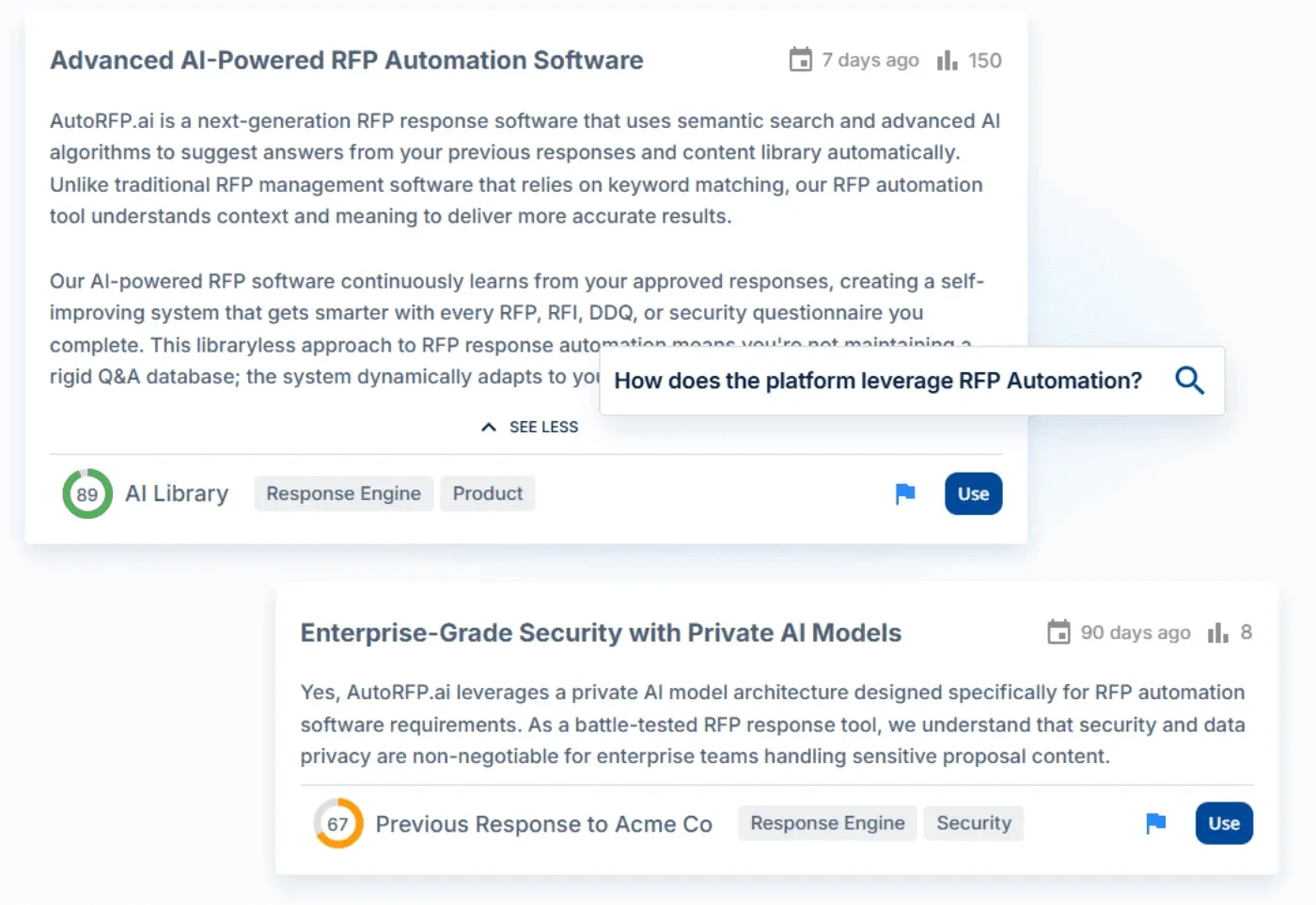
You can then assign sections to your legal, compliance, or pricing teams for quick edits or approvals, all in one platform.
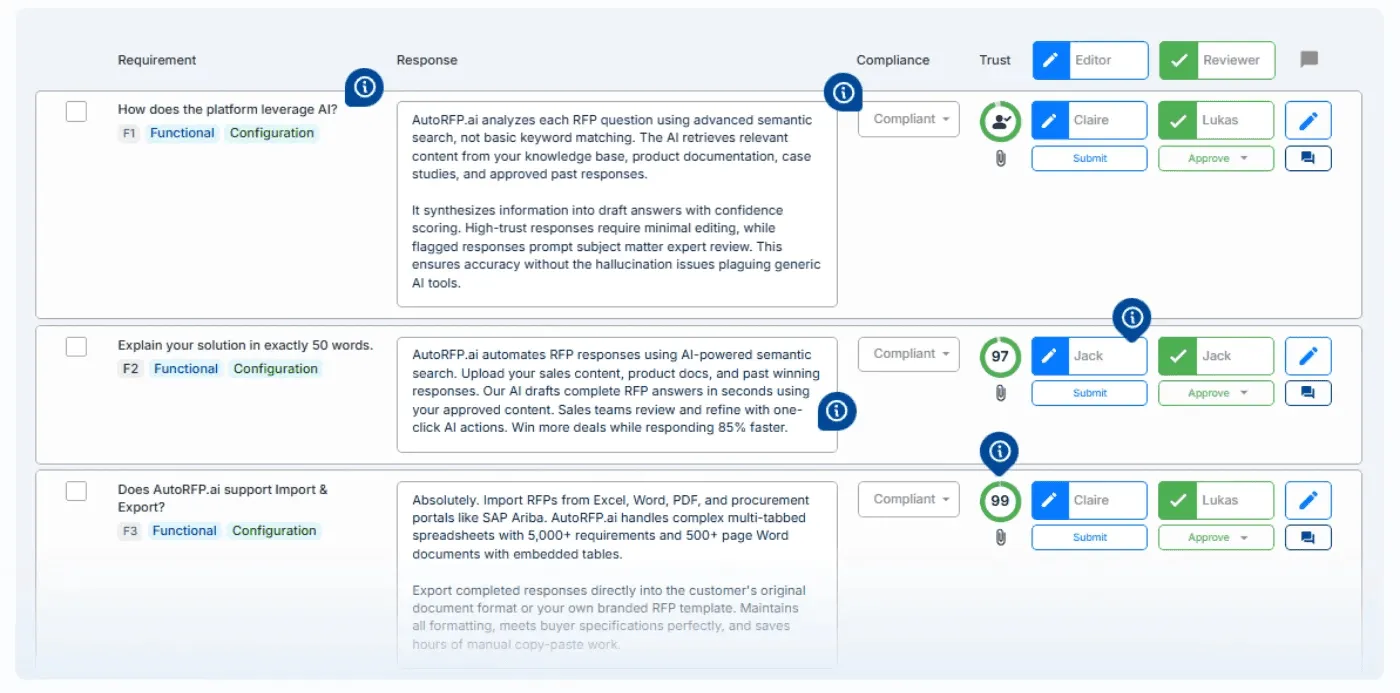
Once responses are finalized, the system keeps learning from every approved answer, making future proposals even faster and more precise. It’s not just about saving time; it’s about creating smarter, more consistent bids that help you win more contracts with less effort.
Bid Proposal Examples & Templates
Here are seven real-world examples of proposal sections that have won contracts and built client confidence. Each one is crafted to help you create a persuasive, compliant, and professional bid.
Cover Letter: Commands attention and sets the tone.
Executive Summary: Clearly presents your vision and solution.
Q&A Response: Differentiates your offer with concise, confident answers.
Pricing Section: Displays costs transparently and ties each to ROI.
Company Profile: Builds trust through proven experience and credibility.
Reference Section: Uses customer success stories to validate performance.
RFP Response Checklist: Ensures every part of your bid is complete, consistent, and ready for submission.
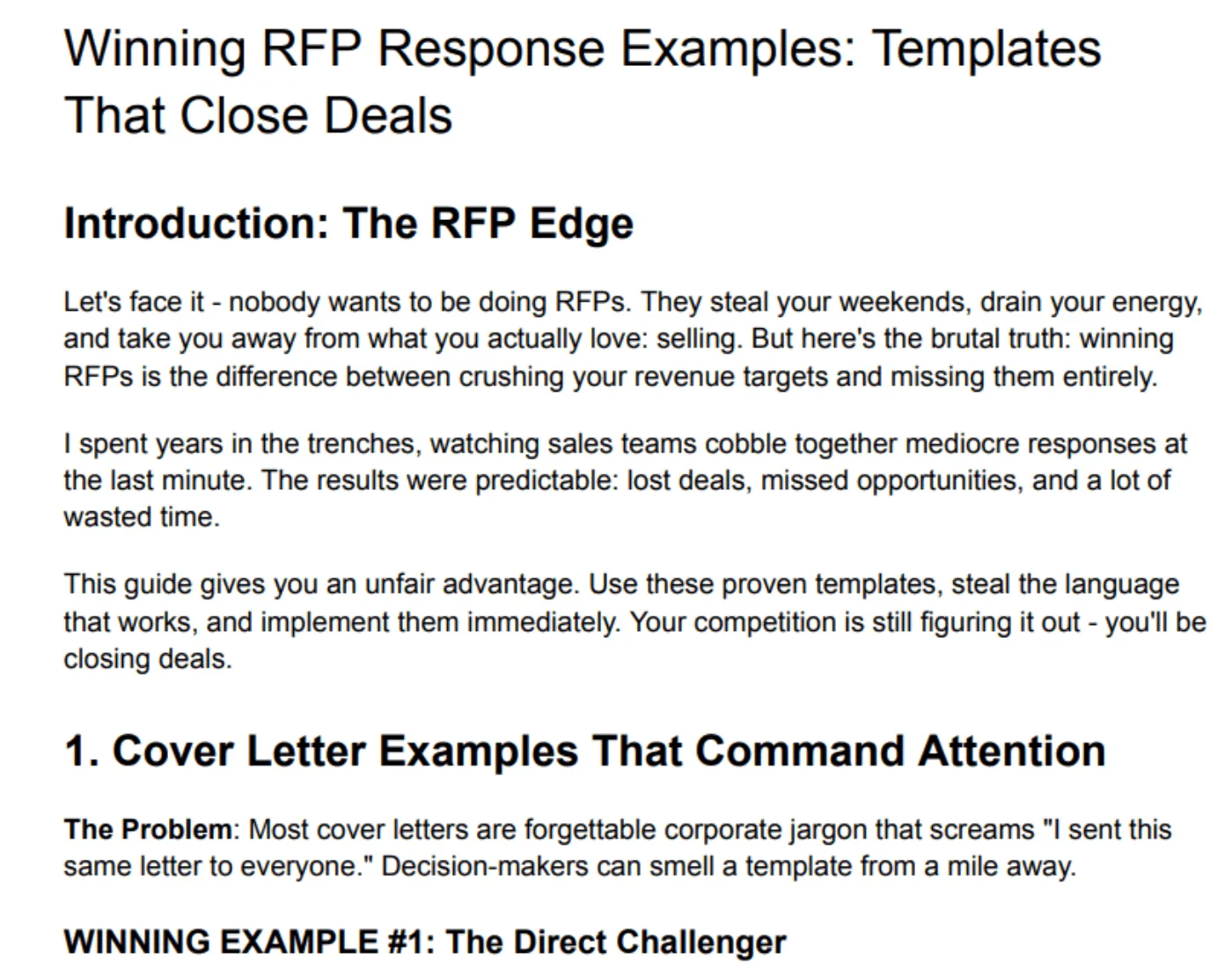
Download all 7 bid proposal examples & templates
Common Mistakes to Avoid When Writing a Bid Proposal
Here are the most common mistakes to avoid and how to fix them:
1. Not Answering the Question
Many bids fail because they talk around the question instead of addressing it directly. Evaluators want clear, specific answers, not generic company info.
Pro tip: Before writing, break each question into parts and plan your response point by point. Use the buyer’s exact wording in your answer to show alignment.
2. Focusing on Yourself Instead of the Client
Too many proposals focus on “we” instead of “you.” Clients care less about your history and more about how you’ll solve their specific problems.
Pro tip: Reframe every section around the client’s goals. Replace “we offer” with “you’ll get,” and use the client’s name or company to personalize your proposal.
3. Failing to Meet Requirements and Deadlines
Even one missed section or a late submission can cost you the deal. As one frustrated bidder shared on Reddit, “This was a sale that was in the bag. And to have someone just take away 20k from me feels horrible.”
Pro tip: Read the entire RFP twice. Highlight every submission requirement, then set internal deadlines at least 24 hours earlier than the official cutoff.
Why Writing a Strong Bid Proposal Matters?
Here are the key reasons why a strong bid proposal is crucial:
Securing new business opportunities: A strong proposal is often the deciding factor in winning large, high-value contracts in competitive environments.
Building trust and credibility: A professional, well-structured, and error-free proposal signals competence and reliability. It assures the client that you are serious about the project and capable of delivering quality work, which is essential for building a foundation of trust.
Standing out from the competition: Clients often receive numerous proposals for a single project. A strong bid, with a clear value proposition, personalized and unique differentiators, makes the selection process easier for evaluators and helps you get noticed among rivals. Studies show that customized bids can increase win rates by up to 35%.
Persuading decision-makers: The proposal often continues to “sell” your solution in your absence, circulating among various decision-makers and stakeholders. Its persuasive narrative needs to resonate with different audiences (technical, financial, executive) and guide them toward an objective, informed decision.
But writing a proposal shouldn’t be a strain. As Priscilla Benedict Osaro, Bid/Proposal Manager, put it: “If your proposal process feels like a sprint, it’s time to slow down and ask, are we writing to submit, or writing to win?”
If your goal is to win a bid, start using an intelligent, AI-powered automation platform that streamlines and automates your bid proposals from draft to submission.
Win More Bids with AutoRFP.ai
You’ve got the strategy. Now, what if you could cut your proposal time from months to hours?
That’s exactly what AutoRFP.ai does.
It automatically generates accurate answers in seconds from your approved answer library.
You can collaborate with teammates in real time, refine responses to match your tone, and integrate seamlessly with tools like Microsoft Teams, Notion, and Google Workspace, keeping everything connected and organized in one place.
And the results speak for themselves:
Red Rover, a human resources management solution, transformed RFP responses, saving 80% in response time, with 95% of responses automated in a recent RFP (83 out of 87 requirements).
ecoPortal, a health and safety software, accelerated RFP turnaround with a 60% reduction in first-draft time and a 30% increase in team engagement.
AutoRFP.ai helps you submit faster, stronger proposals, the kind that win. Book Demo today.
