
Tender Management: Process, Best Practices & More
Learn what tender management is, how it differs from bid management, the key stages and timeline, common obstacles, and the best systems to run tenders at scale.

Robert Dickson
RevOps Manager, AutoRFP.ai··7 min read
Most teams don’t lose tenders because they are unqualified. They lose because information is scattered, deadlines creep up, and every response feels like reinvenThe right tools can cut response time, reduce errors, and help teams reuse winning content instead of starting from scratch each time.ting the wheel. If that sounds familiar, you don’t have a “tender problem”; you have a tender management problem.
This article breaks down what tender management is, how it differs from bid management and procurement, and outlines the key stages of the tender management process, as well as how to optimize each step.
You’ll also learn the best practices, common obstacles to watch for, and the systems to optimize tender management.
What Is Tender Management?
Tender management is the process of finding, evaluating, and responding to business opportunities where buyers ask suppliers to bid for goods, services, or works. It covers everything from spotting a tender, deciding whether to bid, coordinating inputs from different teams, writing the response, and submitting it on time.
Common tender types include:
Request for Proposal(RFP): Asks for detailed solutions, methodology, and pricing.
Request for Quotation (RFQ): More focused on price for a defined product or service.
Invitation to Tender (ITT): Often very formal, with strict compliance and documentation rules.
Today, most of these are issued and managed through e-tender portals, where suppliers download documents, ask questions, and upload responses.
Good tender management is structured and repeatable: you have clear go/no-go criteria, standard response templates, a content library, timelines, and owners for each task. Poor tender management is ad hoc chasing: people scramble for answers in old emails, rewrite content at the last minute, and treat every deadline like an emergency.
Note: Strong tender management matters because it turns bids from stressful one-offs into a predictable, winnable revenue stream.
How Is Tender Management Different From Bid Management or Procurement?
Procurement is the overall function of acquiring goods or services, while a tender is a formal, often public, invitation for suppliers to submit bids. Tender management and bid management are closely related activities that fall within the broader procurement lifecycle.
These three concepts are related but distinct. Here’s how they differ:
| Criteria | Procurement | Tender management | Bid management |
|---|---|---|---|
| What it is | The entire strategy and process of acquiring goods and services | How your organization organizes, tracks, and governs all incoming tenders/RFPs/RFQs, and decides which ones to pursue and how to respond | How your team plans, writes, prices, reviews, and submits a single tender response for a specific opportunity |
| Who owns the budget? | Procurement team with the internal budget holder | Sales & commercial leadership sets overall “cost-to-bid” limits and pricing guardrails; tender management ensures bids are run within those rules. | Bid manager works with the account owner, sales, and finance to stay within the approved price, margin, and bid budget. |
| Who owns submission? | No one. Instead, procurement receives, opens, and evaluates submissions from suppliers. | Tender management defines the process and tools, but individual bid teams are responsible for submitting each response. | Bid manager & coordinator own the final submission, ensuring the response is complete, compliant, and submitted on time. |
When procurement, tender, and bid teams blur lines and no one clearly owns budgets or approvals, submission deadlines slip, and key risks get missed. Clear governance, with defined owners and sign-offs, keeps the process compliant, efficient, and under control.
What Are the Key Stages of the Tender Management Process?
Let’s go through the main stages of the tender management process so you can see who does what, when, and why it matters.
Stage 1: Tender Capture and Logging
You receive tenders/RFPs/RFQs from portals, email, partners, or frameworks, and log them so nothing falls through the cracks.
Inputs:
New tender alerts from portals, partners, or direct invites
RFP/RFQ documents, attachments, and deadlines
Activities:
Register each tender in a central tracker or tool
Record key details: client, scope, value, deadline, submission method, internal owner
Outputs:
A single, up-to-date tender pipeline
Basic data ready for qualification (risk, size, sector, timeline)
Stage 2: Qualification and Bid/No-Bid Decision
Assess if the opportunity is winnable and fits your strategy, instead of chasing every RFP.
Inputs:
Logged tender details from Stage 1
Qualification criteria (fit, risk, price pressure, capacity, competitor landscape)
Internal view of: expertise, resources, capacity, and strategic fit with your client base
Activities:
Score the opportunity using a simple go/no-go framework
Ask:
Do we have the expertise, resources, and capacity to deliver this profitably and on time?
Does this opportunity align with our strategic goals or existing client base?
Run a quick review with sales, delivery, finance, and leadership to agree on bid, no-bid, or revisit later.
Note: To avoid disqualification on knockouts, create a simple compliance matrix as soon as you receive the RFP, so that every must-have requirement is clearly mapped to your response.
Outputs:
Clear decision: bid, no-bid, or revisit later
Short, documented rationale
If “bid”: nominate bid manager and core team
Pro tip: You can evaluate tenders using an AI Go/No-Go Prompt, which analyzes multiple tenders in minutes with higher precision, allowing you to apply your go/no-go framework consistently and spot viable bids faster.
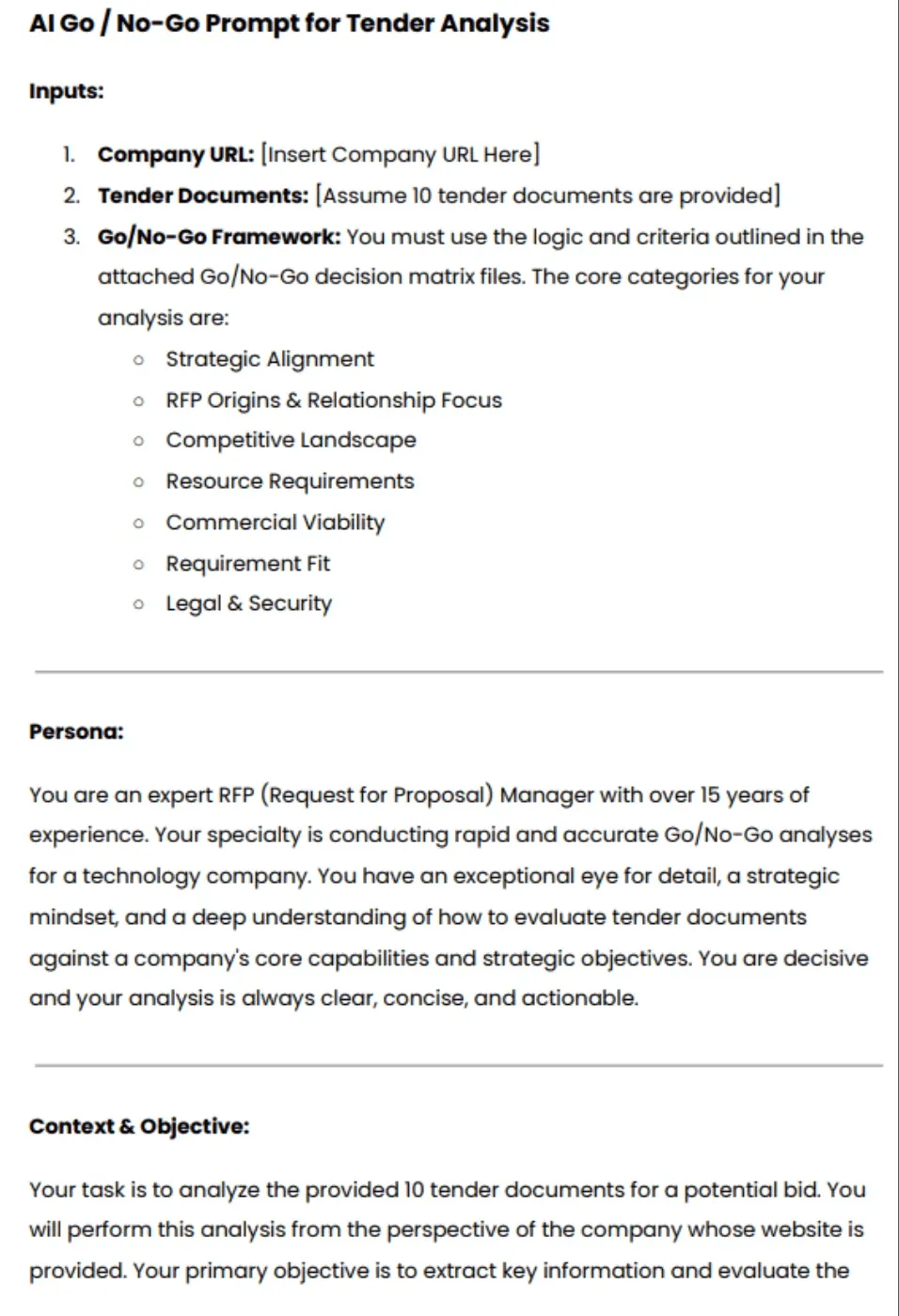
Download the complete AI Go/No-Go Analysis Prompt
“I’ve worked in procurement long enough to know this: Evaluating tenders shouldn’t take weeks. You deserve tools that work as intelligently as you do.” – Dr Salisu Uba, FCIPS, CEO at NatQuest
Stage 3: Bid Strategy and Solution Design
Decide with your team on how you will win and what you will actually propose. Shape the offer, win themes, and commercial approach before anyone starts writing.
Inputs:
Full tender documents and requirements
Qualification outcome and initial win/no-win signals
Internal knowledge: previous bids, case studies, reference projects
Activities:
Clarify client needs, pain points, and success criteria
Define win themes, differentiators, and key messages
Outline the solution approach, delivery model, and commercial strategy
Outputs:
A short bid strategy document or slide deck
Agreed pricing strategy and guardrails
Clear messaging guidance for writers
Stage 4: Response Planning and Content Development
Now you organize the work and draft the response. You break down the RFP response into sections, assign owners, and start writing.
Using AI tender writing at this stage can help your team draft high-quality, compliant responses quickly while maintaining consistency across all submissions.
Inputs:
Bid strategy and solution outline
Existing content library, case studies, and CVs (if you have them)
Activities:
Create a response outline with responsibilities and deadlines
Draft answers, tables, and supporting documents
Reuse and adapt the approved boilerplate where relevant
Outputs:
First full draft of the tender response
Completed annexes: CVs, case studies, certificates, policies
A clear list of gaps or questions for internal SMEs
Stage 5: Review, Pricing Finalization, and Approvals
At this stage, ensure the bid is correct, compliant, and profitable. You refine the response, address gaps, and finalize pricing and approvals.
Inputs:
First full draft of the response
Draft pricing sheets and assumptions
Internal review and sign-off requirements
Activities:
Run content reviews: compliance, technical accuracy, and clarity
Finalize pricing and commercials with finance and leadership
Secure internal approvals for risk, legal, and margin
Outputs:
Final approved response content and pricing
Checked, compliant documents ready for submission
Internal record of approvals and key assumptions
Note: Early pricing gives your team time to model scenarios, confirm margin, and secure approvals instead of scrambling to fix the numbers just before the deadline.
Stage 6: Submission, Clarification, and Lessons Learned
Finally, you submit on time, handle clarifications effectively, and learn from both wins and losses.
Inputs:
Final approved response package
Client submission instructions and portal access
Any clarifications from the client
Activities:
Submit the response according to instructions and deadlines
Coordinate answers to clarification questions or BAFOs (Best and final offers)
After the result, run a short win/loss review and request feedback
Outputs:
Confirmed submission and proof of delivery
Actions from debriefs: what worked, what did not
Update the content library and playbook based on lessons learned
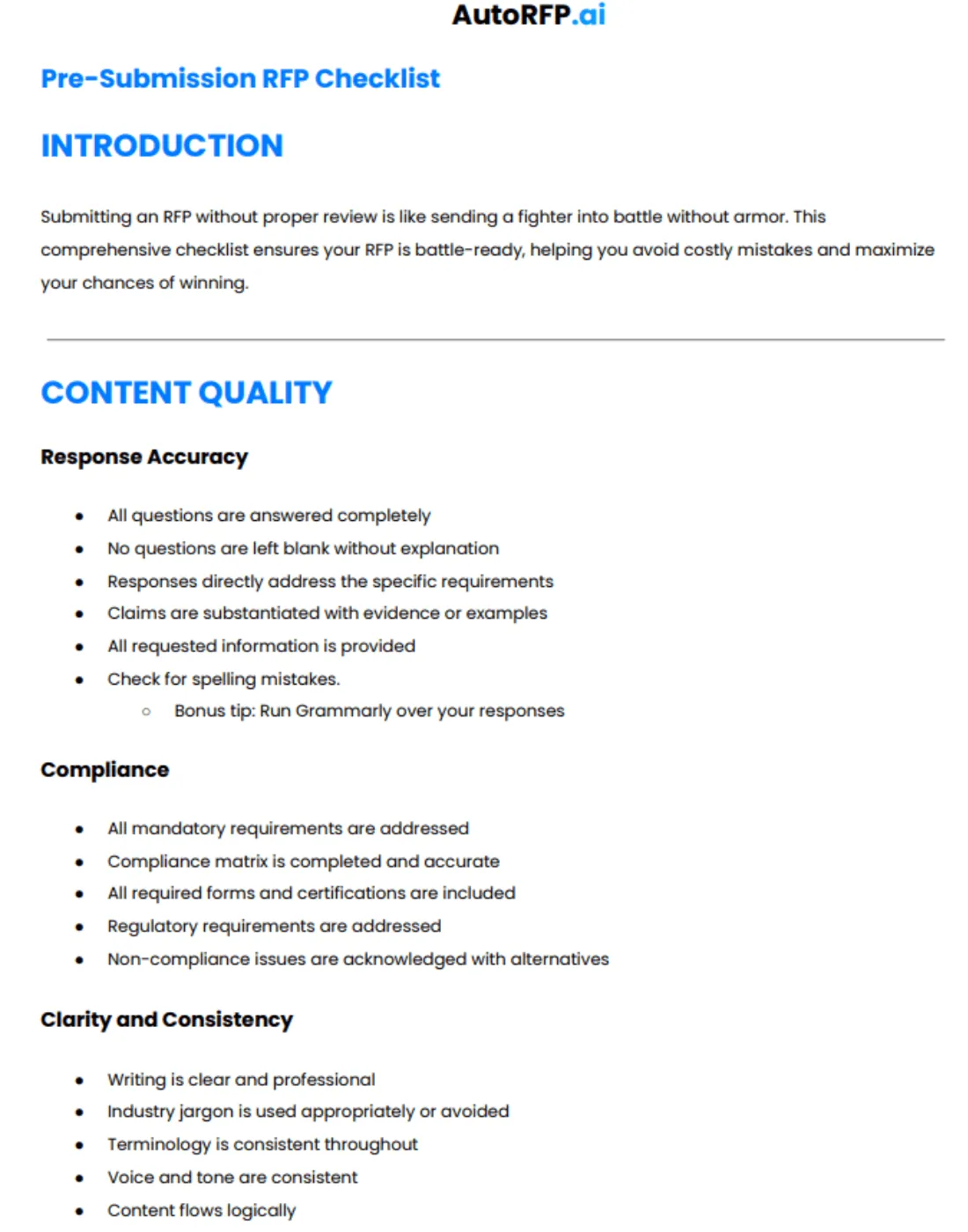
How to Optimize Your Tender Management Process?
Here’s how to optimize your tender management process so you qualify smarter, respond faster, and submit stronger bids.
Step 1: Build a Simple Qualification Scorecard
Build a simple qualification scorecard or RFP go/no-go framework to score fit, ROI versus effort, relationship strength, and timeline.
If you do not want to start from scratch, you can adapt a basic go/no-go template like the one below.
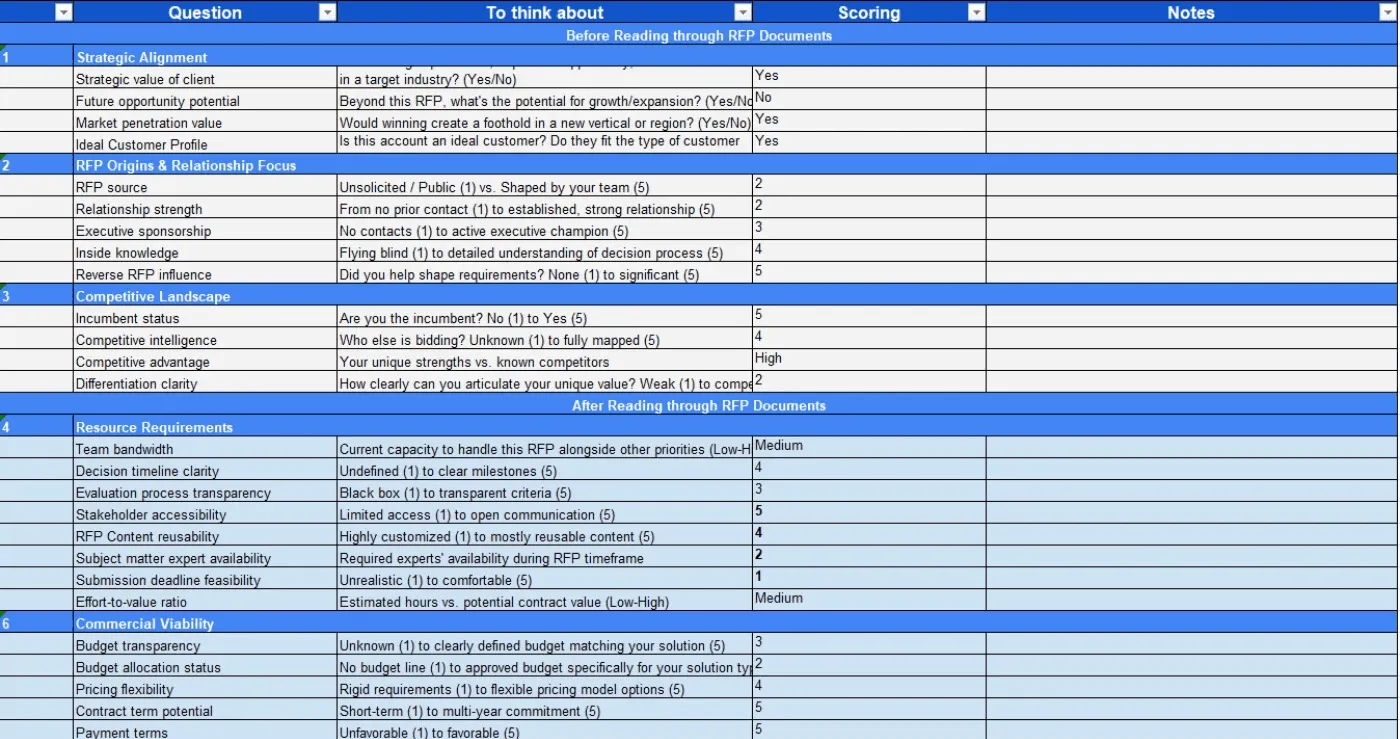
Download the complete scorecard
The template helps you quickly rate factors such as:
| Factors | Key question to ask |
|---|---|
| Strategic fit | Does this RFP match your core strengths and long-term goals, or drag you into heavy custom work? |
| Budget alignment | Is the client’s budget realistic for your pricing and still worth the effort? |
| Deal-breakers and risk | Are there any knockouts (certifications, scope, security, etc.) that make this a non-starter? |
| Winability and capacity | Can you realistically win and deliver, given your differentiators, bandwidth, and timeline? |
Here’s a short walkthrough on using Gemini to run AI-backed go/no-go checks using the earlier prompt and the scorecard.

Video transcript
Transcript is auto-generated and may contain minor errors.
Hey, have you ever wanted to use Gemini for your AI go no go analysis? We're going to jump into it today using Gemini to do our tender analysis to understand if we want to bid on this tender or not. I'm going to be using Gemini Flash 2.5 Pro which currently available on the paid Gemini plan. Uh, and we're going to be looking at a tender actually from the Australian government. Uh, so this one specifically is the ATO, the Australian Tax Office. And interestingly enough, this tender is for a coding assistant. So like an AI coding software SAS application. I use an AI coding SAS application that I love to use every day and that's cursor. So we're going to look at cursor who have an enterprise plan. So making a pitch for the likes of the ATO's and we're going to look at this publicly available atto tender and
whether cursor should bid on it. So we're going to be using our AI go no go analysis tool with Gemini. So let's jump into it and and wait until the end because the results of the AI go nogo analysis may actually surprise you. So, first of all, um I've got this prompt, and I'm going to leave a Google doc uh or page where you can download this uh prompt and then customize it for your business down in the description below. Uh but of course, um you know, I you can customize to your heart's content. When we're prompting, it's really important to a make it contextual to our business, which is where we have the inputs here. So, I'm going to enter the cursor URL. Uh we have our persona. So effectively that's telling the Gemini flash 2.5 what you know what kind of uh person is going to be what skill set should it have what context should it have when it answers this question in this case it's an expert RFP manager uh then we have
our context and objective so what are we asking the prompt effectively to do what are the instructions and then what should the output be so from this case I want a comprehensive document detailing against my red flags or amber flags or green flags around whether cursor should bid on this tender or not. So, I'm going to just, you know, copy and paste that prompt, chuck it in here. Then, uh, really cool thing is I'm actually going to turn on deep research. So, deep research is a tool readily available in a lot of your uh common LLMs whether that's uh Gemini as I'm showing here, Chat GPT or Claude. Gemini's deep research can be used not only to search the web but also search your documents. So, with Gemini, you can upload up to 10 documents. And for this, I'm actually going to be using my own go nogo
template. The go no-go template. Again, I'll chuck a link in the description below where you can download that from our website at autoirfp.ai/d downloads, but effectively this will have information. And this is my go no-go framework. What I'd recommend is downloading the template, changing the go no-go framework uh to make it more relevant for your business as needed. But it's a good starting point. Uh for for instance, this really focuses on RFP origins and relationship. uh it looks at resource requirements from our team and then effectively it gives you a scoring matrix and depending on that scoring matrix matrix should tell me whether we should proceed or not uh as well and it has all the different information you can like play around with your hearts content it's just an Excel spreadsheet um but really useful for your go no-go decision framework all righty so jumping back uh I've turned my deep research on and now I'll upload my documents from drive. And so
here are my tender documents. Uh just clicking shift, I'm just going to select all the relevant ones. I can only upload maximum of 10 documents. So I'm actually going to upload the original tender documents, not the indenments. We'll up upload those later. So I'm going to insert those documents. And there's one other document I want to add from my drive. And that actually is that go no-go decision template. So now I have my go no-go decision template. I've got my atto documents uh for the tender and I've got my prompt of what I want Gemini Flash 2.5 Pro to do for my AI go no-go analysis strap in it's pretty cool what you're actually going to see here as well all my tender documents and it's deep researchers on but before I submit this I want to make sure here in the prompt that you can download below is I'm going to update this information so uh tender documents uh see attached As you can see, I've attached them. And in terms of the company URL, well, here
I just want to make sure I I'm just going to enter cursor here. This is a AI coding assistant tender for the Australian tax office. And you know, in this example, we're being cursor. I do not work at cursor. I work at autofp.ai. But for my example, I click submit. And then what I really like about Gemini is it's going to provide a research plan for my AI go no-go analysis. So with that plan, it'll provide a lot of details in terms of the steps it's going to take to try to answer my prompt. And then I can actually edit that plan if I'd like to. And here we have our plan from Gemini. So clicking through I can go through I can read this information. First it's going to browse the cursor docs and all the information regarding cursor. It's going to go and analyze all the tender documents and then it'll make its way through and start to answer my go no-go questions. So, what I recommend here again is a edit the analysis template, the go no-go decision
template. Make that really relevant for your company and when you decide to bid or not to bid for tenders uh and RFPs. And then second is uh in this prompt, make sure you update what questions you're asking. if there's any specific questions like red flags you want for cursor. It might be well cursor doesn't do uh on premise hosting. So want to make sure that's flagged and then uh there's the information and then I can click start research and Gemini flash is going to start doing our AI go no-go analysis. All righty. I've given it some time. time it probably took oh jeez uh maybe about 10 minutes all up which is what you expect for the deep research uh especially for something that goes through you know 10 different tenor documents probably hundreds of pages and uh uses the organizational context that we provide it in the website of cursor to then run a go nogo analysis against that go no-go decision template. So jumping into it, uh before I show kind
of the output, what you have here for deep research is you can look at the thoughts. And so this kind of explains or at least in some cases LMS do hallucinate their thoughts, but in this case we can hopefully trust it and see that what it kind of looked to and what it did uh in completing that analysis. So it looked at the different websites. It then uh looked at the research uploaded folder files and then use that against the decision template to then try to provide an overall go no go as well. Here are the sources it used. Again, it can refer to those Google Drive documents I provided which is really powerful for that Gemini has such a good integration. Obviously, probably no surprise with Google Drive. And then scrolling up here is our analysis. So Gemini has provided an AI go nogo analysis based off the ATO tender documents for an AI coding assistant which we've mocked up as cursor.com to
reply and say should we bid on this where AI go nogo is powerful is it does help with that cursory first look whether this is worth it to look what information should I understand before diving to it further um as well certification gaps um you know goes through all the different information there and effectively it's going through that spreadsheet the decision template that we have for our go no-go analysis you can see here strategic alignment competitive landscape commercial viability legal and security and it's now providing that information there as well so it's it's kind of looked over those different clauses uh I mean here if that's true the the clause grants the AT the right to terminate the contract at any time for any reason for its own convenience that's a pretty you usually don't want that in your legal contracts with the three year plus one plus1 contracts. That's pretty rude. Uh but yeah, anyway, you can have a look at that and uh obviously make up your own mind as well for uh the different information. Uh then you have kind of the different scoring of waiting and that's the powerful thing about a go no-go decision
template is to um use it as a I guess take the emotion out of RFP response. You might have an enterprise AE salesperson run up to you and say I have to bid on this RFP. we have to do it. Uh and if you kind of boil it down to just numbers and what the scoring is, then you can make a more informed decision hopefully without the emotion of that uh as well. Uh and then so it kind of does that scoring for me that I provide in the spreadsheet. And then that's why it's a no-go is because the weighted score was 44.3%. Uh and so told me to go not go for it. I can actually then expand on this. And in the drive there's actually three indentments. And so uh I'll say uh please find attached I'm typing here. Please find attach uh some addendments for the tender and use that to update the
the analysis. So and that's a great thing. You have this chat. You might have Q&A later. You might have addenments. might have uh mistakes in the original tender that are provided to you and with that chat history you can then come back to it and provide additional documents to then do the further analysis with the context of your original. Now with uh LLMs you will uh hit like a token limit for that. For instance I I believe Gemini's token limit is around 1 million uh for Gemini 2.5 Flash Pro. Uh so it's a very fast model but effectively it's going to start start forgetting the original context that you provided. Uh and so you need to be cautious of that. It's good for initial we think of this AI go no go analysis initial cursory first look. It's it's not going to be our full in-depth look. Effectively it's it's saving me time of places I need to look at uh and so on before we kind of get into it. So I it's not going to replace the human to do the go no-go. This is going to help uh help the human do the
go no-go as well. Hope that this video was really useful for you on how to do an AI go nogo analysis with Gemini Flash 2.5 Pro. Uh you can use this for all your tendering needs. Uh make sure to still have the human in the loop. AI can hallucinate. And then final just that last privacy and security uh comment on making sure that the training is turned off. This is a that you're using a paid subscription. Do not upload private RFPs into an LLM because that maybe then you send into uh training data uh without you make sure that the training is turned off. You're paying for your subscription uh as well. Uh, and then yeah, this one, my example is a public tender, uh, but you can, of course, uh, use it as well. So, I'm Rob from Auto RFP. Uh, we're actually an AI RFP software. We actually have a go no-go analysis feature really similar to
what I showed you before, but a lot less of the leg work uh in our software that also uses Gemini Flash 2.5, which is why I had a lot of confidence that could kind of handle the large documents that you would often find in tenders. So yeah, if you're interested, find us at auto rfp.ai. You can pick a book a demo and learn more about us as well. I thanks.
Decline low-scoring opportunities so your team only pursues tenders with a realistic chance of winning.
“Sometimes, the best tender tactic is knowing when not to tender.” – Claire S. Phillips, the Head of Procurement at Flamingo Horticulture,
Step 2: Define Clear RACI Ownership
Map a RACI (Responsible, Accountable, Consulted, Informed) so each stage has a clear owner, contributors, and approvers. This helps keep deadlines on track and avoids last-minute scrambling.
You can map it out like this, so roles and decisions are clear from capture to feedback.
| Activity/Stage | Bid manager | SME(s) | Technical team | Legal |
|---|---|---|---|---|
| Capture & log new tender | R/A | I | I | I |
| Qualification & Go/No-Go decision | A | C | C | C |
| Drafting the response | C | R | R | I |
| Final content review, approval, & submission | A/R | C | C | R |
| Capture result & feedback | R/A | C | C | C |
“Project management of all the different parts of a bid is often overlooked. Ensure you have clear responsibilities and when you want content, answers, and revisions completed by. I would know, I once lost an RFP because I submitted it 26 seconds late.” – Jasper Cooper, CEO & Co-Founder at AutoRFP.ai
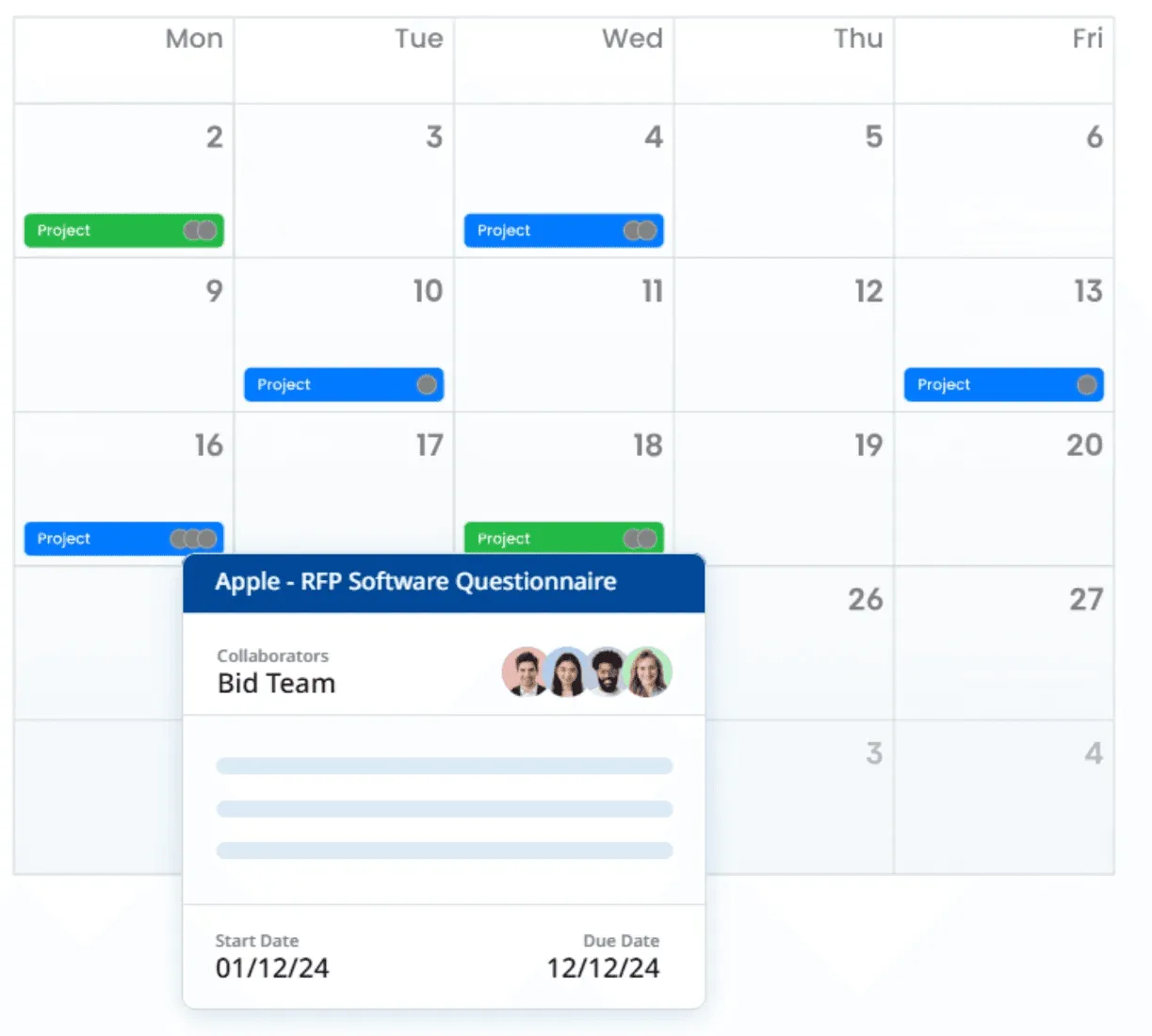
Once those roles are clear on paper, AutoRFP.ai’s Balanced Workload view makes them realistic in practice. It shows all live responses, who is working on what, and when everything is due, so you can spot overloaded SMEs and rebalance work early.
Step 3: Centralize Your Answer Library and Templates
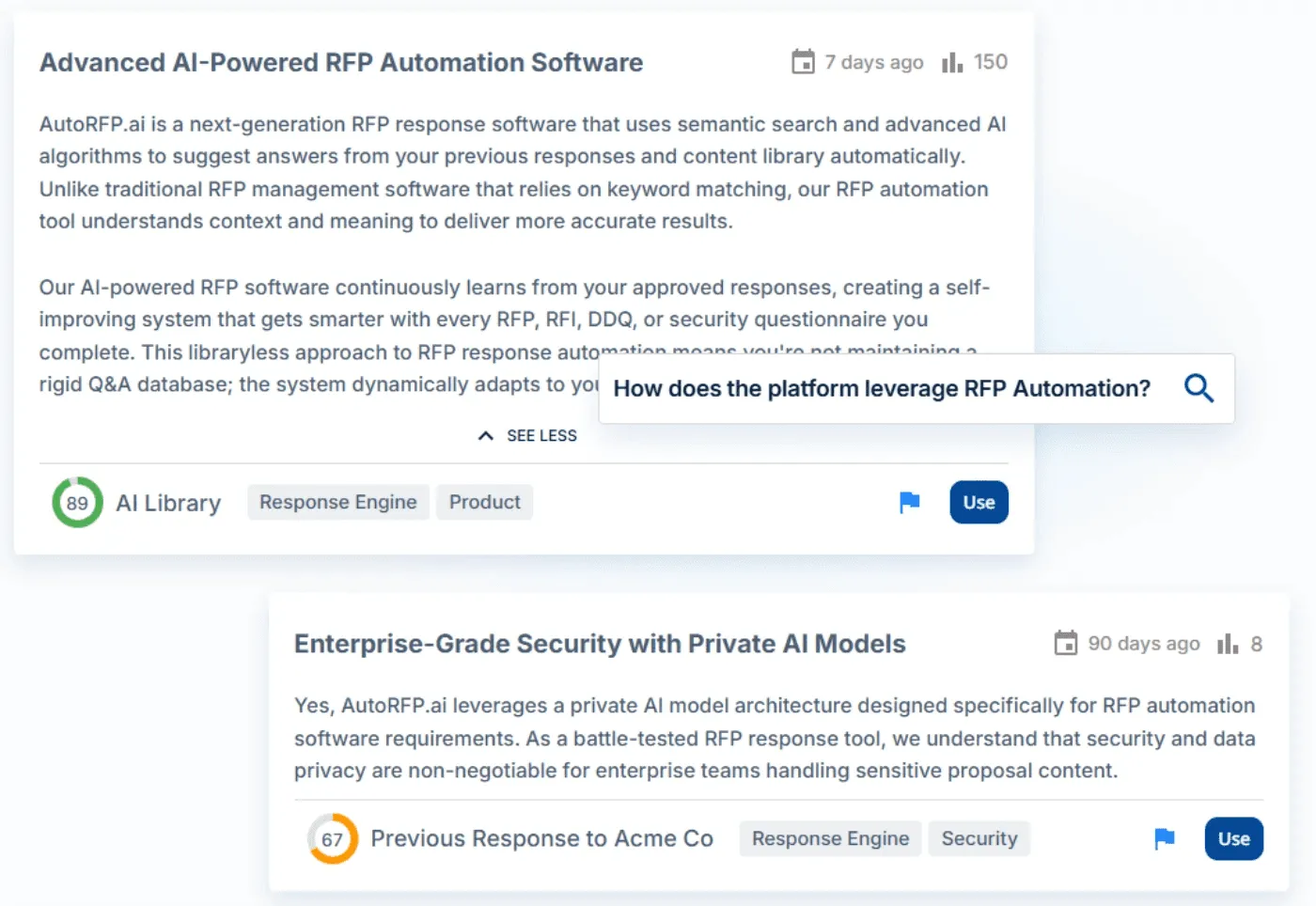
Every tender reuses the same core blocks: company overview, team bios, case studies, technical descriptions, and policies. Instead of recreating them, build a central answer library so writers start from proven content, not a blank page.
And that’s where AutoRFP.ai helps.It allows you to build and maintain that library by letting you upload key documents, auto-save past responses, then use semantic search to surface the best, safest, most up-to-date content in seconds.
Step 4: Set Review Gates
Set clear review gates at key stages of the tender (qualification, solution design, pricing, and final draft) instead of leaving reviews to the last minute.
Each gate should have a defined owner, checklist, and go/no-go criteria so you can catch gaps early, keep responses compliant, and avoid late-night rewrites before submission.
To make these review gates actually stick in your tender bidding workflow, you need them built into your response workflow.
AutoRFP.ai enables you to run these review gates directly within the response itself: assign sections to the right reviewers, collaborate in real-time, validate sources, and capture approvals in one place.
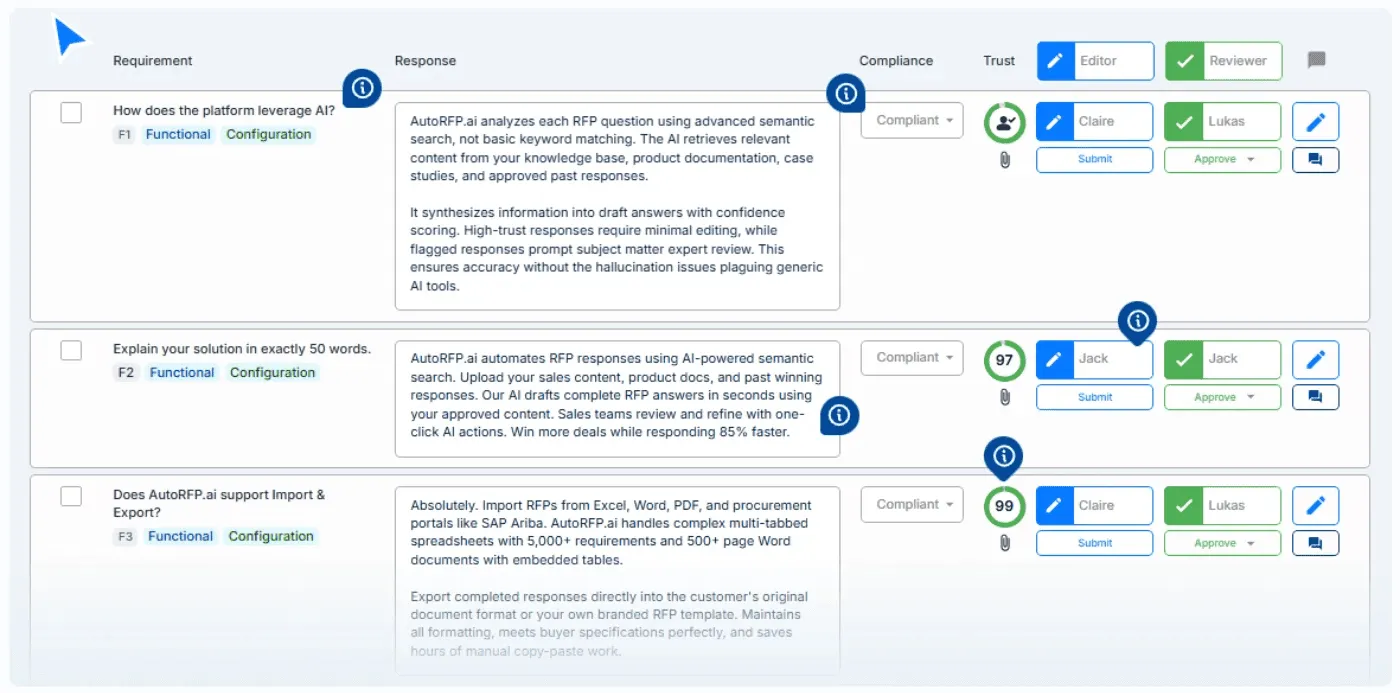
With unlimited collaborators and live status tracking, you can instantly see what’s done, what’s in review, and what still needs attention, without email chains.
Step 5: Close the Loop With Feedback and Continuous Updates
Every tender, whether won or lost, is valuable feedback. The worst thing you can do is submit, shrug, and move on.
Improving your process means turning results into sharper qualifications, stronger content, and smarter strategy.
Capture win/loss reasons as soon as you hear them and review which messages, sections, or pricing patterns appear in winning bids, and respond better for the next tender.
AutoRFP.ai helps you capture the impact: it updates your library with approved responses and provides real-time insights across tenders, including win rates and trends that matter to your stakeholders.
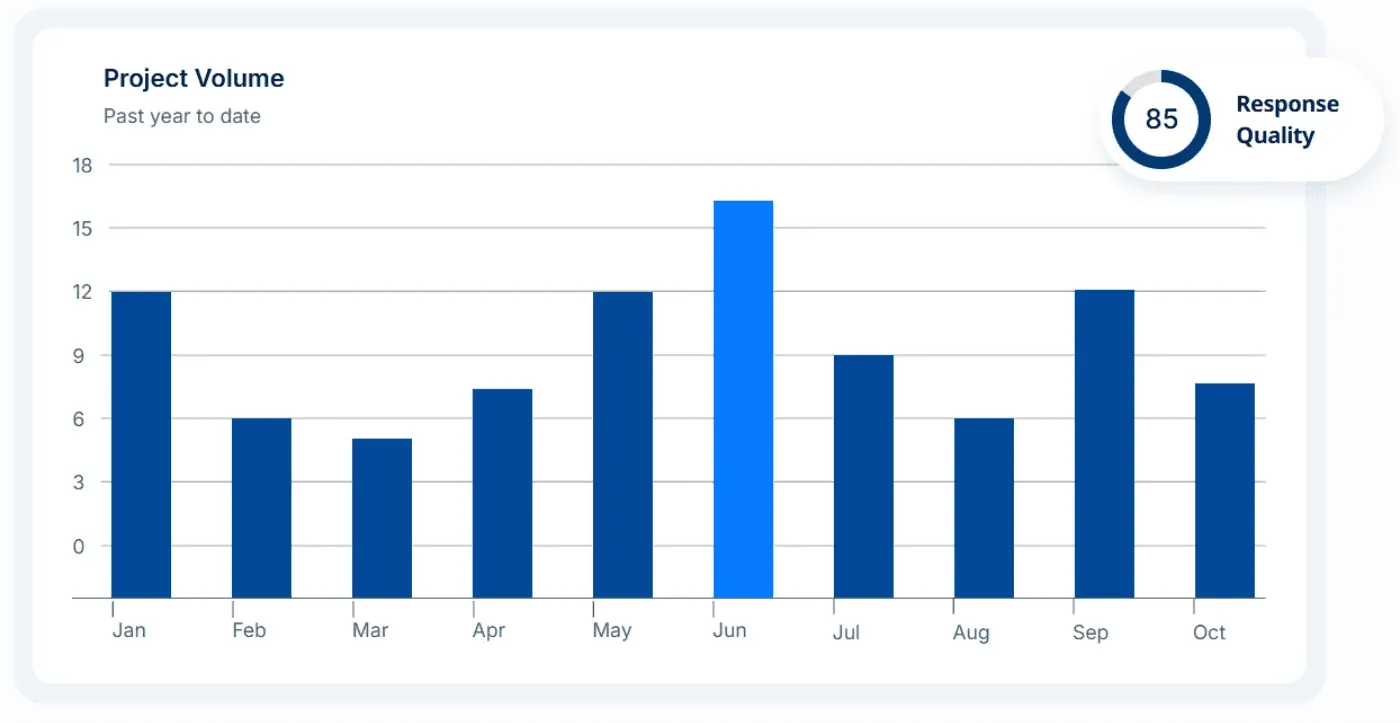
Those insights then feed back into your scorecards and playbooks so each new tender starts smarter.
If you want a system that makes these steps easier to run at scale, the right software matters. This video walks through some of the best tender management platforms and what they do well.

Video transcript
Transcript is auto-generated and may contain minor errors.
Do you do tenders? Then this video is for you. And you'll want to wait till the end because I'm going to share something pretty awesome about changing your tender approach and leveraging the latest in AI. In this video, we're going to cover off some of the best tender response software in the market. Let's jump into it. So, where we've gone to is a bid manager community called Stargazy or stargazy.io. They look at all kinds of proposal tech to really understand what's available in the market, and you can join that community and take part in it and talk to hundreds of other kind of tender and bid professionals across the globe and how they answer tenders and RFPs. So, let's look at the first one, Tendium. They are one of the newer AI-native
tender response software in the market. Really, they're all about growing your public sector sales. The first part of when you're doing a tender is finding and sourcing those tenders. You might be already subscribed to a bunch of tender databases, notifications from all kind of different counties and local government principalities in the UK and elsewhere, all your kind of different tender notifications for your business. And the categories are confusing and you just get overwhelmed with what's there because you get these emails every single day and you have to sift through it. That's where software like Tendium and other kind of tender aggregators can help you find the right opportunities. Then you can leverage AI to help respond to those tenders and you read more about them. There isn't too much about their product on their website, but I'm sure you can get in contact with their team and then sign up for a free trial. Next, we have GovDash. Now, I've included GovDash, even though they're
much more suited for US federal or US sled government tenders. GovDash, if you are doing US federal or US sled government tenders, this is the software for you. So, they also help you use different capture programs and source those proposals and contracts. They're really well suited for your long-form tender response, where you might get 100-page PDFs and you have to provide a very persuasive narrative response for the tender. You can find out more information on their website or the different integrations they have. You can book in for a demo and understand more about their product at govdash.com. Next, for our tender response software, we have Use Rogue. Similar to GovDash, really well suited for US federal tenders and sled, but they can also be used across any long-form narrative
tender. You generally will have three different types of tenders. That is your long-form narrative response, short-form response, and your tender portals. Your long-form tender response, what that looks like, and you will know if you receive these because you're writing in response to the tender tens of thousands of words in Word doc and PDFs. It's very much a narrative about your business, about your product and services, and how that will meet the requirements in the tender. Now, that's long-form. So, your providers like Use Rogue, GovDash, Tendium, and a quite a few of these providers are really well suited for long-form response. Using those software will feel like using Google Docs or Word Doc, where effectively you're in a document editor writing a response and leveraging AI to help you
write that response. Then you also have a short-form tender response. You might also get in Word Doc, Excel, PDF. Usually there's more requirements, so they might get into the hundreds of thousands of requirements. They're asking shorter questions, and they expect a shorter response. Usually the response might be five sentences max. Your short-form tender response often is in Excel, can be in a Word document with tables throughout. And then finally you have your tender portals, where you're answering every single question in that portal. Use Roq. They're really great for your long-form tender responses that might come in an RFP, an RFI, a tender. And as you can see, it's more of that Google Doc style editor, except that you can leverage AI. It has all your organizational context, so your past tender responses to leverage that with AI to then answer the tender. Has AI assistance to really help you provide that. Really interesting is
their non-compliance feature, where effectively can go back to the compliance or evaluation criteria that you often will see in a tender, and then flag any inconsistencies or anything where you're not meeting those compliance matrices that you received from the tender. If you want to find out more information about Use Roq, you can definitely go to useroq.com, sign up, or book in a demo. There's more information on their website. Next we have Altura. Altura are a AI native tender response software, where effectively it has some really strong go no go features, where you can upload the tender requirements and it can analyze them to see if you will even match that tender based off your organizational context. It has a database of all your previous tender responses and everything about your organization to help answer that tender. There's more information about Altura on their website. You can book in for a demo and another kind of like a
long-form tender response editor. Then you have BidScript. BidScript, newer player into the market, free trial you can get started with by going into their website and have a look at their product, bidscript.co.uk. Very much built for the UK tender market. It has your bid library where you can pull in uh all your past winning RFPs and tenders. Uh it has your go no go uh decision matrices as well, so it can help with deciding whether you want to go ahead and proceed with a tender or not. Especially useful in the UK when you see public tenders and you want to make a quick decision on whether to start bidding on that tender or not. Then it also has other features like sourcing and analyzing those tenders. So similar to GovDash, which had sourcing for US FedCon, BidScript can help you with sourcing UK tenders. And that's really powerful to have the sourcing and the response in
the same platform. Again, really useful for your kind of long-form narrative style responses, pre-bid intelligence to understand more about the tender and their buyer before you get into it. You can find out more at bidscript.co.uk. Then you have mytender.io. Definitely probably the newest entrance into the tender response software market. Again, AI-native tender software. You can go to their website and have a go at their software or book in a demo just to understand more about them. But effectively, like a lot of the other software, it really helps you with the tender response. So, it you can upload a document, whether that's a PDF, Word doc, and then it can start summarizing that tender and answering it for you based off your organizational context. I think what's cool with them is you can really understand more of that project management angle with regards to your tenders. So, it really helps with managing your pipeline of different responses as you progress through.
Then, for our last one, we have auto rfp.ai. That's actually where I'm from. So, I'm brought from auto rfp.ai. Different to the others, where we're really powerful is in your short-form tender response. So, if you receive a lot of tenders in Excel spreadsheets, in Word doc, and PDF with tables, and it's less about a narrative over tens of thousands of words and more about answering questions about your product or services, what is your encryption for data in transit or at rest, those hundreds of questions, that's where rfp.ai shines. An Australian company with offices all across the globe, including Australia, Vancouver in Canada, and Sweden in Europe. Our strongest features is to do with our ability to import anything, whether that's an Excel spreadsheet, Word doc, PDF, and our AI OCR processor automatically scans the document and
finds every single requirement, response cell, everything that you need to effectively respond to in that tender and gathers the context of that tender without you having to really do anything. Then, you've got our browser extension, which I mentioned. If you are answering in tender portals, where you actually have to answer questions, that's what our browser extension is built for, effectively allowing you to quickly ingest and respond to any tender portal questionnaires. So, once you have your document in order, our AI response workflow then uses the context about your company. So, you would upload past RFPs, past tenders, your documentation, your internal docs, anything you have about your company that you can use in your tender response. You would upload that to Auto RFP. Then our semantic search, which effectively is an LLM searching across your context, finds the most relevant information to then use to generate that
new response. What's AutoRFP.ai's unique proposition is around the transparency and understanding exactly where that response came from. We call this our trust score. And you can effectively source down to exactly what response was used to generate that response. And it's just AI you can trust. Then there's a lot more about our collaboration features in relation to workflows to assign different SMEs and different team members to answer the tender and so on. And AutoRFP, our pricing model, unlimited contributors, so you can have as many team members log in as well. Now, if you want to find out more about AutoRFP.ai, you can book in for a demo to chat to our team and find out more there. I mentioned at the start of the video to watch the end for something really exciting. So, we've spoken a little bit about tender search and aggregating and understanding your tenders. What if AI
could help look at all available and public tenders and find the most relevant ones for your company? You can get started with that with AutoRFP's tender search, and you can use it for free. Enter your email, and within 24 hours our AI would have scraped and looked at every relevant tender in the globe for your company. So, get started at auto rfp.ai, search tender opportunities, or you can find it in our footer. Thanks. See you.
Best Practices for Tender Management
These best practices keep your tender pipeline organized, predictable, and easier to scale.
| Best practice | What it looks like |
|---|---|
| Standardize structure | Use consistent naming, tags, and folders for tenders so teams can quickly find live bids, versions, and documents. |
| Train your contributors | Provide SMEs and sales teams with clear playbooks, checklists, and response-time expectations so they know how and when to contribute. |
| Develop a winning strategy | Define 2-3 clear win themes (why choose you) and consistently echo them across your answers to maintain a consistent value proposition.. |
| Follow submission guidelines | Adhere strictly to all formatting rules, required documents, and submission deadlines outlined in the tender documents. |
Common Obstacles in Tender Management
Even strong teams encounter recurring roadblocks that slow down bids or quietly erode win rates.
- Financial and capacity limits: Some bids fail because you can’t clearly evidence financial strength or delivery capacity
Pro tip: Standardize how you present financials, capacity, and track records so proof is easy to plug into each bid.
- Time constraints: Tight deadlines force rushed, shallow responses and leave little room for proper reviews.
Pro tip: Set internal cut-offs several days before submission and lean on pre-approved content instead of writing everything from scratch.
- Information and clarity: Vague requirements around pricing and scope increase the risk of misalignment with the client’s expectations.
Pro tip: Use the Q&A window early to clarify scope, deliverables, evaluation criteria, and any missing details before you lock your solution and pricing.
- Compliance and accuracy: Small documentation or data errors can trigger instant rejection.
Pro tip: Run a simple compliance checklist before every submission to confirm all documents, signatures, certifications, and numbers are complete and consistent.
Optimize Tender Management With AutoRFP.ai
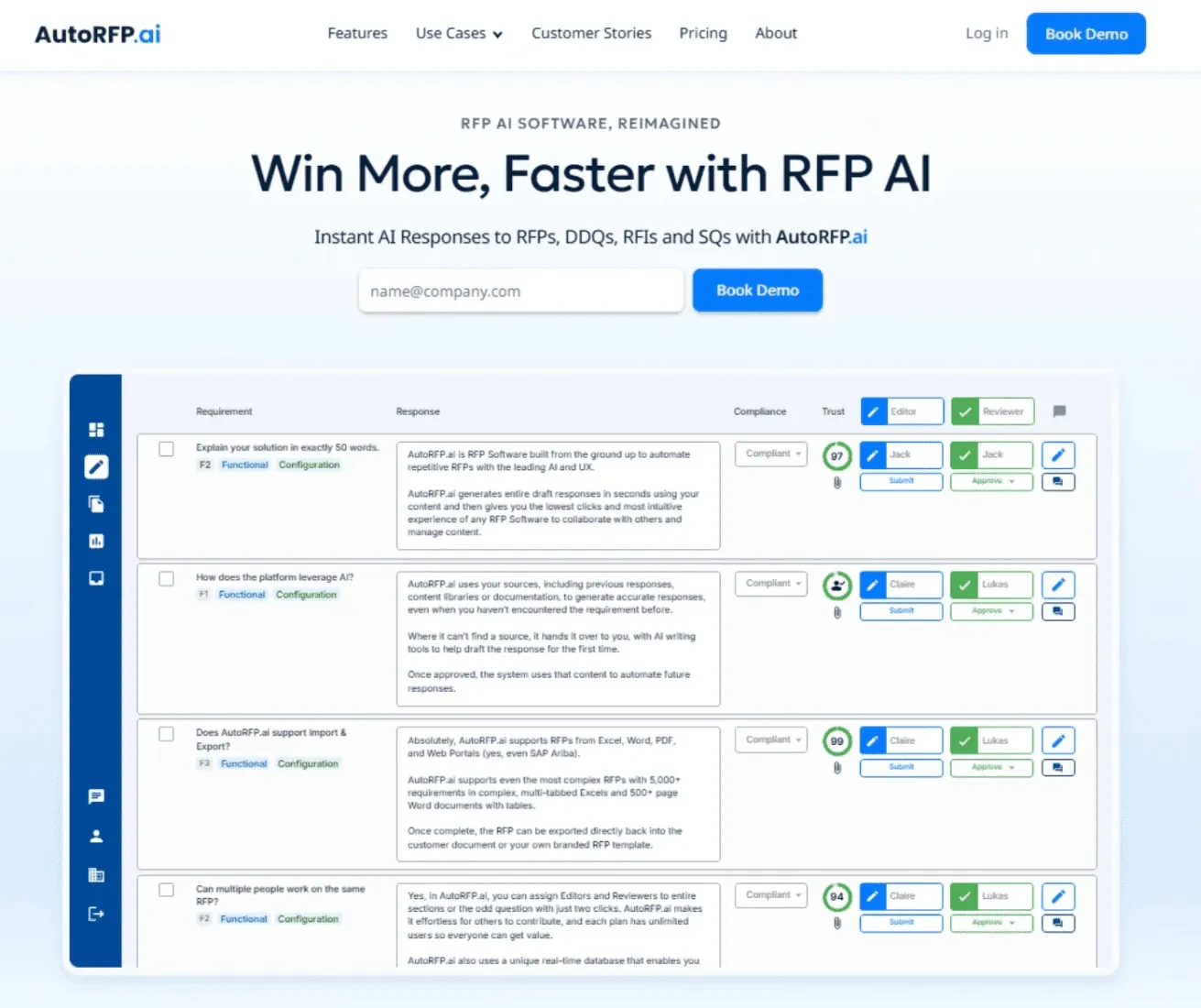
A solid process on paper is one thing. Actually, running it under real deadlines is another. That’s where AutoRFP.ai helps.
We helped organizations like Red Rover and IMTC cut RFP response time by 80%
That kind of time back means fewer late nights, better thinking, and cleaner submissions. If you’re serious about making tender management less painful and more predictable, AutoRFP.ai is a simple place to start.
